docs: wip
assets: move fonts to resources/
This commit is contained in:
 bordun
parent
cd2e77272c
commit
ef3559ffef
64 changed files with 1573 additions and 1688 deletions
|
|
@ -1 +0,0 @@
|
|||
docs/getting-started.md
|
||||
|
|
@ -1,6 +1,4 @@
|
|||
# URL Options
|
||||
|
||||
Client specific options can be set by adding query parameters to the server's url. One must prepend the url with a question mark (`?`) followed by `parameter=value` pairs separated with ampersands (`&`).
|
||||
Client options can be set either with the server's `--client-options` option, or per client by adding query parameters to the server's url. One must prepend the url with a question mark (`?`) followed by `parameter=value` pairs separated with ampersands (`&`).
|
||||
|
||||
|
||||
| Option | Value | Default | Description |
|
||||
|
|
@ -15,9 +13,3 @@ Client specific options can be set by adding query parameters to the server's ur
|
|||
Example:
|
||||
|
||||
`http://server-ip:port?hdpi=1`
|
||||
|
||||
|
||||
!!! note ""
|
||||
When using the built-in client, url options can be set through the `--url-options` switch.
|
||||
|
||||
Example: `open-stage-control --url-options zoom=2 doubletap=200`
|
||||
|
|
@ -5,8 +5,36 @@ This program is a free software released under the [GNU/GPL3](https://github.com
|
|||
|
||||
## Dependencies
|
||||
|
||||
Open Stage Control relies on several other free softwares, including [Node.js](https://nodejs.org/), [Electron](http://electron.atom.io/), [osc.js](https://github.com/colinbdclark/osc.js), [babel](http://babeljs.io/), [browserify](http://browserify.org), [exorcist](https://github.com/thlorenz/exorcist), [express](http://expressjs.com), [node-sass](https://github.com/sass/node-sass), [jQuery](http://jquery.com/), [jQuery-UI](http://jqueryui.com/), [Font Awesome](http://fontawesome.io/), [stacktracejs](http://stacktracejs.com), [mathjs](http://mathjs.org/). A comprehensive and up-to-date list can be found [here](https://github.com/jean-emmanuel/open-stage-control/network/dependencies).
|
||||
Open Stage Control relies on several other free softwares:
|
||||
|
||||
https://github.com/jean-emmanuel/open-stage-control/network/dependencies
|
||||
|
||||
## Contributors
|
||||
|
||||
https://github.com/jean-emmanuel/open-stage-control/graphs/contributors
|
||||
|
||||
## Infrastructure supports
|
||||
|
||||
----
|
||||
|
||||
<a href="https://ammd.net/" class="sp-logo">
|
||||
<img src="/img/sponsors/ammd.png" width="140px"/>
|
||||
</a>
|
||||
|
||||
AMMD hosts this website and made this project possible by funding its first 2 years of development.
|
||||
|
||||
----
|
||||
|
||||
<a href="https://discourse.org/" class="sp-logo">
|
||||
<img src="/img/sponsors/discourse.png" width="140px"/>
|
||||
</a>
|
||||
|
||||
Discourse provides the community forum.
|
||||
|
||||
----
|
||||
|
||||
<a href="https://browserstack.com/" class="sp-logo">
|
||||
<img src="/img/sponsors/browserstack.png" width="140px"/>
|
||||
</a>
|
||||
|
||||
BrowserStack provides remote browsers for debbuging.
|
||||
|
|
|
|||
|
|
@ -50,9 +50,13 @@ module.exports = {
|
|||
|
||||
The module is executed in a restricted context, only a few globals are available :
|
||||
|
||||
----
|
||||
|
||||
#### `app`: [`Event Emitter`](https://nodejs.org/api/events.html#events_class_eventemitter)
|
||||
Useful for monitoring the events sent by the different clients. Event names can be found in [callbacks.js](https://github.com/jean-emmanuel/open-stage-control/blob/master/src/server/callbacks.js), callbacks are called with 2 arguments: `data` (object) and `client` (object: `{address, id}`)
|
||||
|
||||
----
|
||||
|
||||
#### `receive`: `function(host, port, address, ...args, options)`
|
||||
|
||||
Send osc/midi message to connected clients. `host` and `port` can be specified to simulate a specific origin for the message.
|
||||
|
|
@ -61,29 +65,40 @@ Send osc/midi message to connected clients. `host` and `port` can be specified t
|
|||
- `port` (optional): `integer` port number or `string` midi device name
|
||||
- `address`: osc address
|
||||
- `args`: value or `{type: "OSC_TYPE_LETTER", value: VALUE}` `object`
|
||||
- `options` (optional): set to `{clientId: id}` to define which client receives the message (where `id` is the client's id as retreived from `app` events or `oscOutFilter`)
|
||||
- `options` (optional): set to `{clientId: id}` to define which client receives the message (where `id` is the client's id as retreived from `app` events or `oscOutFilter`)
|
||||
|
||||
----
|
||||
|
||||
#### `send`: `function(host, port, address, ...args)`
|
||||
|
||||
Send osc/midi to a target.
|
||||
|
||||
----
|
||||
|
||||
#### `settings.read`: `function(name)`
|
||||
|
||||
Returns specified server option. `name` must be the option's long name without the leading dashes (ie: `"send"`, not `"s"`)
|
||||
|
||||
----
|
||||
|
||||
#### `options`: `array`
|
||||
|
||||
Contains the extra options passed to `--custom-module` after the filename
|
||||
|
||||
----
|
||||
|
||||
#### `loadJSON`: `function(path)`
|
||||
|
||||
Loads a json file (path is relative to the custom module location)
|
||||
|
||||
----
|
||||
|
||||
#### `saveJSON`: `function(path, object)`
|
||||
|
||||
Saves an object/array to a json file (path is relative to the custom module location)
|
||||
|
||||
----
|
||||
|
||||
#### Other javascript globals
|
||||
- `console`
|
||||
- `setTimeout`
|
||||
|
|
@ -91,34 +106,4 @@ Saves an object/array to a json file (path is relative to the custom module loca
|
|||
- `setInterval`
|
||||
- `clearInterval`
|
||||
|
||||
## Managing big modules
|
||||
|
||||
Custom modules don't let you use node's `require` function at runtime, but you can manage your sources in multiple files and bundle them into a single file before loading it in Open Stage Control.
|
||||
|
||||
The common pattern for this is using the [browserify](http://browserify.org/) library:
|
||||
|
||||
**1**. define some variable in `number.js`
|
||||
|
||||
```javascript
|
||||
module.exports = 42
|
||||
```
|
||||
|
||||
**2**. retreive it in your main module file (`main.js`):
|
||||
|
||||
```javascript
|
||||
var num = require('./number.js')
|
||||
|
||||
module.exports = {
|
||||
init: function(){
|
||||
console.log(num) // 42
|
||||
},
|
||||
oscInFilter: function(data){
|
||||
// etc
|
||||
}
|
||||
}
|
||||
```
|
||||
|
||||
|
||||
**3**. bundle your sources into `custom-module.js`:
|
||||
|
||||
`browserify main.js -o custom-module.js --standalone module.exports`
|
||||
----
|
||||
1
resources/docs/docs/custom-module/examples.md
Normal file
1
resources/docs/docs/custom-module/examples.md
Normal file
|
|
@ -0,0 +1 @@
|
|||
!!! warning "Incomplete documentation"
|
||||
29
resources/docs/docs/custom-module/managing-big-modules.md
Normal file
29
resources/docs/docs/custom-module/managing-big-modules.md
Normal file
|
|
@ -0,0 +1,29 @@
|
|||
Custom modules don't let you use node's `require` function at runtime, but you can manage your sources in multiple files and bundle them into a single file before loading it in OSC.
|
||||
|
||||
The common pattern for this is using the [browserify](http://browserify.org/) library:
|
||||
|
||||
**1**. define some variable in `number.js`
|
||||
|
||||
```javascript
|
||||
module.exports = 42
|
||||
```
|
||||
|
||||
**2**. retreive it in your main module file (`main.js`):
|
||||
|
||||
```javascript
|
||||
var num = require('./number.js')
|
||||
|
||||
module.exports = {
|
||||
init: function(){
|
||||
console.log(num) // 42
|
||||
},
|
||||
oscInFilter: function(data){
|
||||
// etc
|
||||
}
|
||||
}
|
||||
```
|
||||
|
||||
|
||||
**3**. bundle your sources into `custom-module.js`:
|
||||
|
||||
`browserify main.js -o custom-module.js --standalone module.exports`
|
||||
|
|
@ -31,7 +31,7 @@ CSS selectors can be used to apply styles to specific elements:
|
|||
|
||||
```
|
||||
|
||||
!!! warning ""
|
||||
!!! info ""
|
||||
Mixing Inline and Selector syntaxes doesn't work, once you use selectors, you have to use the `:host` selector to target the widget element.
|
||||
|
||||
## Extra css classes: `class`
|
||||
|
|
@ -39,7 +39,7 @@ CSS selectors can be used to apply styles to specific elements:
|
|||
This non-standard css property can be used to add custom css classes to the widget element: `class: my-custom-class;`
|
||||
Multiple classes can be added (one per `class` statement). Custom classes are always added to the widget's root element, css selectors are ignored.
|
||||
|
||||
!!! warning ""
|
||||
!!! info ""
|
||||
Using class names that are already used in the app can be hazardous. In order to avoid that, custom class names should be prefixed with something uncommon and preferably cool, such as `xxx-myclass` or `crispy-seitan-myclass`.
|
||||
|
||||
## Layering: `z-index`
|
||||
|
|
@ -50,7 +50,7 @@ Z-Axis ordering can be set using the `z-index` rule. Absolutely positionned widg
|
|||
|
||||
To make a widget ignore interactions (ie to be able to click through it), add `pointer-events:none;`.
|
||||
|
||||
!!! note ""
|
||||
!!! info ""
|
||||
This is always ignored when the editor is enabled.
|
||||
|
||||
## Responsive sizing
|
||||
|
|
@ -5,14 +5,6 @@ Themes can be loaded with the `--theme` option. Multiple themes can be combined.
|
|||
Available themes (full color scheme):
|
||||
|
||||
- `orange`: grey and orange theme
|
||||
- `light`: light and blue
|
||||
- `dark`: blue night theme
|
||||
|
||||
Available extensions (alternative visual settings)
|
||||
|
||||
- `flat`: remove 3d effects
|
||||
- `alt-buttons`: colorful active buttons
|
||||
- `responsive-fonts`: bigger texts for bigger screens
|
||||
|
||||
## Creating a custom theme
|
||||
|
||||
|
|
@ -20,7 +12,7 @@ Creating a custom theme is as simple as writing a tiny css file that will overri
|
|||
|
||||
```css
|
||||
:root {
|
||||
--color-accent:red;
|
||||
--color-accent: red;
|
||||
}
|
||||
```
|
||||
|
||||
|
|
@ -28,15 +20,15 @@ This will change the default accent color to red. Variables can also be overridd
|
|||
|
||||
```css
|
||||
.panel-container {
|
||||
--color-text:blue;
|
||||
--color-accent: blue;
|
||||
}
|
||||
```
|
||||
|
||||
This will change the default text color to blue for all elements in panel widgets.
|
||||
This will change the default accent color to blue for all elements in panel widgets.
|
||||
|
||||
## Scss / autoreload
|
||||
|
||||
When running the app [from sources](/docs/getting-started), custom themes can be written in scss:
|
||||
When running the app from sources, custom themes can be written in scss:
|
||||
|
||||
- the scss file must be located in `src/browser/scss/themes/`
|
||||
- run `npm run watch-css`
|
||||
|
|
@ -1,46 +0,0 @@
|
|||
# Community examples
|
||||
|
||||
Feel free to submit your own by [opening an issue](https://github.com/jean-emmanuel/open-stage-control/issues/new?title=[example]) on github.
|
||||
|
||||
## Ardour
|
||||
|
||||
[Ardour Control](https://github.com/jean-emmanuel/ardour-control)
|
||||
|
||||

|
||||
|
||||
## Reaper
|
||||
|
||||
[Reaper OSC Panels](https://github.com/ThrashJazzAssassin/REAPER-OSC-panels)
|
||||
|
||||
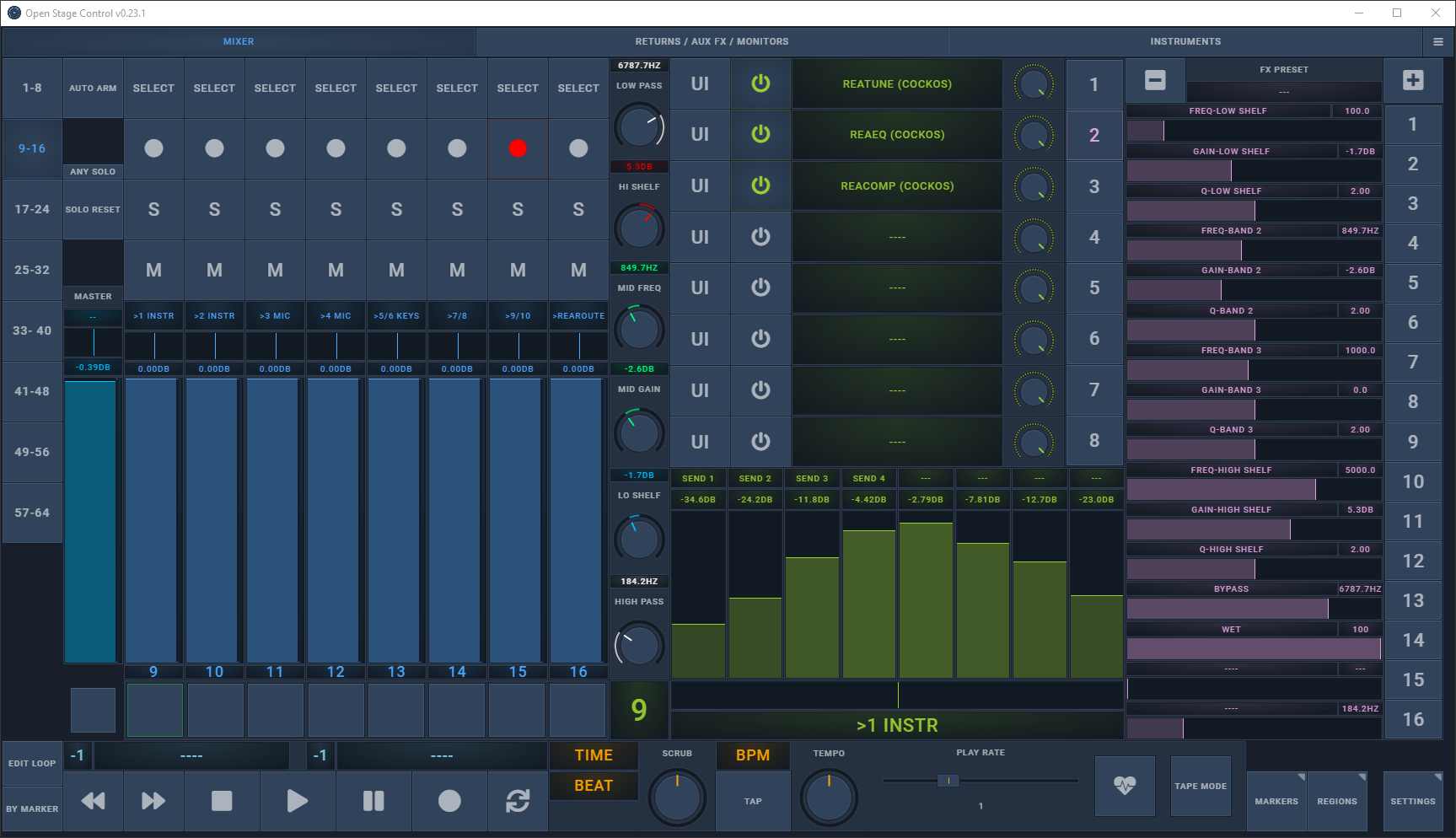
|
||||
|
||||
## QLab
|
||||
|
||||
[QLab Cook Book / Open Stage Control](https://qlabcookbook.com/tag/open-stage-control/)
|
||||
|
||||

|
||||
|
||||
## Bitwig
|
||||
|
||||
[Open Stage Control Bitwig](https://github.com/kdejaeger/open-stage-control-bitwig)
|
||||
|
||||
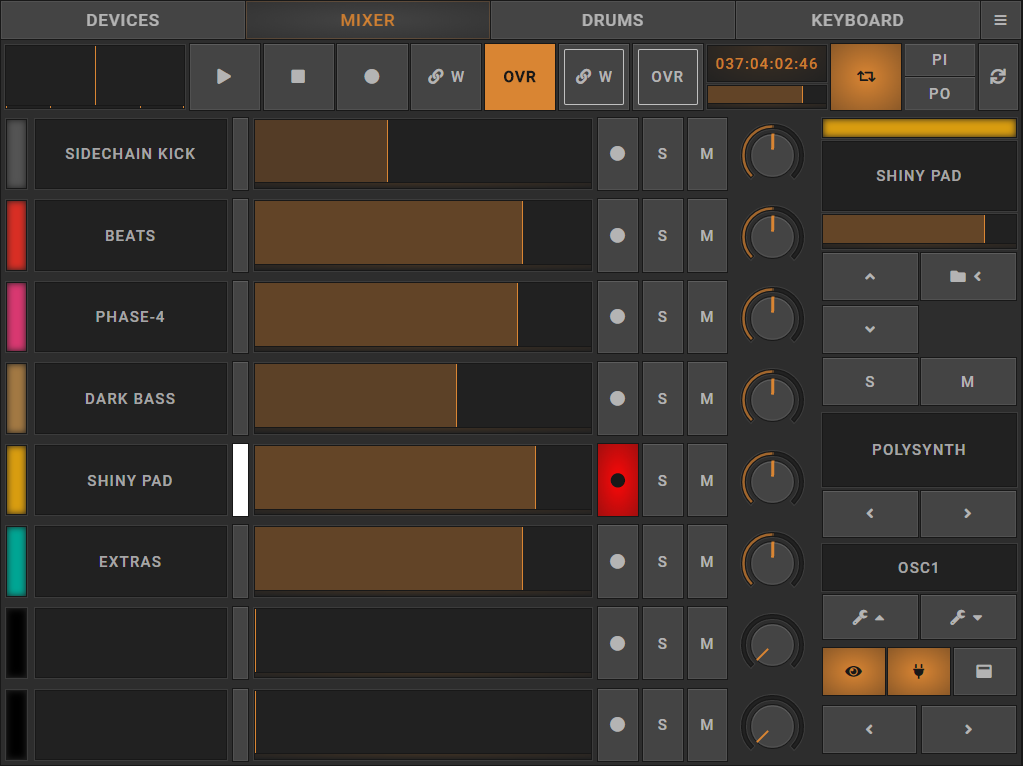
|
||||
|
||||
|
||||
[OpenStageControl4Bitwig](http://www.mossgrabers.de/Software/Bitwig/Bitwig.html)
|
||||
|
||||
- https://www.youtube.com/watch?v=u-fgArpsHQQ
|
||||
- https://www.youtube.com/watch?v=RvEMlo72ynQ
|
||||
|
||||
|
||||
## Cubase
|
||||
|
||||
[Manaberry's UI](https://vi-control.net/community/threads/open-stage-control-tutorial-an-alternative-to-lemur-and-touchosc.72643/)
|
||||
|
||||

|
||||
|
||||
# Ableton
|
||||
|
||||
[Hiram's AaMakro5oul](https://github.com/hiramegl/AaMakro5oul) (v0.23.0 only)
|
||||
|
||||

|
||||
|
|
@ -1,206 +0,0 @@
|
|||
# Getting started
|
||||
|
||||
!!! tip ""
|
||||
Prebuilt binaries for Linux, Windows and OS X can be found on the [release](https://github.com/jean-emmanuel/open-stage-control/releases) page.
|
||||
|
||||
## Supported platforms
|
||||
|
||||
Open Stage Control is a *desktop* server application. It runs on all [platforms supported by Electron](https://electron.atom.io/docs/tutorial/supported-platforms/) or [Node](https://nodejs.org/en/) (in headless mode only, see [Running without Electron](#running-without-electron)). Any device running a compatible browser can connect to the server :
|
||||
|
||||
- Chrome/Chromium version `50` or later (Linux, MacOS, Windows, Android, etc)
|
||||
- iOS version `9.3` or later
|
||||
|
||||
!!! tip "Android / iOS native app ?"
|
||||
There is no native mobile application. The server's url can be added to the home screen to launch the interface in fullscreen.
|
||||
|
||||
|
||||
## Options
|
||||
|
||||
Below are the available command-line options. Note that when running without any command-line switch (ie from a file browser), a launcher window will spawn to help setting them.
|
||||
|
||||
!!! tip ""
|
||||
Preferences are stored in the user's home folder in a file named `.open-stage-control` (hidden under Linux / macOS)
|
||||
|
||||
|| Option | Description |
|
||||
|---||---|
|
||||
| `-s` | `--send` | default targets for all widgets (ip:port / domain:port / midi:port_name pairs) |
|
||||
| `-l` | `--load` | session file to load |
|
||||
| | `--state` | state file to load (osc messages will be sent, unless there are other clients connected) |
|
||||
| `-b` | `--blank` | load a blank session and start the editor |
|
||||
| `-c` | `--custom-module` | custom module file to load (custom options can be passed after the filename) |
|
||||
| `-p` | `--port` | http port of the server (default to 8080) |
|
||||
| `-o` | `--osc-port` | osc input port (default to --port) |
|
||||
| | `--tcp-port` | tcp server input port |
|
||||
| | `--tcp-targets` | tcp servers to connect to (ip:port pairs), does not susbtitute for --send |
|
||||
| `-m` | `--midi` | midi router settings |
|
||||
| `-d` | `--debug` | log received osc messages in the console |
|
||||
| `-n` | `--no-gui` | disable default gui |
|
||||
| `-g` | `--gui-only` | app server's url. If true, local port (--port) is used |
|
||||
| `-t` | `--theme` | theme name or path (mutliple values allowed) see [theming](/docs/theming/) |
|
||||
| `-e` | `--examples` | list examples instead of recent sessions |
|
||||
| | `--url-options` | [url options](/docs/url-options) (opt=value pairs) |
|
||||
| |`--disable-vsync` | disable gui's vertical synchronization |
|
||||
| |`--disable-gpu` | disable hardware acceleration |
|
||||
| |`--force-gpu` | ignore chrome's gpu blacklist |
|
||||
| |`--read-only` | disable session editing and session history changes |
|
||||
| |`--remote-saving` | disable remote session saving for hosts that don\'t match the regular expresion |
|
||||
| |`--remote-root` | set remote file browsing root folder |
|
||||
| |`--instance-name` | used to differenciate multiple instances in a zeroconf network |
|
||||
| |`--fullscreen` | launch in fullscreen mode (only affects the default gui, F11 to exit) |
|
||||
|
||||
Command-line only :
|
||||
|
||||
|| Option | Description |
|
||||
|---||---|
|
||||
| `-h` | `--help` | print available options |
|
||||
| `-v` | `--version` | print version number |
|
||||
| | `--inspect` | enable node/electron inspector (visit chrome://inspect with chromium to access DevTools) |
|
||||
|
||||
**Examples**
|
||||
|
||||
```bash
|
||||
open-stage-control --send 127.0.0.1:5555 127.0.0.1:6666 --port 7777
|
||||
```
|
||||
|
||||
This will create an app listening on port 7777 for synchronization messages, and sending its widgets state changes to ports 5555 and 6666.
|
||||
|
||||
```bash
|
||||
open-stage-control --no-gui --load path/to/session.js --port 9999
|
||||
```
|
||||
|
||||
This will create a headless app available through http on port 9999 with session.js loaded automatically.
|
||||
|
||||
!!! tip "What about HTTPS ?"
|
||||
Security is out of the app's scope. If you are concerned about safety, using a private - protected - network should be enough.
|
||||
|
||||
|
||||
## Run from sources
|
||||
|
||||
Running the app from the sources slightly differs from using built binaries : we'll build and launch the app with npm (node package manager).
|
||||
|
||||
**1. Requirements**
|
||||
|
||||
- [Node.js >= 4.8](https://nodejs.org/en/#download)
|
||||
- [git](https://git-scm.com/downloads)
|
||||
|
||||
**2. Download sources**
|
||||
|
||||
```bash
|
||||
git clone https://github.com/jean-emmanuel/open-stage-control
|
||||
cd open-stage-control/
|
||||
# uncomment next line if you want the latest release
|
||||
# instead of the current development version
|
||||
# git checkout $(git describe --tags `git rev-list --tags --max-count=1`)
|
||||
npm install
|
||||
npm run build
|
||||
```
|
||||
|
||||
!!! note "Updating from sources"
|
||||
```bash
|
||||
git pull
|
||||
npm install
|
||||
npm run build
|
||||
```
|
||||
|
||||
**3. Run !**
|
||||
|
||||
```bash
|
||||
npm start [ -- options]
|
||||
```
|
||||
|
||||
!!! note ""
|
||||
A double hyphen (`--`) is used here to tell npm that the options are to be passed to the app.
|
||||
|
||||
|
||||
## Build from sources
|
||||
|
||||
**1. Requirements**
|
||||
|
||||
- [Node.js >= 4.8](https://nodejs.org/en/#download)
|
||||
- [git](https://git-scm.com/downloads)
|
||||
|
||||
**2. Download sources & build package**
|
||||
|
||||
```bash
|
||||
git clone https://github.com/jean-emmanuel/open-stage-control
|
||||
cd open-stage-control/
|
||||
# uncomment next line if you want the latest release
|
||||
# instead of the current development version
|
||||
# git checkout $(git describe --tags `git rev-list --tags --max-count=1`)
|
||||
|
||||
# TARGET_PLATFORM can be linux, win32 (windows) or darwin (os x)
|
||||
export PLATFORM=TARGET_PLATFORM
|
||||
# TARGET_ARCH can be ia32, x64, armv7l or arm64
|
||||
export ARCH=TARGET_ARCH
|
||||
|
||||
|
||||
npm install
|
||||
|
||||
# run this instead if ARCH is armv7l
|
||||
# npm install --arch=armv7l
|
||||
|
||||
|
||||
npm run build
|
||||
|
||||
npm run package
|
||||
|
||||
# Do one of the following if you want a deb package for debian/ubuntu
|
||||
npm run deb32
|
||||
npm run deb64
|
||||
npm run debarm
|
||||
```
|
||||
|
||||
This will build the app in `dist/open-stage-control-PLATFORM-ARCH`.
|
||||
|
||||
!!! note ""
|
||||
Building the app for windows from a linux system requires wine to be installed.*
|
||||
|
||||
## Running in a headless context
|
||||
|
||||
Electron, Open Stage Control's engine, is based on chromium and can't run out of the box without a display server. However, using a virtual framebuffer does the trick. Detailed instructions can be found in Electron's [documentation](http://electron.atom.io/docs/tutorial/testing-on-headless-ci/).
|
||||
|
||||
In short: install [xvfb](https://en.wikipedia.org/wiki/Xvfb) and prepend your command with `xvfb-run`:
|
||||
|
||||
```bash
|
||||
xvfb-run open-stage-control -n
|
||||
```
|
||||
|
||||
## Running without Electron
|
||||
|
||||
It is possible to run the server in headless mode without Electron using [node](https://nodejs.org/en/download/package-manager/) (v6 or higher) :
|
||||
|
||||
```bash
|
||||
node /path/to/packaged/open-stage-control/resources/app/ -n
|
||||
node /path/to/sources/open-stage-control/app/ -n
|
||||
```
|
||||
|
||||
Or using the precompilled binaries for node:
|
||||
|
||||
```bash
|
||||
node /path/to/packaged/open-stage-control-node/ -n
|
||||
```
|
||||
|
||||
To build the app for node only from sources:
|
||||
|
||||
```bash
|
||||
|
||||
# git clone, etc...
|
||||
|
||||
npm install
|
||||
|
||||
npm run build
|
||||
|
||||
npm run package-node
|
||||
|
||||
```
|
||||
|
||||
## Running in a terminal on Windows
|
||||
|
||||
Windows users launching the app from a terminal need to add a double dash (`--`) before their options:
|
||||
|
||||
```bash
|
||||
open-stage-control.exe -- --port 5555 [...]
|
||||
|
||||
# when running from sources
|
||||
npm start -- -- [options]
|
||||
```
|
||||
79
resources/docs/docs/getting-started/running-from-sources.md
Normal file
79
resources/docs/docs/getting-started/running-from-sources.md
Normal file
|
|
@ -0,0 +1,79 @@
|
|||
## Requirements
|
||||
|
||||
- [Node.js](https://nodejs.org/en/#download)
|
||||
- [git](https://git-scm.com/downloads)
|
||||
|
||||
|
||||
## Run from sources
|
||||
|
||||
Running the app from the sources slightly differs from using built binaries : we'll build and launch the app with npm (node package manager).
|
||||
|
||||
**2. Download sources**
|
||||
|
||||
```bash
|
||||
git clone https://github.com/jean-emmanuel/open-stage-control
|
||||
cd open-stage-control/
|
||||
# uncomment next line if you want the latest release
|
||||
# instead of the current development version
|
||||
# git checkout $(git describe --tags `git rev-list --tags --max-count=1`)
|
||||
npm install
|
||||
npm run build
|
||||
```
|
||||
|
||||
!!! info "Updating from sources"
|
||||
```bash
|
||||
git pull
|
||||
npm install
|
||||
npm run build
|
||||
```
|
||||
|
||||
**3. Run !**
|
||||
|
||||
```bash
|
||||
npm start [ -- options]
|
||||
```
|
||||
|
||||
!!! info ""
|
||||
A double hyphen (`--`) is used here to tell npm that the options are to be passed to the app.
|
||||
|
||||
|
||||
## Package from sources
|
||||
|
||||
```bash
|
||||
git clone https://github.com/jean-emmanuel/open-stage-control
|
||||
cd open-stage-control/
|
||||
# uncomment next line if you want the latest release
|
||||
# instead of the current development version
|
||||
# git checkout $(git describe --tags `git rev-list --tags --max-count=1`)
|
||||
|
||||
# TARGET_PLATFORM can be linux, win32 (windows) or darwin (os x)
|
||||
export PLATFORM=TARGET_PLATFORM
|
||||
# TARGET_ARCH can be ia32, x64, armv7l or arm64
|
||||
export ARCH=TARGET_ARCH
|
||||
|
||||
|
||||
npm install
|
||||
|
||||
# run this instead if ARCH is armv7l
|
||||
# npm install --arch=armv7l
|
||||
|
||||
|
||||
npm run build
|
||||
|
||||
npm run package
|
||||
|
||||
# Do one of the following if you want a deb package for debian/ubuntu
|
||||
npm run deb32
|
||||
npm run deb64
|
||||
npm run debarm
|
||||
|
||||
|
||||
# The node-only package can be built with
|
||||
npm run package-node
|
||||
|
||||
```
|
||||
|
||||
This will build the app in `dist/open-stage-control-PLATFORM-ARCH`.
|
||||
|
||||
!!! info ""
|
||||
Building the app for windows from a linux system requires wine to be installed.
|
||||
13
resources/docs/docs/getting-started/running-with-node.md
Normal file
13
resources/docs/docs/getting-started/running-with-node.md
Normal file
|
|
@ -0,0 +1,13 @@
|
|||
It is possible to run the server in headless mode using [Node.js](https://nodejs.org/en/download/package-manager/). This allows running OSC on systems that
|
||||
|
||||
|
||||
1. Install [Node.js](https://nodejs.org/en/download/package-manager/)
|
||||
2. Download `open-stage-control-[version]-node.zip` package and extract it
|
||||
3. Run `node /path/to/open-stage-control`
|
||||
|
||||
|
||||
!!! info
|
||||
When running from sources or with regular binaries (packaged with electron), the command slightly differs:
|
||||
|
||||
- electron package: `node /path/to/open-stage-control/resources/app`
|
||||
- from sources: `node /path/to/open-stage-control/app`
|
||||
50
resources/docs/docs/getting-started/server-setup.md
Normal file
50
resources/docs/docs/getting-started/server-setup.md
Normal file
|
|
@ -0,0 +1,50 @@
|
|||
# Server options
|
||||
|
||||
Below are the available command-line options. Note that when running without any command-line switch (ie from a file browser), a launcher window will spawn to help setting them.
|
||||
|
||||
<div class="force-full-table"></div>
|
||||
| Option | Description |
|
||||
|---|---|
|
||||
| --send | default targets for all widgets (ip: port / domain: port / midi: port_name pairs) |
|
||||
| --load | session file to load |
|
||||
| --state | state file to load |
|
||||
| --custom-module | custom module file to load (custom options can be passed after the filename) |
|
||||
| --port | http port of the server (default to 8080) |
|
||||
| --osc-port | osc input port (default to --port) |
|
||||
| --tcp-port | tcp server input port |
|
||||
| --tcp-targets | tcp servers to connect to (ip: port pairs), does not susbtitute for --send |
|
||||
| --midi | midi router settings |
|
||||
| --debug | log received osc messages in the console |
|
||||
| --no-gui | disable default gui |
|
||||
| --theme | theme name or path (mutliple values allowed) |
|
||||
| --client-options | client options (opt=value pairs) |
|
||||
| --disable-vsync | disable gui's vertical synchronization |
|
||||
| --force-gpu | ignore chrome's gpu blacklist |
|
||||
| --read-only | disable session editing and session history changes |
|
||||
| --remote-saving | disable remote session saving for hosts that don't match the regular expresion |
|
||||
| --remote-root | set remote file browsing root folder |
|
||||
| --instance-name | used to differenciate multiple instances in a zeroconf network |
|
||||
| --fullscreen | launch in fullscreen mode (only affects the default client gui) |
|
||||
|
||||
The following options can only be set when running the app from a terminal:
|
||||
|
||||
<div class="force-full-table"></div>
|
||||
| Option | Description |
|
||||
|---|---|
|
||||
| --disable-gpu | disable hardware acceleration |
|
||||
| --inspect | enable node/electron inspector |
|
||||
| --cache-dir | override default cache directory |
|
||||
| --config-file | override default config file (defaults to cache-dir/config.json) |
|
||||
| --help | Show help |
|
||||
| --version | Show version number |
|
||||
|
||||
## Running in a terminal on Windows
|
||||
|
||||
Windows users launching the app from a terminal need to add a double dash (`--`) before their options:
|
||||
|
||||
```bash
|
||||
open-stage-control.exe -- --port 5555 [...]
|
||||
|
||||
# when running from sources
|
||||
npm start -- -- [options]
|
||||
```
|
||||
|
|
@ -0,0 +1,9 @@
|
|||
# Supported platforms
|
||||
|
||||
Open Stage Control is a *desktop* server application. It runs on all [platforms supported by Electron](https://electron.atom.io/docs/tutorial/supported-platforms/) or [Node](https://nodejs.org/en/) (in headless mode only, see [Running with Node](./running-with-node.md)). Any device running a compatible browser can connect to the server :
|
||||
|
||||
- Chrome/Chromium version `60` or later (Linux, MacOS, Windows, Android, etc)
|
||||
- iOS version `10.3` or later
|
||||
|
||||
!!! info "Android / iOS app ?"
|
||||
There is no native mobile application. The server's url can be added to the home screen to launch the interface in fullscreen.
|
||||
|
|
@ -1,45 +0,0 @@
|
|||
# User interface
|
||||
|
||||
The interface is made of two main components: the widgets and the sidepanel.
|
||||
|
||||
## Widgets
|
||||
|
||||
All widgets are contained in the `root` widget, a special `panel` widget that can only contain tabs.
|
||||
|
||||
### Interacting with widgets
|
||||
|
||||
| Mouse | Touch | Description |
|
||||
|---|---|---|
|
||||
| Click | Tap | Handled at pressing time, not releasing. |
|
||||
| Double Click | Double Tap | Some widgets handle double click / tap events. |
|
||||
| Drag | Drag | The widgets respond to mouse and touch drag gestures with a 1:1 precision ratio. |
|
||||
| `Ctrl` + Drag | | Holding the `Ctrl` key while dragging with the mouse increases the gesture's precision by 10.|
|
||||
| | Two-fingers drag (single target) | Using two fingers on a single-touch target increases the gesture's precision by 10. |
|
||||
|
||||
|
||||
## Sidepanel
|
||||
|
||||
The sidepanel can be opened by clicking the navigation icon in the upper right corner or by pressing `F10`.
|
||||
|
||||
### State management
|
||||
|
||||
- Store: save the state of all widgets in the temporary slot
|
||||
- Recall: reload saved state from the temporary slot
|
||||
- Send All: make all widgets send their current value
|
||||
- Save / Save As: save the state of all widgets to a `.state` file on the server
|
||||
- Load: load a state from a `.state` file on the server
|
||||
- Export: save to local filesystem
|
||||
- Import: load from local filesystem
|
||||
|
||||
### Traversing gestures
|
||||
|
||||
By default, a dragging gesture can only affect the widget it started on. Enabling traversing gesture does two things:
|
||||
|
||||
- make gestures affect every widgets no matter where they started
|
||||
- make sliders-like widgets respond as if their `snap` option is enabled
|
||||
|
||||
When traversing gestures are set to `auto`, these will only affect widgets that have the same type as the first touched widget.
|
||||
|
||||
### Editor
|
||||
|
||||
See [Editing sessions](/docs/editing-sessions.md).
|
||||
|
|
@ -1,49 +1,7 @@
|
|||
## Requirements
|
||||
|
||||
MIDI support requires additional software to be installed on the server's system:
|
||||
|
||||
- python (2 or 3)
|
||||
- python package [python-rtmidi](https://spotlightkid.github.io/python-rtmidi/installation.html)
|
||||
|
||||
To install `python-rtmidi`, run `pip install python-rtmidi` (python 2) in a terminal or `pip3 install python-rtmidi` (python 3).
|
||||
|
||||
!!! note "Why an additionnal dependency ?"
|
||||
Providing cross-platform MIDI support is not trivial, as it requires OS-specific compilation that cannot be automated within Open Stage Control's current packaging workflow. Using a python addon seems to be the best compromise so far : the core app remains easy to build, and the extra dependency is easy to install.
|
||||
|
||||
## Setup
|
||||
|
||||
When running the app, the `-m / --midi` switch must be set; it accepts the following options (separated by spaces):
|
||||
|
||||
- `list`: prints the available MIDI ports to the console; numbers in the first column may be used for `input`/`output` definition below
|
||||
- `device_name:input,output`: connect to midi ports `input` and `output`; osc messages sent to target `midi:device_name` will be processed as midi events; Multiple devices can be declared. If the `device_name` contains white spaces, the declaration must be enquoted (ie `"spaced name:input,output"`). `device_name` doesn't need to match the actual midi device name, it is just an identifier (see [Widget settings](#widget-settings)).
|
||||
- `sysex`: parse incomming system exclusive messages (disabled by default)
|
||||
- `pc_offset`: send program changes with a `-1` offset to match some software/hardware implementations
|
||||
- `path=/path/to/python`: indicates where to find python or python3 binary in case open stage control doesn't (`Error: spawn python3 ENOENT`)
|
||||
|
||||
*Linux only:*
|
||||
|
||||
- `device_name:virtual`: creates a virtual midi device with one input port and one output port
|
||||
- `jack`: use JACK MIDI instead of ALSA (add as extra parameter). `rtmidi` must be compiled with `--jack-midi` flag for this to work.
|
||||
|
||||
!!! tip
|
||||
When using the launcher window, midi devices can be listed by right-clicking and choosing `Midi > List Devices`
|
||||
|
||||
## Widget settings
|
||||
|
||||
In order to send MIDI messages, a widget must have at least one `target` formatted as follows:
|
||||
|
||||
`midi:device_name` (where `device_name` is one of the declared midi devices)
|
||||
|
||||
!!! warning
|
||||
Messages received from a MIDI port only affect widgets that send to this port.
|
||||
|
||||
|
||||
## Supported MIDI messages
|
||||
|
||||
!!! warning ""
|
||||
!!! info ""
|
||||
Define static argument values using the [`preArgs`](/docs/widgets-reference/#preArgs) option in order to complete the respective MIDI message.
|
||||
|
||||
|
||||
----
|
||||
|
||||
#### `/note channel note velocity`
|
||||
|
||||
|
|
@ -63,6 +21,8 @@ A push button might be configured as follows in order to send a MIDI note whose
|
|||
- `off`: 0 (to send a noteOff on button release)
|
||||
- `target`: ["midi:device_name"] (where device_name is one of the declared midi devices defined during [setup](#setup))
|
||||
|
||||
----
|
||||
|
||||
#### `/control channel cc value`
|
||||
|
||||
Control change event.
|
||||
|
|
@ -80,6 +40,8 @@ A fader might be configured as follows in order to send a MIDI control message (
|
|||
- `range`: {"min": 0, "max": 127} (MIDI values are encoded in this range)
|
||||
- `target`: ["midi:device_name"]
|
||||
|
||||
----
|
||||
|
||||
#### `/program channel program`
|
||||
|
||||
Program change event.
|
||||
|
|
@ -87,9 +49,11 @@ Program change event.
|
|||
- `channel`: integer between 1 and 16
|
||||
- `program`: integer between 0 and 127*
|
||||
|
||||
!!! note
|
||||
!!! info
|
||||
\* Some devices / softwares display the `program` value between 1 and 128, thus interpreting `program change 0` as `program change 1` and so on. Enable the `pc_offset` option to make Open Stage Control behave this way.
|
||||
|
||||
----
|
||||
|
||||
#### `/pitch channel pitch`
|
||||
|
||||
PitchWheel event.
|
||||
|
|
@ -97,6 +61,8 @@ PitchWheel event.
|
|||
- `channel`: integer between 1 and 16
|
||||
- `pitch`: integer between 0 and 16383
|
||||
|
||||
----
|
||||
|
||||
#### `/sysex msg v1 .. vN`
|
||||
|
||||
System exclusive message.
|
||||
|
|
@ -105,3 +71,5 @@ System exclusive message.
|
|||
- `v1, .., vN`: values encoded as hexadecimal data strings to include in `msg`. Most probably, you will need to sepcify a [custom module](/docs/custom-module/) in order to convert numeric widget values into the required hexadecimal format. In general, this conversion will be different for each manufacturer / device.
|
||||
|
||||
For a very simple example, refer to session 'sysex.json' found in the application's sub folder 'resources/app/examples/'. Please remember to adjust the button's `target` to the `device_name` used in your MIDI setup.
|
||||
|
||||
----
|
||||
36
resources/docs/docs/midi/midi-setup.md
Normal file
36
resources/docs/docs/midi/midi-setup.md
Normal file
|
|
@ -0,0 +1,36 @@
|
|||
## Requirements
|
||||
|
||||
MIDI support requires additional software to be installed on the server's system:
|
||||
|
||||
- python (2 or 3)
|
||||
- python package [python-rtmidi](https://spotlightkid.github.io/python-rtmidi/installation.html)
|
||||
|
||||
To install `python-rtmidi`, run `pip install python-rtmidi` (python 2) in a terminal or `pip3 install python-rtmidi` (python 3).
|
||||
|
||||
!!! info "Why an additionnal dependency ?"
|
||||
Providing cross-platform MIDI support is not trivial, as it requires OS-specific compilation that cannot be automated within Open Stage Control's current packaging workflow. Using a python addon seems to be the best compromise so far : the core app remains easy to build, and the extra dependency is easy to install.
|
||||
|
||||
## Setup
|
||||
|
||||
When running the app, the `-m / --midi` switch must be set; it accepts the following options (separated by spaces):
|
||||
|
||||
- `list`: prints the available MIDI ports to the console; numbers in the first column may be used for `input`/`output` definition below
|
||||
- `device_name:input,output`: connect to midi ports `input` and `output`; osc messages sent to target `midi:device_name` will be processed as midi events; Multiple devices can be declared. If the `device_name` contains white spaces, the declaration must be enquoted (ie `"spaced name:input,output"`). `device_name` doesn't need to match the actual midi device name, it is just an identifier (see [Widget settings](#widget-settings)).
|
||||
- `sysex`: parse incomming system exclusive messages (disabled by default)
|
||||
- `pc_offset`: send program changes with a `-1` offset to match some software/hardware implementations
|
||||
- `path=/path/to/python`: indicates where to find python or python3 binary in case open stage control doesn't (`Error: spawn python3 ENOENT`)
|
||||
|
||||
*Linux only:*
|
||||
|
||||
- `device_name:virtual`: creates a virtual midi device with one input port and one output port
|
||||
- `jack`: use JACK MIDI instead of ALSA (add as extra parameter). `rtmidi` must be compiled with `--jack-midi` flag for this to work.
|
||||
|
||||
|
||||
## Widget setup
|
||||
|
||||
In order to send MIDI messages, a widget must have at least one `target` formatted as follows:
|
||||
|
||||
`midi:device_name` (where `device_name` is one of the declared midi devices)
|
||||
|
||||
!!! warning
|
||||
Messages received from a MIDI port only affect widgets that send to this port.
|
||||
|
|
@ -3,7 +3,7 @@
|
|||
All widgets that send osc messages respond to the same messages. Additionnaly, Open Stage Control responds to some general osc commands.
|
||||
|
||||
|
||||
## `/EDIT id options`
|
||||
#### `/EDIT id options`
|
||||
|
||||
|
||||
Apply a set of options to an existing widget by replacing the old ones with the new ones.
|
||||
|
|
@ -13,10 +13,10 @@ Apply a set of options to an existing widget by replacing the old ones with the
|
|||
- `options`: `string`, [JSON5](https://github.com/json5/json5) stringified object defining the new properties to merge
|
||||
- example: `{"label":"New Label", "color":"red"}`
|
||||
|
||||
!!! warning ""
|
||||
!!! info ""
|
||||
Editing a widget can be cpu expensive, hence updating the UI continuously is not a good idea
|
||||
|
||||
## `/EDIT/MERGE id options`
|
||||
#### `/EDIT/MERGE id options`
|
||||
|
||||
Apply a set of options to an existing widget by merging them to the widget's options.
|
||||
|
||||
|
|
@ -25,18 +25,18 @@ Apply a set of options to an existing widget by merging them to the widget's opt
|
|||
- `options`: `string`, [JSON5](https://github.com/json5/json5) stringified object defining the new properties to merge
|
||||
- example: `{"label":"New Label", "color":"red"}`
|
||||
|
||||
!!! warning ""
|
||||
!!! info ""
|
||||
Editing a widget can be cpu expensive, hence updating the UI continuously is not a good idea
|
||||
|
||||
## `/EDIT/UNDO`
|
||||
#### `/EDIT/UNDO`
|
||||
|
||||
Undo editing action
|
||||
|
||||
## `/EDIT/REDO`
|
||||
#### `/EDIT/REDO`
|
||||
|
||||
Redo editing action
|
||||
|
||||
## `/EDIT/GET target id`
|
||||
#### `/EDIT/GET target id`
|
||||
|
||||
Sends back a widget's data (JSON stringified object), including its children, to specified target.
|
||||
|
||||
|
|
@ -48,7 +48,7 @@ Replies `/EDIT/GET id data`
|
|||
- `id`: `string`
|
||||
- `data`: `string`
|
||||
|
||||
## `/EDIT/GET target address preArg1 preArg2 ...`
|
||||
#### `/EDIT/GET target address preArg1 preArg2 ...`
|
||||
|
||||
Sends back a widget's data (JSON stringified object), including its children, to specified target.
|
||||
|
||||
|
|
@ -63,7 +63,7 @@ Replies `/EDIT/GET address preArg1 preArg2 ... data`
|
|||
- `data`: `string`
|
||||
|
||||
|
||||
## `/GET target id`
|
||||
#### `/GET target id`
|
||||
|
||||
Sends back a widget's value to specified target.
|
||||
|
||||
|
|
@ -75,7 +75,7 @@ Replies `/GET id value`
|
|||
- `id`: `string`
|
||||
- `value`: `*`
|
||||
|
||||
## `/GET target address preArg1 preArg2 ...`
|
||||
#### `/GET target address preArg1 preArg2 ...`
|
||||
|
||||
Sends back a widget's value to specified target.
|
||||
|
||||
|
|
@ -89,18 +89,18 @@ Replies `/GET address preArg1 preArg2 ... value`
|
|||
- `preArg[1...]`: `*`, widget's `preArgs`
|
||||
- `value`: `*`
|
||||
|
||||
## `/GET/#`
|
||||
#### `/GET/#`
|
||||
|
||||
Same as `/GET` but uses the widget's address instead of `/GET` to reply.
|
||||
|
||||
## `/SET target id value`
|
||||
#### `/SET target id value`
|
||||
|
||||
Set a widget's value as if it was interacted with from the interface. This is likely to make it send its value.
|
||||
|
||||
- `id`: `string`, widget's `id`
|
||||
- `value`: `*`, widget's new value
|
||||
|
||||
## `/SET address preArg1 preArg2 ... value`
|
||||
#### `/SET address preArg1 preArg2 ... value`
|
||||
|
||||
Set a widget's value as if it was interacted with from the interface. This is likely to make it send its value.
|
||||
|
||||
|
|
@ -109,28 +109,23 @@ Set a widget's value as if it was interacted with from the interface. This is li
|
|||
- `value`: `*`, widget's new value
|
||||
|
||||
|
||||
## `/STATE/GET target`
|
||||
#### `/STATE/GET target`
|
||||
|
||||
Sends back the app's state to specified target
|
||||
|
||||
- `target`: `string`, `ip:port` pair
|
||||
|
||||
## `/STATE/SET state`
|
||||
#### `/STATE/SET state`
|
||||
|
||||
Set widgets' state
|
||||
|
||||
- `state`: `string`, json stringified object (`"widget_id": value` pairs)
|
||||
|
||||
|
||||
## `/STATE/STORE`
|
||||
#### `/STATE/STORE`
|
||||
|
||||
Save the state of all widgets in the temporary slot.
|
||||
|
||||
## `/STATE/RECALL`
|
||||
#### `/STATE/RECALL`
|
||||
|
||||
Reload saved state from the temporary slot.
|
||||
|
||||
|
||||
## `/TABS id id etc`
|
||||
|
||||
Open the tabs designated by the `id` parameters.
|
||||
|
|
|
|||
|
|
@ -1,19 +1,13 @@
|
|||
# Editing sessions
|
||||
!!! warning "Incomplete documentation"
|
||||
|
||||
The session editor can be enabled from the sidepanel. Once enabled, clicking on a widget will make it the *selected widget*.
|
||||
|
||||
## Root panel
|
||||
|
||||
The root panel can be selected by clicking on the "Root" button in the sidepanel.
|
||||
|
||||
## Context menu
|
||||
|
||||
Right clicking / long touch on a widget or on a tab will also display a context menu providing useful utilities :
|
||||
|
||||
- `Edit parent`: select widget's parent for edition
|
||||
- `Show in tree`: show widget in project tree
|
||||
- `Copy`: copy widget's data
|
||||
- `Cut`: copy widget's data and delete selected widget
|
||||
- `Wrap in`: wrap the widget in a new container
|
||||
- `Paste`: paste copied widget in selected container
|
||||
- `Paste`: paste the widget as is
|
||||
- `ID + 1` : increments the id of the copied widget (and all its children) before pasting
|
||||
|
|
@ -26,14 +20,13 @@ Right clicking / long touch on a widget or on a tab will also display a context
|
|||
|
||||
By default, sessions are saved and opened on the server's filesystem. When saving a session opened by mutliple clients, these will reload the session file automatically.
|
||||
|
||||
!!! note
|
||||
!!! info
|
||||
It is possible to limit this feature to specific client addresses by using the server's `--remote-saving` option. For example:
|
||||
`open-stage-control --remote-saving 127.0.0.1|192.168.0.10`
|
||||
|
||||
`open-stage-control --remote-saving "127.0.0.1|192.168.0.10"`
|
||||
|
||||
Will disable remote saving except for the clients with ip addresses `127.0.0.1` (the server's local address) and `192.168.0.10`.
|
||||
|
||||
|
||||
|
||||
## Import / Export
|
||||
|
||||
Sessions can be exported/imported on the device's filesystem, doing so has a few limitations:
|
||||
|
|
@ -55,45 +48,11 @@ Properties are written in JSON, with some flexibility brought by the [JSON5](htt
|
|||
|
||||
Selected widget can be resized using its south, south-east and east handles. It can be dragged with its north-west handle. Using this feature will convert position and size values to plain number values, thus breaking previously set percent or inherited values.
|
||||
|
||||
## Keyboard shortcuts
|
||||
|
||||
The following shortcuts are always available:
|
||||
|
||||
| Shortcut | Description |
|
||||
|---|---|
|
||||
| `mod + e` | enable/disable editor |
|
||||
| `mod + s` | save session |
|
||||
| `mod + shift s` | export session as... |
|
||||
| `mod + o` | open a session file |
|
||||
|
||||
The following shortcuts are available only when the editor is enabled:
|
||||
|
||||
| Shortcut | Description |
|
||||
|---|---|
|
||||
| `mod + click`* | Multi-widget selection. Widgets can be toggled from selection by clicking on them individually.|
|
||||
| `shift + click + drag`* | Draw a selection rectangle and attempt to select widgets in it (starts by selecting the widget under the cursor). If `mod` is pressed too, current selection is kept and will be merged with the new one if possible. |
|
||||
| `f2` | Edit selected widget's label |
|
||||
| `mod + z` | Undo |
|
||||
| `mod + y / mod + shift + z` | Redo |
|
||||
| `delete` (`backspace` on Mac) | Delete selected widgets |
|
||||
| `mod + c` | Copy selected widgets |
|
||||
| `mod + x` | Cut selected widgets |
|
||||
| `mod + v` | Paste clipboard in selected widget |
|
||||
| `mod + shift + v` | Paste and increment id |
|
||||
| `up, down, left, right` | Move selected widgets (1 grid unit, hold `shift` for 5 grid units) |
|
||||
| `alt + [up, down, left, right]` | Resize selected widgets (1 grid unit, hold `shift` for 5 grid units) |
|
||||
| `mod + a` | Select current widget's siblings and itself |
|
||||
| `mod + shift + a` | Cancel current widget selection |
|
||||
| `mod + up` | Select current widget's parent |
|
||||
| `mod + down` | Select current widget's first child |
|
||||
| `mod + right` | Select current widget's next sibling |
|
||||
| `mod + left` | Select current widget's previous sibling |
|
||||
|
||||
|
||||
Where `mod` is `ctrl` except on MacOs (`command`)
|
||||
!!! info ""
|
||||
\* *Multi-widgets editing*
|
||||
|
||||
|
||||
!!! note "* Multi-widgets editing"
|
||||
- selection can only contain sibling widgets (same direct parent)
|
||||
- context-menu actions and properties changes apply to all selected widgets
|
||||
- resizing / dragging will affect all selected widgets, relatively to the first selected widget
|
||||
38
resources/docs/docs/user-interface/keyboard-shortcuts.md
Normal file
38
resources/docs/docs/user-interface/keyboard-shortcuts.md
Normal file
|
|
@ -0,0 +1,38 @@
|
|||
!!! info
|
||||
`mod` refers to the `ctrl` key except on MacOs (`command`)
|
||||
|
||||
## General
|
||||
|
||||
The following shortcuts are always available:
|
||||
|
||||
<div class="force-full-table"></div>
|
||||
| Shortcut | Description |
|
||||
|---|---|
|
||||
| `mod + e` | enable/disable editor |
|
||||
| `mod + s` | save session |
|
||||
| `mod + shift s` | save session as... |
|
||||
| `mod + o` | open a session file |
|
||||
|
||||
## Editor
|
||||
|
||||
The following shortcuts are available only when the editor is enabled:
|
||||
|
||||
| Shortcut | Description |
|
||||
|---|---|
|
||||
| `mod + click`* | Multi-widget selection. Widgets can be toggled from selection by clicking on them individually.|
|
||||
| `shift + click + drag`* | Draw a selection rectangle and attempt to select widgets in it (starts by selecting the widget under the cursor). If `mod` is pressed too, current selection is kept and will be merged with the new one if possible. |
|
||||
| `mod + z` | Undo |
|
||||
| `mod + y / mod + shift + z` | Redo |
|
||||
| `delete` (`backspace` on Mac) | Delete selected widgets |
|
||||
| `mod + c` | Copy selected widgets |
|
||||
| `mod + x` | Cut selected widgets |
|
||||
| `mod + v` | Paste clipboard in selected widget |
|
||||
| `mod + shift + v` | Paste and increment id |
|
||||
| `up, down, left, right` | Move selected widgets (1 grid unit, hold `shift` for 5 grid units) |
|
||||
| `alt + [up, down, left, right]` | Resize selected widgets (1 grid unit, hold `shift` for 5 grid units) |
|
||||
| `mod + a` | Select current widget's siblings and itself |
|
||||
| `mod + shift + a` | Cancel current widget selection |
|
||||
| `mod + up` | Select current widget's parent |
|
||||
| `mod + down` | Select current widget's first child |
|
||||
| `mod + right` | Select current widget's next sibling |
|
||||
| `mod + left` | Select current widget's previous sibling |
|
||||
5
resources/docs/docs/user-interface/user-interface.md
Normal file
5
resources/docs/docs/user-interface/user-interface.md
Normal file
|
|
@ -0,0 +1,5 @@
|
|||
!!! warning "Incomplete documentation"
|
||||
|
||||
## Layout
|
||||
|
||||
## Menu
|
||||
|
|
@ -1,832 +0,0 @@
|
|||
|
||||
|
||||
# Widget reference
|
||||
|
||||
<div class="accordion" data-category="generic" markdown="1">
|
||||
|
||||
<h4 class="accordionlink" id="generic_properties"><a class="headerlink" href="#generic_properties">Generic properties</a></h3>
|
||||
<div class="accordion-description">Properties shared by all widgets</div>
|
||||
|
||||
| property | type |default | description |
|
||||
| --- | --- | --- | --- |
|
||||
| <h4 id="type">type<a class="headerlink" href="#type" title="Permanent link">#</a></h4> | `string` | <code>"auto"</code> | |
|
||||
| <h4 id="id">id<a class="headerlink" href="#id" title="Permanent link">#</a></h4> | `string` | <code>"auto"</code> | Widgets sharing the same `id` will act as clones and update each other's value(s) without sending extra osc messages. |
|
||||
| <h4 id="linkId">linkId<a class="headerlink" href="#linkId" title="Permanent link">#</a></h4> | `string`|<br/>`array` | <code>""</code> | Widgets sharing the same `linkId` update each other's value(s) AND send their respective osc messages.<br/><br/>When prefixed with >>, the `linkId` will make the widget act as a master (sending but not receiving)<br/><br/>When prefixed with <<, the `linkId` will make the widget act as a slave (receiving but not sending) |
|
||||
| <h4 class="thead2" id="geometry">geometry<a class="headerlink" href="#geometry" title="Permanent link">#</a></h4> ||||
|
||||
| <h4 id="left">left<i class="dynamic-prop-icon" title="dynamic"></i><a class="headerlink" href="#left" title="Permanent link">#</a></h4> | `number`|<br/>`string` | <code>"auto"</code> | When both top and left are set to auto, the widget is positioned according to the normal flow of the page (from left to right, by order of creation).<br/><br/>Otherwise, the widget will be absolutely positioned |
|
||||
| <h4 id="top">top<i class="dynamic-prop-icon" title="dynamic"></i><a class="headerlink" href="#top" title="Permanent link">#</a></h4> | `number`|<br/>`percentage` | <code>"auto"</code> | When both top and left are set to auto, the widget is positioned according to the normal flow of the page (from left to right, by order of creation).<br/><br/>Otherwise, the widget will be absolutely positioned |
|
||||
| <h4 id="width">width<i class="dynamic-prop-icon" title="dynamic"></i><a class="headerlink" href="#width" title="Permanent link">#</a></h4> | `number`|<br/>`percentage` | <code>"auto"</code> | |
|
||||
| <h4 id="height">height<i class="dynamic-prop-icon" title="dynamic"></i><a class="headerlink" href="#height" title="Permanent link">#</a></h4> | `number`|<br/>`percentage` | <code>"auto"</code> | |
|
||||
| <h4 class="thead2" id="style">style<a class="headerlink" href="#style" title="Permanent link">#</a></h4> ||||
|
||||
| <h4 id="label">label<i class="dynamic-prop-icon" title="dynamic"></i><a class="headerlink" href="#label" title="Permanent link">#</a></h4> | `string`|<br/>`boolean` | <code>"auto"</code> | Set to `false` to hide completely<br/><br/>Insert icons using the prefix ^ followed by the icon's name : ^play, ^pause, etc (see https://fontawesome.com/icons?d=gallery&s=solid&m=free) |
|
||||
| <h4 id="color">color<i class="dynamic-prop-icon" title="dynamic"></i><a class="headerlink" href="#color" title="Permanent link">#</a></h4> | `string` | <code>"auto"</code> | Defines the widget's accent color (css variable `--custom-color`). Must be a valid CSS color. Set to "auto" to inherit from parent widget. |
|
||||
| <h4 id="css">css<i class="dynamic-prop-icon" title="dynamic"></i><a class="headerlink" href="#css" title="Permanent link">#</a></h4> | `string` | <code>""</code> | CSS rules. See <a href="https://openstagecontrol.ammd.net/docs/css-tips/">documentation</a>. |
|
||||
| <h4 class="thead2" id="value">value<a class="headerlink" href="#value" title="Permanent link">#</a></h4> ||||
|
||||
| <h4 id="default">default<a class="headerlink" href="#default" title="Permanent link">#</a></h4> | `*` | <code>""</code> | If set, the widget will be initialized with this value when the session is loaded. |
|
||||
| <h4 id="value">value<i class="dynamic-prop-icon" title="dynamic"></i><a class="headerlink" href="#value" title="Permanent link">#</a></h4> | `*` | <code>""</code> | Define the widget's value depending on other widget's values / properties using property inheritance and property maths |
|
||||
| <h4 class="thead2" id="osc">osc<a class="headerlink" href="#osc" title="Permanent link">#</a></h4> ||||
|
||||
| <h4 id="precision">precision<i class="dynamic-prop-icon" title="dynamic"></i><a class="headerlink" href="#precision" title="Permanent link">#</a></h4> | `integer`|<br/>`string` | <code>2</code> | Defines the number of decimals to display and to send.<br/><br/>Set to `0` to send integers only.<br/><br/>Data type can be specified by appending a valid osc type tag to the precision value, for example : `3d` will make the widget send double precision numbers rounded to three decimals |
|
||||
| <h4 id="address">address<i class="dynamic-prop-icon" title="dynamic"></i><a class="headerlink" href="#address" title="Permanent link">#</a></h4> | `string` | <code>"auto"</code> | OSC address for sending messages, it must start with a / |
|
||||
| <h4 id="preArgs">preArgs<i class="dynamic-prop-icon" title="dynamic"></i><a class="headerlink" href="#preArgs" title="Permanent link">#</a></h4> | `*`|<br/>`array` | <code>""</code> | A value or array of values that will be prepended to the OSC messages.<br/><br/>Values can be defined as objects if the osc type tag needs to be specified: `{type: "i", value: 1}` |
|
||||
| <h4 id="target">target<i class="dynamic-prop-icon" title="dynamic"></i><a class="headerlink" href="#target" title="Permanent link">#</a></h4> | `string`|<br/>`array`|<br/>`null` | <code>""</code> | This defines the targets of the widget's OSC messages<br/>- A `string` or `array` of strings formatted as follow: `ip:port` or `["ip:port"]`<br/>- If midi is enabled, targets can be `midi:device_name`<br/>- The special item `"self"` can be used to refer to the emitting client directly.<br/>- If no target is set, messages can still be sent if the server has default targets<br/>- The server's default targets can be bypassed by setting one of the items to `null` |
|
||||
| <h4 id="bypass">bypass<i class="dynamic-prop-icon" title="dynamic"></i><a class="headerlink" href="#bypass" title="Permanent link">#</a></h4> | `boolean` | <code>false</code> | Set to `true` to prevent the widget from sending any osc message |</div>
|
||||
|
||||
## Sliders
|
||||
|
||||
|
||||
<div class="accordion" data-category="Sliders" markdown="1">
|
||||
|
||||
<h4 class="accordionlink" id="fader"><a class="headerlink" href="#fader">fader</a></h3>
|
||||
<div class="accordion-description">Vertical / horizontal slider.</div>
|
||||
|
||||
| property | type |default | description |
|
||||
| --- | --- | --- | --- |
|
||||
| <h4 class="thead2" id="fader_style">style<a class="headerlink" href="#fader_style" title="Permanent link">#</a></h4> ||||
|
||||
| <h4 id="fader_css">css<i class="dynamic-prop-icon" title="dynamic"></i><a class="headerlink" href="#fader_css" title="Permanent link">#</a></h4> | `string` | <code>""</code> | Available CSS variables:<br/>- `--color-gauge: color;`<br/>- `--color-knob: color;`<br/>- `--color-pips: color;`<br/>- `--gauge-opacity: number;`<br/>- `--gauge-width: number;` (2-16, requires a manual resize to take effect) |
|
||||
| <h4 class="thead2" id="fader_fader">fader<a class="headerlink" href="#fader_fader" title="Permanent link">#</a></h4> ||||
|
||||
| <h4 id="fader_horizontal">horizontal<a class="headerlink" href="#fader_horizontal" title="Permanent link">#</a></h4> | `boolean` | <code>false</code> | Set to `true` to display the fader horizontally |
|
||||
| <h4 id="fader_alignRight">alignRight<a class="headerlink" href="#fader_alignRight" title="Permanent link">#</a></h4> | `boolean` | <code>false</code> | Set to `true` to invert the pip's and fader's position |
|
||||
| <h4 id="fader_pips">pips<a class="headerlink" href="#fader_pips" title="Permanent link">#</a></h4> | `boolean` | <code>true</code> | Set to `false` to hide the scale |
|
||||
| <h4 id="fader_input">input<a class="headerlink" href="#fader_input" title="Permanent link">#</a></h4> | `boolean` | <code>true</code> | Set to `false` to hide the built-in input |
|
||||
| <h4 id="fader_meter">meter<a class="headerlink" href="#fader_meter" title="Permanent link">#</a></h4> | `boolean` | <code>false</code> | Set to true to display a vu-meter next in the fader<br/>- the meter's `id` will be the same as the widget's with `/meter` appended to it<br/>- the meter's `address` will be the same as the widget's with `/meter` appended to it |
|
||||
| <h4 id="fader_compact">compact<a class="headerlink" href="#fader_compact" title="Permanent link">#</a></h4> | `boolean` | <code>false</code> | Set to `true` to display a compact alternative for the widget. If `input` is `true`, the input can be focused with a right-click (mouse only). Disables `pips` when enabled. |
|
||||
| <h4 id="fader_dashed">dashed<a class="headerlink" href="#fader_dashed" title="Permanent link">#</a></h4> | `boolean` | <code>false</code> | Set to `true` to display a dashed gauge |
|
||||
| <h4 id="fader_snap">snap<a class="headerlink" href="#fader_snap" title="Permanent link">#</a></h4> | `boolean` | <code>false</code> | By default, dragging the widget will modify it's value starting from its last value. Setting this to `true` will make it snap directly to the mouse/touch position |
|
||||
| <h4 id="fader_spring">spring<i class="dynamic-prop-icon" title="dynamic"></i><a class="headerlink" href="#fader_spring" title="Permanent link">#</a></h4> | `boolean` | <code>false</code> | When set to `true`, the widget will go back to its `default` value when released |
|
||||
| <h4 id="fader_doubleTap">doubleTap<a class="headerlink" href="#fader_doubleTap" title="Permanent link">#</a></h4> | `boolean` | <code>false</code> | Set to `true` to make the fader reset to its `default` value when receiving a double tap.<br/><br/>Can also be an osc address, in which case the widget will just send an osc message (`/<doubleTap> <preArgs>`) |
|
||||
| <h4 id="fader_range">range<a class="headerlink" href="#fader_range" title="Permanent link">#</a></h4> | `object` | <code>\{<br/> "min": 0,<br/> "max": 1<br/>}</code> | Defines the breakpoints of the fader's scale:<br/>- keys can be percentages and/or `min` / `max`<br/>- values can be `number` or `object` if a custom label is needed<br/><br/>Example: (`{min:{"-inf": 0}, "50%": 0.25, max: {"+inf": 1}}`) |
|
||||
| <h4 id="fader_logScale">logScale<a class="headerlink" href="#fader_logScale" title="Permanent link">#</a></h4> | `boolean`|<br/>`number` | <code>false</code> | Set to `true` to use logarithmic scale (base 10). Set to a `number` to define the logarithm's base. |
|
||||
| <h4 id="fader_sensitivity">sensitivity<i class="dynamic-prop-icon" title="dynamic"></i><a class="headerlink" href="#fader_sensitivity" title="Permanent link">#</a></h4> | `number` | <code>1</code> | Defines the fader's sensitivity when `snap` is `false` |
|
||||
| <h4 id="fader_steps">steps<i class="dynamic-prop-icon" title="dynamic"></i><a class="headerlink" href="#fader_steps" title="Permanent link">#</a></h4> | `string`|<br/>`number`|<br/>`array` | <code>""</code> | Restricts the widget's value:<br/>- `auto`: use values defined in `range`<br/>- `number`: define a number of evenly spaced steps<br/>- `array`: use arbitrary values |
|
||||
| <h4 id="fader_unit">unit<a class="headerlink" href="#fader_unit" title="Permanent link">#</a></h4> | `string` | <code>""</code> | Unit will be appended to the displayed widget's value (it doesn't affect osc messages) |
|
||||
| <h4 id="fader_origin">origin<a class="headerlink" href="#fader_origin" title="Permanent link">#</a></h4> | `number` | <code>"auto"</code> | Defines the starting point's value of the fader's gauge |
|
||||
| <h4 class="thead2" id="fader_osc">osc<a class="headerlink" href="#fader_osc" title="Permanent link">#</a></h4> ||||
|
||||
| <h4 id="fader_touchAddress">touchAddress<a class="headerlink" href="#fader_touchAddress" title="Permanent link">#</a></h4> | `string` | <code>""</code> | OSC address for touched state messages: `/touchAddress [preArgs] 0/1` |
|
||||
| <h4 id="fader_meterAddress">meterAddress<a class="headerlink" href="#fader_meterAddress" title="Permanent link">#</a></h4> | `string` | <code>""</code> | OSC address for the built-in meter |</div>
|
||||
|
||||
|
||||
|
||||
|
||||
<div class="accordion" data-category="Sliders" markdown="1">
|
||||
|
||||
<h4 class="accordionlink" id="knob"><a class="headerlink" href="#knob">knob</a></h3>
|
||||
<div class="accordion-description">Rotative knob slider.</div>
|
||||
|
||||
| property | type |default | description |
|
||||
| --- | --- | --- | --- |
|
||||
| <h4 class="thead2" id="knob_style">style<a class="headerlink" href="#knob_style" title="Permanent link">#</a></h4> ||||
|
||||
| <h4 id="knob_css">css<i class="dynamic-prop-icon" title="dynamic"></i><a class="headerlink" href="#knob_css" title="Permanent link">#</a></h4> | `string` | <code>""</code> | Available CSS variables:<br/>- `--color-gauge: color;`<br/>- `--color-knob: color;`<br/>- `--color-pips: color;` |
|
||||
| <h4 class="thead2" id="knob_knob">knob<a class="headerlink" href="#knob_knob" title="Permanent link">#</a></h4> ||||
|
||||
| <h4 id="knob_pips">pips<a class="headerlink" href="#knob_pips" title="Permanent link">#</a></h4> | `boolean` | <code>false</code> | Set to `true` to show the scale's breakpoints |
|
||||
| <h4 id="knob_input">input<a class="headerlink" href="#knob_input" title="Permanent link">#</a></h4> | `boolean` | <code>true</code> | Set to `false` to hide the built-in input |
|
||||
| <h4 id="knob_compact">compact<a class="headerlink" href="#knob_compact" title="Permanent link">#</a></h4> | `boolean` | <code>false</code> | Set to `true` to display a compact alternative for the widget. If `input` is `true`, the input can be focused with a right-click (mouse only). Disables `pips` when enabled. |
|
||||
| <h4 id="knob_dashed">dashed<a class="headerlink" href="#knob_dashed" title="Permanent link">#</a></h4> | `boolean` | <code>false</code> | Set to `true` to display a dashed gauge |
|
||||
| <h4 id="knob_angle">angle<a class="headerlink" href="#knob_angle" title="Permanent link">#</a></h4> | `number` | <code>270</code> | Defines the angle's width of the knob, in degrees |
|
||||
| <h4 id="knob_snap">snap<a class="headerlink" href="#knob_snap" title="Permanent link">#</a></h4> | `boolean` | <code>false</code> | By default, dragging the widget will modify it's value starting from its last value. Setting this to `true` will make it snap directly to the mouse/touch position |
|
||||
| <h4 id="knob_spring">spring<i class="dynamic-prop-icon" title="dynamic"></i><a class="headerlink" href="#knob_spring" title="Permanent link">#</a></h4> | `boolean` | <code>false</code> | When set to `true`, the widget will go back to its `default` value when released |
|
||||
| <h4 id="knob_doubleTap">doubleTap<a class="headerlink" href="#knob_doubleTap" title="Permanent link">#</a></h4> | `boolean` | <code>false</code> | Set to `true` to make the knob reset to its `default` value when receiving a double tap.<br/><br/>Can also be an osc address, in which case the widget will just send an osc message (`/<doubleTap> <preArgs>`) |
|
||||
| <h4 id="knob_range">range<a class="headerlink" href="#knob_range" title="Permanent link">#</a></h4> | `object` | <code>\{<br/> "min": 0,<br/> "max": 1<br/>}</code> | Defines the breakpoints of the fader's scale:<br/>- keys can be percentages and/or `min` / `max`<br/>- values can be `number` or `object` if a custom label is needed<br/><br/>Example: (`{min:{"-inf": 0}, "50%": 0.25, max: {"+inf": 1}}`) |
|
||||
| <h4 id="knob_logScale">logScale<a class="headerlink" href="#knob_logScale" title="Permanent link">#</a></h4> | `boolean`|<br/>`number` | <code>false</code> | Set to `true` to use logarithmic scale (base 10). Set to a `number` to define the logarithm's base. |
|
||||
| <h4 id="knob_sensitivity">sensitivity<i class="dynamic-prop-icon" title="dynamic"></i><a class="headerlink" href="#knob_sensitivity" title="Permanent link">#</a></h4> | `number` | <code>1</code> | Defines the knob's sensitivity when `snap` is `false` |
|
||||
| <h4 id="knob_steps">steps<i class="dynamic-prop-icon" title="dynamic"></i><a class="headerlink" href="#knob_steps" title="Permanent link">#</a></h4> | `string`|<br/>`number`|<br/>`array` | <code>""</code> | Restricts the widget's value:<br/>- `auto`: use values defined in `range`<br/>- `number`: define a number of evenly spaced steps<br/>- `array`: use arbitrary values |
|
||||
| <h4 id="knob_unit">unit<a class="headerlink" href="#knob_unit" title="Permanent link">#</a></h4> | `string` | <code>""</code> | Unit will be appended to the displayed widget's value (it doesn't affect osc messages) |
|
||||
| <h4 id="knob_origin">origin<a class="headerlink" href="#knob_origin" title="Permanent link">#</a></h4> | `number` | <code>"auto"</code> | Defines the starting point's value of the knob's gauge |
|
||||
| <h4 class="thead2" id="knob_osc">osc<a class="headerlink" href="#knob_osc" title="Permanent link">#</a></h4> ||||
|
||||
| <h4 id="knob_touchAddress">touchAddress<a class="headerlink" href="#knob_touchAddress" title="Permanent link">#</a></h4> | `string` | <code>""</code> | OSC address for touched state messages: `/touchAddress [preArgs] 0/1` |</div>
|
||||
|
||||
|
||||
|
||||
|
||||
<div class="accordion" data-category="Sliders" markdown="1">
|
||||
|
||||
<h4 class="accordionlink" id="encoder"><a class="headerlink" href="#encoder">encoder</a></h3>
|
||||
<div class="accordion-description">A knob that sends a relative direction infomation instead of an absolute value.</div>
|
||||
|
||||
| property | type |default | description |
|
||||
| --- | --- | --- | --- |
|
||||
| <h4 class="thead2" id="encoder_encoder">encoder<a class="headerlink" href="#encoder_encoder" title="Permanent link">#</a></h4> ||||
|
||||
| <h4 id="encoder_compact">compact<a class="headerlink" href="#encoder_compact" title="Permanent link">#</a></h4> | `boolean` | <code>false</code> | Set to `true` to display a compact alternative for the widget. |
|
||||
| <h4 id="encoder_ticks">ticks<a class="headerlink" href="#encoder_ticks" title="Permanent link">#</a></h4> | `number` | <code>360</code> | defines the granularity / verbosity of the encoder (number of step for a 360° arc) |
|
||||
| <h4 id="encoder_back">back<a class="headerlink" href="#encoder_back" title="Permanent link">#</a></h4> | `*` | <code>-1</code> | Defines which value is sent when rotating the encoder anticlockwise |
|
||||
| <h4 id="encoder_forth">forth<a class="headerlink" href="#encoder_forth" title="Permanent link">#</a></h4> | `*` | <code>1</code> | Defines which value is sent when rotating the encoder clockwise |
|
||||
| <h4 id="encoder_release">release<a class="headerlink" href="#encoder_release" title="Permanent link">#</a></h4> | `number` | <code>""</code> | Defines which value is sent when releasing the encoder:<br/>- Set to `null` to send send no argument in the osc message<br/>- Can be an `object` if the type needs to be specified |
|
||||
| <h4 id="encoder_snap">snap<a class="headerlink" href="#encoder_snap" title="Permanent link">#</a></h4> | `boolean` | <code>false</code> | By default, dragging the widget will modify it's value starting from its last value. Setting this to `true` will make it snap directly to the mouse/touch position |
|
||||
| <h4 id="encoder_doubleTap">doubleTap<a class="headerlink" href="#encoder_doubleTap" title="Permanent link">#</a></h4> | `boolean` | <code>false</code> | Set to `true` to make the fader reset to its `default` value when receiving a double tap.<br/><br/>Can also be an osc address, in which case the widget will just send an osc message (`/<doubleTap> <preArgs>`) |
|
||||
| <h4 class="thead2" id="encoder_osc">osc<a class="headerlink" href="#encoder_osc" title="Permanent link">#</a></h4> ||||
|
||||
| <h4 id="encoder_touchAddress">touchAddress<a class="headerlink" href="#encoder_touchAddress" title="Permanent link">#</a></h4> | `string` | <code>""</code> | OSC address for touched state messages: `/touchAddress [preArgs] 0/1` |</div>
|
||||
|
||||
|
||||
|
||||
|
||||
<div class="accordion" data-category="Sliders" markdown="1">
|
||||
|
||||
<h4 class="accordionlink" id="range"><a class="headerlink" href="#range">range</a></h3>
|
||||
<div class="accordion-description">A fader with two heads for setting a range.</div>
|
||||
|
||||
| property | type |default | description |
|
||||
| --- | --- | --- | --- |
|
||||
| <h4 class="thead2" id="range_style">style<a class="headerlink" href="#range_style" title="Permanent link">#</a></h4> ||||
|
||||
| <h4 id="range_css">css<i class="dynamic-prop-icon" title="dynamic"></i><a class="headerlink" href="#range_css" title="Permanent link">#</a></h4> | `string` | <code>""</code> | Available CSS variables:<br/>- `--color-gauge: color;`<br/>- `--color-knob: color;`<br/>- `--color-pips: color;`<br/>- `--gauge-opacity: number;` |
|
||||
| <h4 class="thead2" id="range_range">range<a class="headerlink" href="#range_range" title="Permanent link">#</a></h4> ||||
|
||||
| <h4 id="range_range">range<a class="headerlink" href="#range_range" title="Permanent link">#</a></h4> | `object` | <code>\{<br/> "min": 0,<br/> "max": 1<br/>}</code> | See fader's `range` |
|
||||
| <h4 id="range_horizontal">horizontal<a class="headerlink" href="#range_horizontal" title="Permanent link">#</a></h4> | `boolean` | <code>false</code> | See fader's `horizontal` |
|
||||
| <h4 id="range_alignRight">alignRight<a class="headerlink" href="#range_alignRight" title="Permanent link">#</a></h4> | `boolean` | <code>false</code> | See fader's `alignRight` |
|
||||
| <h4 id="range_input">input<a class="headerlink" href="#range_input" title="Permanent link">#</a></h4> | `boolean` | <code>true</code> | See fader's `input` |
|
||||
| <h4 id="range_compact">compact<a class="headerlink" href="#range_compact" title="Permanent link">#</a></h4> | `boolean` | <code>false</code> | See fader's `compact` |
|
||||
| <h4 id="range_pips">pips<a class="headerlink" href="#range_pips" title="Permanent link">#</a></h4> | `boolean` | <code>true</code> | See fader's `pips` |
|
||||
| <h4 id="range_snap">snap<a class="headerlink" href="#range_snap" title="Permanent link">#</a></h4> | `boolean` | <code>false</code> | See fader's `snap` |
|
||||
| <h4 id="range_spring">spring<a class="headerlink" href="#range_spring" title="Permanent link">#</a></h4> | `boolean` | <code>false</code> | See fader's `spring` |
|
||||
| <h4 id="range_logScale">logScale<a class="headerlink" href="#range_logScale" title="Permanent link">#</a></h4> | `boolean` | <code>false</code> | See fader's `logScale` |
|
||||
| <h4 id="range_sensitivity">sensitivity<a class="headerlink" href="#range_sensitivity" title="Permanent link">#</a></h4> | `number` | <code>1</code> | See fader's `sensitivity` |
|
||||
| <h4 class="thead2" id="range_osc">osc<a class="headerlink" href="#range_osc" title="Permanent link">#</a></h4> ||||
|
||||
| <h4 id="range_touchAddress">touchAddress<a class="headerlink" href="#range_touchAddress" title="Permanent link">#</a></h4> | `string` | <code>""</code> | See fader's `touchAddress` |
|
||||
| <h4 id="range_split">split<a class="headerlink" href="#range_split" title="Permanent link">#</a></h4> | `boolean`|<br/>`object` | <code>false</code> | Set to `true` to send separate osc messages for `low` and `high` handles. The `address` will be the same as the widget's with `/low` or `/high` appended to it<br/><br/>Can be set as an object to specify a different `address` : `['/osc_address_low', '/osc_address_high']`<br/><br/>Note: the widget will only respond to its original osc address, not to the splitted version |</div>
|
||||
|
||||
|
||||
|
||||
## Buttons
|
||||
|
||||
|
||||
<div class="accordion" data-category="Buttons" markdown="1">
|
||||
|
||||
<h4 class="accordionlink" id="toggle"><a class="headerlink" href="#toggle">toggle</a></h3>
|
||||
<div class="accordion-description">On / off button.</div>
|
||||
|
||||
| property | type |default | description |
|
||||
| --- | --- | --- | --- |
|
||||
| <h4 class="thead2" id="toggle_toggle">toggle<a class="headerlink" href="#toggle_toggle" title="Permanent link">#</a></h4> ||||
|
||||
| <h4 id="toggle_doubleTap">doubleTap<a class="headerlink" href="#toggle_doubleTap" title="Permanent link">#</a></h4> | `boolean` | <code>false</code> | Set to `true` to make the button require a double tap to be toggled instead of a single tap |
|
||||
| <h4 id="toggle_led">led<a class="headerlink" href="#toggle_led" title="Permanent link">#</a></h4> | `boolean` | <code>false</code> | Set to `true` to display the toggle's state with a led |
|
||||
| <h4 id="toggle_on">on<i class="dynamic-prop-icon" title="dynamic"></i><a class="headerlink" href="#toggle_on" title="Permanent link">#</a></h4> | `*` | <code>1</code> | Set to `null` to send send no argument in the osc message<br/><br/>Can be an `object` if the type needs to be specified (see preArgs) |
|
||||
| <h4 id="toggle_off">off<i class="dynamic-prop-icon" title="dynamic"></i><a class="headerlink" href="#toggle_off" title="Permanent link">#</a></h4> | `*` | <code>0</code> | Set to `null` to send send no argument in the osc message<br/><br/>Can be an `object` if the type needs to be specified (see preArgs) |</div>
|
||||
|
||||
|
||||
|
||||
|
||||
<div class="accordion" data-category="Buttons" markdown="1">
|
||||
|
||||
<h4 class="accordionlink" id="push"><a class="headerlink" href="#push">push</a></h3>
|
||||
<div class="accordion-description">On / off button that turns off when released.</div>
|
||||
|
||||
| property | type |default | description |
|
||||
| --- | --- | --- | --- |
|
||||
| <h4 class="thead2" id="push_push">push<a class="headerlink" href="#push_push" title="Permanent link">#</a></h4> ||||
|
||||
| <h4 id="push_doubleTap">doubleTap<a class="headerlink" href="#push_doubleTap" title="Permanent link">#</a></h4> | `boolean` | <code>false</code> | Set to `true` to make the button require a double tap to be pushed instead of a single tap |
|
||||
| <h4 id="push_on">on<i class="dynamic-prop-icon" title="dynamic"></i><a class="headerlink" href="#push_on" title="Permanent link">#</a></h4> | `*` | <code>1</code> | Set to `null` to send send no argument in the osc message<br/><br/>Can be an `object` if the type needs to be specified (see preArgs) |
|
||||
| <h4 id="push_off">off<i class="dynamic-prop-icon" title="dynamic"></i><a class="headerlink" href="#push_off" title="Permanent link">#</a></h4> | `*` | <code>0</code> | Set to `null` to send send no argument in the osc message<br/><br/>Can be an `object` if the type needs to be specified (see preArgs) |
|
||||
| <h4 id="push_norelease">norelease<i class="dynamic-prop-icon" title="dynamic"></i><a class="headerlink" href="#push_norelease" title="Permanent link">#</a></h4> | `boolean` | <code>false</code> | Set to `true` to prevent sending any osc message when releasing the button |</div>
|
||||
|
||||
|
||||
|
||||
|
||||
<div class="accordion" data-category="Buttons" markdown="1">
|
||||
|
||||
<h4 class="accordionlink" id="switch"><a class="headerlink" href="#switch">switch</a></h3>
|
||||
<div class="accordion-description">Value selector button.</div>
|
||||
|
||||
| property | type |default | description |
|
||||
| --- | --- | --- | --- |
|
||||
| <h4 class="thead2" id="switch_switch">switch<a class="headerlink" href="#switch_switch" title="Permanent link">#</a></h4> ||||
|
||||
| <h4 id="switch_horizontal">horizontal<a class="headerlink" href="#switch_horizontal" title="Permanent link">#</a></h4> | `boolean` | <code>false</code> | Set to `true` to display values horizontally |
|
||||
| <h4 id="switch_showValues">showValues<a class="headerlink" href="#switch_showValues" title="Permanent link">#</a></h4> | `boolean` | <code>false</code> | If values is an object, set to `true` to display both values and labels instead of labels only |
|
||||
| <h4 id="switch_values">values<a class="headerlink" href="#switch_values" title="Permanent link">#</a></h4> | `array`|<br/>`object` | <code>\{<br/> "Value 1": 1,<br/> "Value 2": 2<br/>}</code> | `Array` of possible values to switch between : `[1,2,3]`<br/><br/>`Object` of `"label":value` pairs. Numeric labels must be prepended or appended with a white space (or any other non-numeric character) otherwise the order of the values won't be kept |
|
||||
| <h4 id="switch_traversing">traversing<a class="headerlink" href="#switch_traversing" title="Permanent link">#</a></h4> | `boolean` | <code>true</code> | Set to `false` to disable traversing gestures |</div>
|
||||
|
||||
|
||||
|
||||
|
||||
<div class="accordion" data-category="Buttons" markdown="1">
|
||||
|
||||
<h4 class="accordionlink" id="dropdown"><a class="headerlink" href="#dropdown">dropdown</a></h3>
|
||||
<div class="accordion-description">Native dropdown menu.</div>
|
||||
|
||||
| property | type |default | description |
|
||||
| --- | --- | --- | --- |
|
||||
| <h4 class="thead2" id="dropdown_dropdown">dropdown<a class="headerlink" href="#dropdown_dropdown" title="Permanent link">#</a></h4> ||||
|
||||
| <h4 id="dropdown_values">values<i class="dynamic-prop-icon" title="dynamic"></i><a class="headerlink" href="#dropdown_values" title="Permanent link">#</a></h4> | `array`|<br/>`object` | <code>\{<br/> "Value 1": 1,<br/> "Value 2": 2<br/>}</code> | `Array` of possible values to switch between : `[1,2,3]`<br/><br/>`Object` of label:value pairs. Numeric labels must be prepended or appended with a white space (or any other non-numeric character) otherwise the order of the values won't be kept<br/><br/>An empty option will always be prepended to values (sends an osc message without any value); it can be hidden by adding `option:first-child{display:none}` to the widget's `css` |</div>
|
||||
|
||||
|
||||
|
||||
|
||||
<div class="accordion" data-category="Buttons" markdown="1">
|
||||
|
||||
<h4 class="accordionlink" id="menu"><a class="headerlink" href="#menu">menu</a></h3>
|
||||
<div class="accordion-description">Drag and drop menu with a circular or grid layout.</div>
|
||||
|
||||
| property | type |default | description |
|
||||
| --- | --- | --- | --- |
|
||||
| <h4 class="thead2" id="menu_menu">menu<a class="headerlink" href="#menu_menu" title="Permanent link">#</a></h4> ||||
|
||||
| <h4 id="menu_size">size<i class="dynamic-prop-icon" title="dynamic"></i><a class="headerlink" href="#menu_size" title="Permanent link">#</a></h4> | `number`|<br/>`array` | <code>200</code> | - If `circular` is `true`: diameter (in px)<br/>- If `circular` is `false`: square size or `[width, height]` array |
|
||||
| <h4 id="menu_circular">circular<i class="dynamic-prop-icon" title="dynamic"></i><a class="headerlink" href="#menu_circular" title="Permanent link">#</a></h4> | `boolean` | <code>true</code> | Defines whether the menu should be rendered in a circle or in a box |
|
||||
| <h4 id="menu_vertical">vertical<i class="dynamic-prop-icon" title="dynamic"></i><a class="headerlink" href="#menu_vertical" title="Permanent link">#</a></h4> | `boolean`|<br/>`number` | <code>false</code> | If `circular` is `false`, set this to `true` for vertical layout<br/><br/>Ignored when `grid` is `true` |
|
||||
| <h4 id="menu_grid">grid<i class="dynamic-prop-icon" title="dynamic"></i><a class="headerlink" href="#menu_grid" title="Permanent link">#</a></h4> | `boolean`|<br/>`number` | <code>false</code> | - If `circular` is `false`, set this to `true` for grid layout<br/>- Can be a `number` to define the number of columns |
|
||||
| <h4 id="menu_toggle">toggle<a class="headerlink" href="#menu_toggle" title="Permanent link">#</a></h4> | `boolean` | <code>false</code> | Set to `true` to make the menu stay opened after mouse/touch release |
|
||||
| <h4 id="menu_doubleTap">doubleTap<a class="headerlink" href="#menu_doubleTap" title="Permanent link">#</a></h4> | `boolean` | <code>false</code> | Set to `true` to make the menu require a double tap to be opened instead of a single tap |
|
||||
| <h4 id="menu_values">values<i class="dynamic-prop-icon" title="dynamic"></i><a class="headerlink" href="#menu_values" title="Permanent link">#</a></h4> | `array`|<br/>`object` | <code>\{<br/> "Value 1": 1,<br/> "Value 2": 2<br/>}</code> | `Array` of possible values to switch between : `[1,2,3]`<br/><br/>`Object` of label:value pairs. Numeric labels must be prepended or appended with a white space (or any other non-numeric character) otherwise the order of the values won't be kept |
|
||||
| <h4 id="menu_weights">weights<a class="headerlink" href="#menu_weights" title="Permanent link">#</a></h4> | `array` | <code>""</code> | `Array` of `number` defining the weights of each value in `values`<br/><br/>Ignored when `grid` is `true` |</div>
|
||||
|
||||
|
||||
|
||||
## Pads
|
||||
|
||||
|
||||
<div class="accordion" data-category="Pads" markdown="1">
|
||||
|
||||
<h4 class="accordionlink" id="xy"><a class="headerlink" href="#xy">xy</a></h3>
|
||||
<div class="accordion-description">Two-dimensional slider.</div>
|
||||
|
||||
| property | type |default | description |
|
||||
| --- | --- | --- | --- |
|
||||
| <h4 class="thead2" id="xy_style">style<a class="headerlink" href="#xy_style" title="Permanent link">#</a></h4> ||||
|
||||
| <h4 id="xy_css">css<i class="dynamic-prop-icon" title="dynamic"></i><a class="headerlink" href="#xy_css" title="Permanent link">#</a></h4> | `string` | <code>""</code> | Available CSS variables:<br/>- `--background: background;`: sets the dragging area's background<br/>- `--pips-color: color;`<br/>- `--pips-opacity: number;`<br/>- `--point-opacity: number;` |
|
||||
| <h4 class="thead2" id="xy_xy">xy<a class="headerlink" href="#xy_xy" title="Permanent link">#</a></h4> ||||
|
||||
| <h4 id="xy_pointSize">pointSize<a class="headerlink" href="#xy_pointSize" title="Permanent link">#</a></h4> | `integer` | <code>20</code> | Defines the points' size |
|
||||
| <h4 id="xy_snap">snap<a class="headerlink" href="#xy_snap" title="Permanent link">#</a></h4> | `boolean` | <code>false</code> | By default, the points are dragged from their initial position.<br/><br/>If set to `true`, touching anywhere on the widget's surface will make them snap to the touching coordinates |
|
||||
| <h4 id="xy_spring">spring<a class="headerlink" href="#xy_spring" title="Permanent link">#</a></h4> | `boolean` | <code>false</code> | When set to `true`, the widget will go back to its default value when released |
|
||||
| <h4 id="xy_pips">pips<a class="headerlink" href="#xy_pips" title="Permanent link">#</a></h4> | `boolean` | <code>true</code> | Set to `false` to hide the scale |
|
||||
| <h4 id="xy_rangeX">rangeX<a class="headerlink" href="#xy_rangeX" title="Permanent link">#</a></h4> | `object` | <code>\{<br/> "min": 0,<br/> "max": 1<br/>}</code> | Defines the min and max values for the x axis |
|
||||
| <h4 id="xy_rangeY">rangeY<a class="headerlink" href="#xy_rangeY" title="Permanent link">#</a></h4> | `object` | <code>\{<br/> "min": 0,<br/> "max": 1<br/>}</code> | Defines the min and max values for the y axis |
|
||||
| <h4 id="xy_logScaleX">logScaleX<a class="headerlink" href="#xy_logScaleX" title="Permanent link">#</a></h4> | `boolean`|<br/>`number` | <code>false</code> | Set to `true` to use logarithmic scale for the x axis (base 10). Set to a `number` to define the logarithm's base. |
|
||||
| <h4 id="xy_logScaleY">logScaleY<a class="headerlink" href="#xy_logScaleY" title="Permanent link">#</a></h4> | `boolean`|<br/>`number` | <code>false</code> | Set to `true` to use logarithmic scale for the y axis (base 10). Set to a `number` to define the logarithm's base. |
|
||||
| <h4 id="xy_input">input<a class="headerlink" href="#xy_input" title="Permanent link">#</a></h4> | `boolean` | <code>true</code> | Set to false to hide the built-in input widget |
|
||||
| <h4 id="xy_doubleTap">doubleTap<a class="headerlink" href="#xy_doubleTap" title="Permanent link">#</a></h4> | `boolean`|<br/>`string` | <code>false</code> | Set to `true` to make the fader reset to its default value when receiving a double tap.<br/><br/>Can also be an osc address, which case the widget will just send an osc message: `/<doubleTap> <preArgs>` |
|
||||
| <h4 id="xy_sensitivity">sensitivity<a class="headerlink" href="#xy_sensitivity" title="Permanent link">#</a></h4> | `number` | <code>1</code> | Defines the pad's sensitivity when `snap` is `false` |
|
||||
| <h4 class="thead2" id="xy_osc">osc<a class="headerlink" href="#xy_osc" title="Permanent link">#</a></h4> ||||
|
||||
| <h4 id="xy_touchAddress">touchAddress<a class="headerlink" href="#xy_touchAddress" title="Permanent link">#</a></h4> | `string` | <code>""</code> | OSC address for touched state messages: `/touchAddress [preArgs] 0/1`) |
|
||||
| <h4 id="xy_split">split<a class="headerlink" href="#xy_split" title="Permanent link">#</a></h4> | `boolean`|<br/>`object` | <code>false</code> | Set to `true` to send separate osc messages for each point's x and y axis. The address will be the same as the widget's with `/x` or `/y` appended to it<br/><br/>Can be set as an `object` to specify a different address : ['/osc_address_x', '/osc_address_y']<br/><br/>Note: the widget will only respond to its original osc address, not to the splitted version |</div>
|
||||
|
||||
|
||||
|
||||
|
||||
<div class="accordion" data-category="Pads" markdown="1">
|
||||
|
||||
<h4 class="accordionlink" id="rgb"><a class="headerlink" href="#rgb">rgb</a></h3>
|
||||
<div class="accordion-description">Color picker with optional alpha slider.</div>
|
||||
|
||||
| property | type |default | description |
|
||||
| --- | --- | --- | --- |
|
||||
| <h4 class="thead2" id="rgb_rgb">rgb<a class="headerlink" href="#rgb_rgb" title="Permanent link">#</a></h4> ||||
|
||||
| <h4 id="rgb_snap">snap<a class="headerlink" href="#rgb_snap" title="Permanent link">#</a></h4> | `boolean` | <code>false</code> | By default, the points are dragged from their initial position.<br/><br/>If set to `true`, touching anywhere on the widget's surface will make them snap to the touching coordinates |
|
||||
| <h4 id="rgb_spring">spring<a class="headerlink" href="#rgb_spring" title="Permanent link">#</a></h4> | `boolean` | <code>false</code> | When set to `true`, the widget will go back to its default value when released |
|
||||
| <h4 id="rgb_range">range<a class="headerlink" href="#rgb_range" title="Permanent link">#</a></h4> | `object` | <code>\{<br/> "min": 0,<br/> "max": 255<br/>}</code> | Defines the widget's output scale. |
|
||||
| <h4 id="rgb_input">input<a class="headerlink" href="#rgb_input" title="Permanent link">#</a></h4> | `boolean` | <code>true</code> | Set to `false` to hide the built-in input widget |
|
||||
| <h4 id="rgb_alpha">alpha<a class="headerlink" href="#rgb_alpha" title="Permanent link">#</a></h4> | `boolean` | <code>false</code> | Set to `true` to enable alpha channel |
|
||||
| <h4 class="thead2" id="rgb_osc">osc<a class="headerlink" href="#rgb_osc" title="Permanent link">#</a></h4> ||||
|
||||
| <h4 id="rgb_split">split<a class="headerlink" href="#rgb_split" title="Permanent link">#</a></h4> | `boolean`|<br/>`object` | <code>false</code> | Set to `true` to send separate osc messages for for r and g & b. The address will be the same as the widget's with `/r`, `/g` or `/b` appended to it<br/><br/>Can be set as an `object` to specify a different address : `['/r', '/g', 'b']`<br/><br/>Note: the widget will only respond to its original osc address, not to the splitted version |</div>
|
||||
|
||||
|
||||
|
||||
|
||||
<div class="accordion" data-category="Pads" markdown="1">
|
||||
|
||||
<h4 class="accordionlink" id="multixy"><a class="headerlink" href="#multixy">multixy</a></h3>
|
||||
<div class="accordion-description">Multi-point XY pad.</div>
|
||||
|
||||
| property | type |default | description |
|
||||
| --- | --- | --- | --- |
|
||||
| <h4 class="thead2" id="multixy_style">style<a class="headerlink" href="#multixy_style" title="Permanent link">#</a></h4> ||||
|
||||
| <h4 id="multixy_css">css<i class="dynamic-prop-icon" title="dynamic"></i><a class="headerlink" href="#multixy_css" title="Permanent link">#</a></h4> | `string` | <code>""</code> | Available CSS variables:<br/>- `--background: background;`: sets the dragging area's background<br/>- `--pips-color: color;`<br/>- `--pips-opacity: number;`<br/>- `--color-text: point-color;`<br/><br/>Pads can be targetted individually with the .pad-X selector (where X is the pad's index) |
|
||||
| <h4 class="thead2" id="multixy_multi xy">multi xy<a class="headerlink" href="#multixy_multi xy" title="Permanent link">#</a></h4> ||||
|
||||
| <h4 id="multixy_points">points<a class="headerlink" href="#multixy_points" title="Permanent link">#</a></h4> | `integer`|<br/>`array` | <code>2</code> | Defines the number of points on the pad<br/><br/>Can be an array of strings that will be used as labels for the points (ex: `['A', 'B']`) |
|
||||
| <h4 class="thead2" id="multixy_xy">xy<a class="headerlink" href="#multixy_xy" title="Permanent link">#</a></h4> ||||
|
||||
| <h4 id="multixy_pointSize">pointSize<a class="headerlink" href="#multixy_pointSize" title="Permanent link">#</a></h4> | `integer` | <code>20</code> | Defines the points' size |
|
||||
| <h4 id="multixy_snap">snap<a class="headerlink" href="#multixy_snap" title="Permanent link">#</a></h4> | `boolean` | <code>false</code> | By default, the points are dragged from their initial position.<br/><br/>If set to `true`, touching anywhere on the widget's surface will make them snap to the touching coordinates |
|
||||
| <h4 id="multixy_spring">spring<a class="headerlink" href="#multixy_spring" title="Permanent link">#</a></h4> | `boolean` | <code>false</code> | When set to `true`, the widget will go back to its default value when released |
|
||||
| <h4 id="multixy_pips">pips<a class="headerlink" href="#multixy_pips" title="Permanent link">#</a></h4> | `boolean` | <code>true</code> | Set to `false` to hide the scale |
|
||||
| <h4 id="multixy_rangeX">rangeX<a class="headerlink" href="#multixy_rangeX" title="Permanent link">#</a></h4> | `object` | <code>\{<br/> "min": 0,<br/> "max": 1<br/>}</code> | Defines the min and max values for the x axis |
|
||||
| <h4 id="multixy_rangeY">rangeY<a class="headerlink" href="#multixy_rangeY" title="Permanent link">#</a></h4> | `object` | <code>\{<br/> "min": 0,<br/> "max": 1<br/>}</code> | Defines the min and max values for the y axis |
|
||||
| <h4 id="multixy_logScaleX">logScaleX<a class="headerlink" href="#multixy_logScaleX" title="Permanent link">#</a></h4> | `boolean`|<br/>`number` | <code>false</code> | Set to `true` to use logarithmic scale for the x axis (base 10). Set to a `number` to define the logarithm's base. |
|
||||
| <h4 id="multixy_logScaleY">logScaleY<a class="headerlink" href="#multixy_logScaleY" title="Permanent link">#</a></h4> | `boolean`|<br/>`number` | <code>false</code> | Set to `true` to use logarithmic scale for the y axis (base 10). Set to a `number` to define the logarithm's base. |
|
||||
| <h4 id="multixy_sensitivity">sensitivity<a class="headerlink" href="#multixy_sensitivity" title="Permanent link">#</a></h4> | `number` | <code>1</code> | Defines the pad's sensitivity when `snap` is `false` |
|
||||
| <h4 class="thead2" id="multixy_osc">osc<a class="headerlink" href="#multixy_osc" title="Permanent link">#</a></h4> ||||
|
||||
| <h4 id="multixy_touchAddress">touchAddress<a class="headerlink" href="#multixy_touchAddress" title="Permanent link">#</a></h4> | `string` | <code>""</code> | OSC address for touched state messages: `/touchAddress [preArgs] 0/1` |
|
||||
| <h4 id="multixy_split">split<a class="headerlink" href="#multixy_split" title="Permanent link">#</a></h4> | `boolean`|<br/>`object` | <code>false</code> | Set to `true` to send separate osc messages for each point's x and y axis. The address will be the same as the widget's with `/N/x` or `/N/y` appended to it, where N is the point's id (or the point's label if points is an array)<br/><br/>Can be set as an `object` to specify a different address : `['/0/x', '/0/y', '/1/x', '/2/y']`<br/><br/>Note: the widget will only respond to its original osc address, not to the splitted version |</div>
|
||||
|
||||
|
||||
|
||||
## Matrices
|
||||
|
||||
|
||||
<div class="accordion" data-category="Matrices" markdown="1">
|
||||
|
||||
<h4 class="accordionlink" id="matrix"><a class="headerlink" href="#matrix">matrix</a></h3>
|
||||
<div class="accordion-description">Generic matrix for creating rows/columns of widgets.</div>
|
||||
|
||||
| property | type |default | description |
|
||||
| --- | --- | --- | --- |
|
||||
| <h4 class="thead2" id="matrix_matrix">matrix<a class="headerlink" href="#matrix_matrix" title="Permanent link">#</a></h4> ||||
|
||||
| <h4 id="matrix_widgetType">widgetType<a class="headerlink" href="#matrix_widgetType" title="Permanent link">#</a></h4> | `string` | <code>"toggle"</code> | Defines the type of the widgets in the matrix |
|
||||
| <h4 id="matrix_matrix">matrix<a class="headerlink" href="#matrix_matrix" title="Permanent link">#</a></h4> | `array` | <code>[<br/> 2,<br/> 2<br/>]</code> | Defines the number of columns and and rows in the matrix |
|
||||
| <h4 id="matrix_start">start<a class="headerlink" href="#matrix_start" title="Permanent link">#</a></h4> | `integer` | <code>0</code> | First widget's index |
|
||||
| <h4 id="matrix_spacing">spacing<a class="headerlink" href="#matrix_spacing" title="Permanent link">#</a></h4> | `integer` | <code>0</code> | Adds space between widgets |
|
||||
| <h4 id="matrix_traversing">traversing<a class="headerlink" href="#matrix_traversing" title="Permanent link">#</a></h4> | `boolean` | <code>true</code> | Set to `false` to disable traversing gestures |
|
||||
| <h4 id="matrix_border">border<a class="headerlink" href="#matrix_border" title="Permanent link">#</a></h4> | `boolean` | <code>true</code> | Set to `false` to disables the widgets' borders |
|
||||
| <h4 id="matrix_props">props<i class="dynamic-prop-icon" title="dynamic"></i><a class="headerlink" href="#matrix_props" title="Permanent link">#</a></h4> | `object` | <code>\{}</code> | Defines a set of property to override the widgets' defaults.<br/><br/>Formulas in this field are resolved with an extra variable representing each widget's index: `$`<br/><br/>Note: by default, the widgets inherit from the matrix' `id` and osc properties (`id` and `address` are appended with `/$`) |</div>
|
||||
|
||||
|
||||
|
||||
|
||||
<div class="accordion" data-category="Matrices" markdown="1">
|
||||
|
||||
<h4 class="accordionlink" id="keyboard"><a class="headerlink" href="#keyboard">keyboard</a></h3>
|
||||
<div class="accordion-description">Piano keyboard.</div>
|
||||
|
||||
| property | type |default | description |
|
||||
| --- | --- | --- | --- |
|
||||
| <h4 class="thead2" id="keyboard_style">style<a class="headerlink" href="#keyboard_style" title="Permanent link">#</a></h4> ||||
|
||||
| <h4 id="keyboard_css">css<i class="dynamic-prop-icon" title="dynamic"></i><a class="headerlink" href="#keyboard_css" title="Permanent link">#</a></h4> | `string` | <code>""</code> | Available CSS variables:<br/>- `--color-white:color;` (white keys color)<br/>- `--color-black:color;` (black keys color) |
|
||||
| <h4 class="thead2" id="keyboard_matrix">matrix<a class="headerlink" href="#keyboard_matrix" title="Permanent link">#</a></h4> ||||
|
||||
| <h4 id="keyboard_keys">keys<a class="headerlink" href="#keyboard_keys" title="Permanent link">#</a></h4> | `number` | <code>25</code> | Defines the number keys |
|
||||
| <h4 id="keyboard_start">start<a class="headerlink" href="#keyboard_start" title="Permanent link">#</a></h4> | `number` | <code>48</code> | MIDI note number to start with (default is C4)<br/><br/>Standard keyboards settings are: `[25, 48]`, `[49, 36]`, `[61, 36]`, `[88, 21]` |
|
||||
| <h4 id="keyboard_traversing">traversing<a class="headerlink" href="#keyboard_traversing" title="Permanent link">#</a></h4> | `boolean` | <code>true</code> | Set to `false` to disable traversing gestures |
|
||||
| <h4 id="keyboard_on">on<a class="headerlink" href="#keyboard_on" title="Permanent link">#</a></h4> | `*` | <code>1</code> | Set to `null` to send send no argument in the osc message<br/><br/>Can be an `object` if the type needs to be specified (see preArgs) |
|
||||
| <h4 id="keyboard_off">off<a class="headerlink" href="#keyboard_off" title="Permanent link">#</a></h4> | `*` | <code>0</code> | Set to `null` to send send no argument in the osc message<br/><br/>Can be an `object` if the type needs to be specified (see preArgs) |
|
||||
| <h4 id="keyboard_toggles">toggles<a class="headerlink" href="#keyboard_toggles" title="Permanent link">#</a></h4> | `boolean` | <code>false</code> | Set to `true` to make keys bahave like toggle buttons |
|
||||
| <h4 class="thead2" id="keyboard_osc">osc<a class="headerlink" href="#keyboard_osc" title="Permanent link">#</a></h4> ||||
|
||||
| <h4 id="keyboard_split">split<a class="headerlink" href="#keyboard_split" title="Permanent link">#</a></h4> | `boolean`|<br/>`string` | <code>false</code> | `true`: the widget's index will be appended to the matrice's osc address<br/><br/>`false`: it will be prepended to the widget's preArgs<br/><br/>`string`: will be used to define the widgets' addresses, replacing dollar signs (`$`) with their respective index (to insert the actual dollar sign, it must be escaped with a backslash (`\$`)) |</div>
|
||||
|
||||
|
||||
|
||||
|
||||
<div class="accordion" data-category="Matrices" markdown="1">
|
||||
|
||||
<h4 class="accordionlink" id="patchbay"><a class="headerlink" href="#patchbay">patchbay</a></h3>
|
||||
<div class="accordion-description">Connect inputs to outputs.</div>
|
||||
|
||||
| property | type |default | description |
|
||||
| --- | --- | --- | --- |
|
||||
| <h4 class="thead2" id="patchbay_style">style<a class="headerlink" href="#patchbay_style" title="Permanent link">#</a></h4> ||||
|
||||
| <h4 id="patchbay_css">css<i class="dynamic-prop-icon" title="dynamic"></i><a class="headerlink" href="#patchbay_css" title="Permanent link">#</a></h4> | `string` | <code>""</code> | The inputs/ouputs width can be adjusted by using the `.nodes` selector:<br/><br/>`.nodes { width: 25% }` |
|
||||
| <h4 class="thead2" id="patchbay_patchbay">patchbay<a class="headerlink" href="#patchbay_patchbay" title="Permanent link">#</a></h4> ||||
|
||||
| <h4 id="patchbay_inputs">inputs<a class="headerlink" href="#patchbay_inputs" title="Permanent link">#</a></h4> | `array`|<br/>`object` | <code>[<br/> "input_1",<br/> "input_2"<br/>]</code> | - `Array` of input names : `['input_1', 'input_2']`<br/>- `Object` of `"label_1": "input_1"` pairs. Numeric labels must be prepended or appended with a white space (or any other non-numeric character) otherwise the order of the values won't be kept<br/><br/><br/><br/>Patchbay inputs can be connected to one or more outputs and will send messages of the following form when they are connected/disconnected: <br/><br/>`/patchbay_address input_x output_x output_y etc`<br/><br/>If no output is connected to the input, the message will be `/patchbay_address input_x`<br/><br/>The inputs values can be consumed with the property inheritance syntax: `@{patchbay_id/input_1}` returns an array of output names connected to `input_1` |
|
||||
| <h4 id="patchbay_outputs">outputs<a class="headerlink" href="#patchbay_outputs" title="Permanent link">#</a></h4> | `array`|<br/>`object` | <code>[<br/> "output_1",<br/> "output_2"<br/>]</code> | List of output values the inputs can connect to (see `inputs`). |</div>
|
||||
|
||||
|
||||
|
||||
## Plots
|
||||
|
||||
|
||||
<div class="accordion" data-category="Plots" markdown="1">
|
||||
|
||||
<h4 class="accordionlink" id="plot"><a class="headerlink" href="#plot">plot</a></h3>
|
||||
<div class="accordion-description">XY coordinates plot.</div>
|
||||
|
||||
| property | type |default | description |
|
||||
| --- | --- | --- | --- |
|
||||
| <h4 class="thead2" id="plot_plot">plot<a class="headerlink" href="#plot_plot" title="Permanent link">#</a></h4> ||||
|
||||
| <h4 id="plot_rangeX">rangeX<a class="headerlink" href="#plot_rangeX" title="Permanent link">#</a></h4> | `object` | <code>\{<br/> "min": 0,<br/> "max": 1<br/>}</code> | Defines the min and max values for the x axis |
|
||||
| <h4 id="plot_rangeY">rangeY<a class="headerlink" href="#plot_rangeY" title="Permanent link">#</a></h4> | `object` | <code>\{<br/> "min": 0,<br/> "max": 1<br/>}</code> | Defines the min and max values for the y axis |
|
||||
| <h4 id="plot_logScaleX">logScaleX<a class="headerlink" href="#plot_logScaleX" title="Permanent link">#</a></h4> | `boolean`|<br/>`number` | <code>false</code> | Set to `true` to use logarithmic scale for the x axis (base 10). Set to a `number` to define the logarithm's base. |
|
||||
| <h4 id="plot_logScaleY">logScaleY<a class="headerlink" href="#plot_logScaleY" title="Permanent link">#</a></h4> | `boolean`|<br/>`number` | <code>false</code> | Set to `true` to use logarithmic scale for the y axis (base 10). Set to a `number` to define the logarithm's base. |
|
||||
| <h4 id="plot_origin">origin<a class="headerlink" href="#plot_origin" title="Permanent link">#</a></h4> | `number` | <code>"auto"</code> | Defines the y axis origin. Set to `false` to disable it. |
|
||||
| <h4 id="plot_dots">dots<a class="headerlink" href="#plot_dots" title="Permanent link">#</a></h4> | `boolean` | <code>true</code> | |
|
||||
| <h4 id="plot_bars">bars<a class="headerlink" href="#plot_bars" title="Permanent link">#</a></h4> | `boolean` | <code>false</code> | Set to `true` to use draw bars instead (disables `logScaleX` and forces `x axis` even spacing) |
|
||||
| <h4 id="plot_smooth">smooth<a class="headerlink" href="#plot_smooth" title="Permanent link">#</a></h4> | `boolean`|<br/>`number` | <code>false</code> | Set to `true` to make the line smooth. Float values are also acceptable (works fine between `0` and `0.5`) |
|
||||
| <h4 id="plot_pips">pips<a class="headerlink" href="#plot_pips" title="Permanent link">#</a></h4> | `boolean` | <code>true</code> | Set to `false` to hide the scale |
|
||||
| <h4 class="thead2" id="plot_value">value<a class="headerlink" href="#plot_value" title="Permanent link">#</a></h4> ||||
|
||||
| <h4 id="plot_value">value<i class="dynamic-prop-icon" title="dynamic"></i><a class="headerlink" href="#plot_value" title="Permanent link">#</a></h4> | `array`|<br/>`string` | <code>""</code> | - `Array` of `y` values<br/>- `Array` of `[x, y]` `array` values<br/>- `String` `array`<br/>- `String` `object` to update specific coordinates only: `{0:1, 4:0}` will change the 1st and 5th points' coordinates |</div>
|
||||
|
||||
|
||||
|
||||
|
||||
<div class="accordion" data-category="Plots" markdown="1">
|
||||
|
||||
<h4 class="accordionlink" id="eq"><a class="headerlink" href="#eq">eq</a></h3>
|
||||
<div class="accordion-description">Draws frequency response between from from an array of filter objects.</div>
|
||||
|
||||
| property | type |default | description |
|
||||
| --- | --- | --- | --- |
|
||||
| <h4 class="thead2" id="eq_eq">eq<a class="headerlink" href="#eq_eq" title="Permanent link">#</a></h4> ||||
|
||||
| <h4 id="eq_pips">pips<a class="headerlink" href="#eq_pips" title="Permanent link">#</a></h4> | `boolean` | <code>true</code> | Set to false to hide the scale |
|
||||
| <h4 id="eq_resolution">resolution<a class="headerlink" href="#eq_resolution" title="Permanent link">#</a></h4> | `number` | <code>128</code> | Defines the number of points used to compute the frequency response |
|
||||
| <h4 id="eq_rangeY">rangeY<a class="headerlink" href="#eq_rangeY" title="Permanent link">#</a></h4> | `object` | <code>\{<br/> "min": 0,<br/> "max": 1<br/>}</code> | Defines the min and max values for the y axis |
|
||||
| <h4 id="eq_origin">origin<a class="headerlink" href="#eq_origin" title="Permanent link">#</a></h4> | `number`|<br/>`boolean` | <code>"auto"</code> | Defines the y axis origin. Set to `false` to disable it |
|
||||
| <h4 id="eq_logScaleX">logScaleX<a class="headerlink" href="#eq_logScaleX" title="Permanent link">#</a></h4> | `boolean`|<br/>`number` | <code>false</code> | Set to `true` to use logarithmic scale for the x axis (base 10). Set to a `number` to define the logarithm's base. |
|
||||
| <h4 id="eq_smooth">smooth<a class="headerlink" href="#eq_smooth" title="Permanent link">#</a></h4> | `boolean`|<br/>`number` | <code>false</code> | Set to `true` to make the line smooth. Float values are also acceptable (works fine between `0` and `0.5`) |
|
||||
| <h4 class="thead2" id="eq_value">value<a class="headerlink" href="#eq_value" title="Permanent link">#</a></h4> ||||
|
||||
| <h4 id="eq_value">value<i class="dynamic-prop-icon" title="dynamic"></i><a class="headerlink" href="#eq_value" title="Permanent link">#</a></h4> | `array` | <code>""</code> | Each item must be an object with the following properties<br/>- `type`: string ("highpass", "highshelf", "lowpass", "lowshelf", "peak" or "notch")<br/>- `freq`: number (filter's resonant frequency)<br/>- `q`: number (Q factor)<br/>- `gain`: number<br/>- `on`: boolean |</div>
|
||||
|
||||
|
||||
|
||||
|
||||
<div class="accordion" data-category="Plots" markdown="1">
|
||||
|
||||
<h4 class="accordionlink" id="visualizer"><a class="headerlink" href="#visualizer">visualizer</a></h3>
|
||||
<div class="accordion-description">Display its value over time.</div>
|
||||
|
||||
| property | type |default | description |
|
||||
| --- | --- | --- | --- |
|
||||
| <h4 class="thead2" id="visualizer_visualizer">visualizer<a class="headerlink" href="#visualizer_visualizer" title="Permanent link">#</a></h4> ||||
|
||||
| <h4 id="visualizer_duration">duration<a class="headerlink" href="#visualizer_duration" title="Permanent link">#</a></h4> | `number` | <code>1</code> | Defines visualization duration in seconds |
|
||||
| <h4 id="visualizer_range">range<a class="headerlink" href="#visualizer_range" title="Permanent link">#</a></h4> | `object` | <code>\{<br/> "min": 0,<br/> "max": 1<br/>}</code> | Defines the min and max values for the y axis |
|
||||
| <h4 id="visualizer_origin">origin<a class="headerlink" href="#visualizer_origin" title="Permanent link">#</a></h4> | `number` | <code>"auto"</code> | Defines the y axis origin. Set to `false` to disable it |
|
||||
| <h4 id="visualizer_logScale">logScale<a class="headerlink" href="#visualizer_logScale" title="Permanent link">#</a></h4> | `boolean`|<br/>`number` | <code>false</code> | Set to `true` to use logarithmic scale for the y axis (base 10). Set to a `number` to define the logarithm's base. |
|
||||
| <h4 id="visualizer_smooth">smooth<a class="headerlink" href="#visualizer_smooth" title="Permanent link">#</a></h4> | `boolean`|<br/>`number` | <code>false</code> | Set to `true` to make the line smooth. Float values are also acceptable (works fine between `0` and `0.5`) |
|
||||
| <h4 id="visualizer_pips">pips<a class="headerlink" href="#visualizer_pips" title="Permanent link">#</a></h4> | `boolean` | <code>true</code> | Set to `false` to hide the scale |</div>
|
||||
|
||||
|
||||
|
||||
|
||||
<div class="accordion" data-category="Plots" markdown="1">
|
||||
|
||||
<h4 class="accordionlink" id="led"><a class="headerlink" href="#led">led</a></h3>
|
||||
<div class="accordion-description">Intensity display.</div>
|
||||
|
||||
| property | type |default | description |
|
||||
| --- | --- | --- | --- |
|
||||
| <h4 class="thead2" id="led_led">led<a class="headerlink" href="#led_led" title="Permanent link">#</a></h4> ||||
|
||||
| <h4 id="led_range">range<a class="headerlink" href="#led_range" title="Permanent link">#</a></h4> | `object` | <code>\{<br/> "min": 0,<br/> "max": 1<br/>}</code> | Value to led intensity mapping range |
|
||||
| <h4 id="led_logScale">logScale<a class="headerlink" href="#led_logScale" title="Permanent link">#</a></h4> | `boolean`|<br/>`number` | <code>false</code> | Set to `true` to use logarithmic scale (base 10). Set to a `number` to define the logarithm's base. |</div>
|
||||
|
||||
|
||||
|
||||
|
||||
<div class="accordion" data-category="Plots" markdown="1">
|
||||
|
||||
<h4 class="accordionlink" id="rgbled"><a class="headerlink" href="#rgbled">rgbled</a></h3>
|
||||
<div class="accordion-description">Rgb / rgba color display</div>
|
||||
|
||||
| property | type |default | description |
|
||||
| --- | --- | --- | --- |
|
||||
| <h4 class="thead2" id="rgbled_value">value<a class="headerlink" href="#rgbled_value" title="Permanent link">#</a></h4> ||||
|
||||
| <h4 id="rgbled_value">value<i class="dynamic-prop-icon" title="dynamic"></i><a class="headerlink" href="#rgbled_value" title="Permanent link">#</a></h4> | `array`|<br/>`string` | <code>""</code> | - `Array`: `[r, g, b]` (`r`, `g` and `b` between `0` and `255`)<br/>- `Array`: `[r, g, b, alpha]` (`alpha` between `0` and `255`)<br/>- `String`: CSS color |</div>
|
||||
|
||||
|
||||
|
||||
|
||||
<div class="accordion" data-category="Plots" markdown="1">
|
||||
|
||||
<h4 class="accordionlink" id="meter"><a class="headerlink" href="#meter">meter</a></h3>
|
||||
<div class="accordion-description">Non-interactable fader.</div>
|
||||
|
||||
| property | type |default | description |
|
||||
| --- | --- | --- | --- |
|
||||
| <h4 class="thead2" id="meter_style">style<a class="headerlink" href="#meter_style" title="Permanent link">#</a></h4> ||||
|
||||
| <h4 id="meter_css">css<i class="dynamic-prop-icon" title="dynamic"></i><a class="headerlink" href="#meter_css" title="Permanent link">#</a></h4> | `string` | <code>""</code> | Available CSS variables:<br/>- `--color-gauge: color;`<br/>- `--color-knob: color;`<br/>- `--color-pips: color;`<br/>- `--gauge-opacity: number;` |
|
||||
| <h4 class="thead2" id="meter_meter">meter<a class="headerlink" href="#meter_meter" title="Permanent link">#</a></h4> ||||
|
||||
| <h4 id="meter_range">range<a class="headerlink" href="#meter_range" title="Permanent link">#</a></h4> | `object` | <code>\{<br/> "min": 0,<br/> "max": 1<br/>}</code> | See fader's `range` |
|
||||
| <h4 id="meter_logScale">logScale<a class="headerlink" href="#meter_logScale" title="Permanent link">#</a></h4> | `boolean` | <code>false</code> | See fader's `logScale` |
|
||||
| <h4 id="meter_origin">origin<a class="headerlink" href="#meter_origin" title="Permanent link">#</a></h4> | `number` | <code>"auto"</code> | See fader's `origin` |
|
||||
| <h4 id="meter_unit">unit<a class="headerlink" href="#meter_unit" title="Permanent link">#</a></h4> | `string` | <code>"auto"</code> | See fader's `unit` |
|
||||
| <h4 id="meter_alignRight">alignRight<a class="headerlink" href="#meter_alignRight" title="Permanent link">#</a></h4> | `boolean` | <code>false</code> | See fader's `alignRight` |
|
||||
| <h4 id="meter_horizontal">horizontal<a class="headerlink" href="#meter_horizontal" title="Permanent link">#</a></h4> | `boolean` | <code>false</code> | See fader's `horizontal` |
|
||||
| <h4 id="meter_pips">pips<a class="headerlink" href="#meter_pips" title="Permanent link">#</a></h4> | `boolean` | <code>false</code> | See fader's `pips` |
|
||||
| <h4 id="meter_dashed">dashed<a class="headerlink" href="#meter_dashed" title="Permanent link">#</a></h4> | `boolean` | <code>false</code> | See fader's `dashed` |
|
||||
| <h4 id="meter_gradient">gradient<a class="headerlink" href="#meter_gradient" title="Permanent link">#</a></h4> | `array`|<br/>`object` | <code>[]</code> | When set, the meter's gauge will be filled with a linear color gradient<br/>- each item must be a CSS color string.<br/>- as an `object`: each key must be a number between 0 and 1<br/>- each item must be a CSS color string.<br/><br/>Examples: `['blue', 'red']`, {'0': 'blue', '0.9': 'blue', '1': 'red'} |</div>
|
||||
|
||||
|
||||
|
||||
|
||||
<div class="accordion" data-category="Plots" markdown="1">
|
||||
|
||||
<h4 class="accordionlink" id="text"><a class="headerlink" href="#text">text</a></h3>
|
||||
<div class="accordion-description">Display text.</div>
|
||||
|
||||
| property | type |default | description |
|
||||
| --- | --- | --- | --- |
|
||||
| <h4 class="thead2" id="text_text">text<a class="headerlink" href="#text_text" title="Permanent link">#</a></h4> ||||
|
||||
| <h4 id="text_vertical">vertical<a class="headerlink" href="#text_vertical" title="Permanent link">#</a></h4> | `boolean` | <code>false</code> | Set to `true` to display the text vertically |
|
||||
| <h4 id="text_wrap">wrap<a class="headerlink" href="#text_wrap" title="Permanent link">#</a></h4> | `boolean` | <code>false</code> | Set to `true` to wrap long lines automatically.<br/><br/>This will not break overflowing words by default, word-breaking can be enabled by adding `word-break: break-all;` to the `css` property |
|
||||
| <h4 id="text_align">align<a class="headerlink" href="#text_align" title="Permanent link">#</a></h4> | `string` | <code>""</code> | Set to `left` or `right` to change text alignment (otherwise center) |</div>
|
||||
|
||||
|
||||
|
||||
|
||||
<div class="accordion" data-category="Plots" markdown="1">
|
||||
|
||||
<h4 class="accordionlink" id="image"><a class="headerlink" href="#image">image</a></h3>
|
||||
<div class="accordion-description">Load a image (url or base64-encoded).</div>
|
||||
|
||||
| property | type |default | description |
|
||||
| --- | --- | --- | --- |
|
||||
| <h4 class="thead2" id="image_image">image<a class="headerlink" href="#image_image" title="Permanent link">#</a></h4> ||||
|
||||
| <h4 id="image_size">size<a class="headerlink" href="#image_size" title="Permanent link">#</a></h4> | `string` | <code>"cover"</code> | CSS background-size |
|
||||
| <h4 id="image_position">position<a class="headerlink" href="#image_position" title="Permanent link">#</a></h4> | `string` | <code>"center"</code> | CSS background-position |
|
||||
| <h4 id="image_repeat">repeat<a class="headerlink" href="#image_repeat" title="Permanent link">#</a></h4> | `string` | <code>"no-repeat"</code> | CSS background-repeat |
|
||||
| <h4 id="image_border">border<a class="headerlink" href="#image_border" title="Permanent link">#</a></h4> | `boolean` | <code>true</code> | Set to `false` to disable the borders and background-color |
|
||||
| <h4 id="image_cache">cache<a class="headerlink" href="#image_cache" title="Permanent link">#</a></h4> | `boolean` | <code>true</code> | Set to false to disable image caching (forces file reload when updating or editing the widget).<br/><br/>When true, sending `reload` to the widget reloads its image without changing its value |
|
||||
| <h4 class="thead2" id="image_value">value<a class="headerlink" href="#image_value" title="Permanent link">#</a></h4> ||||
|
||||
| <h4 id="image_value">value<i class="dynamic-prop-icon" title="dynamic"></i><a class="headerlink" href="#image_value" title="Permanent link">#</a></h4> | `string` | <code>""</code> | - File `url` or `path` (relative to the session file location by default, falling back to absolute path)<br/>- Base64 encoded image : `data:image/...` |</div>
|
||||
|
||||
|
||||
|
||||
|
||||
<div class="accordion" data-category="Plots" markdown="1">
|
||||
|
||||
<h4 class="accordionlink" id="svg"><a class="headerlink" href="#svg">svg</a></h3>
|
||||
<div class="accordion-description">Svg parser.</div>
|
||||
|
||||
| property | type |default | description |
|
||||
| --- | --- | --- | --- |
|
||||
| <h4 class="thead2" id="svg_svg">svg<a class="headerlink" href="#svg_svg" title="Permanent link">#</a></h4> ||||
|
||||
| <h4 id="svg_svg">svg<i class="dynamic-prop-icon" title="dynamic"></i><a class="headerlink" href="#svg_svg" title="Permanent link">#</a></h4> | `string` | <code>""</code> | Svg xml definition:<br/>- will be wrapped in a `< svg />` element<br/>- `<path>` commands support a special percent notation (`%x` and `%y`) |
|
||||
| <h4 id="svg_border">border<a class="headerlink" href="#svg_border" title="Permanent link">#</a></h4> | `boolean` | <code>true</code> | Set to `false` to disable the borders and background-color |</div>
|
||||
|
||||
|
||||
|
||||
|
||||
<div class="accordion" data-category="Plots" markdown="1">
|
||||
|
||||
<h4 class="accordionlink" id="html"><a class="headerlink" href="#html">html</a></h3>
|
||||
<div class="accordion-description">Simple HTML parser.</div>
|
||||
|
||||
| property | type |default | description |
|
||||
| --- | --- | --- | --- |
|
||||
| <h4 class="thead2" id="html_html">html<a class="headerlink" href="#html_html" title="Permanent link">#</a></h4> ||||
|
||||
| <h4 id="html_html">html<i class="dynamic-prop-icon" title="dynamic"></i><a class="headerlink" href="#html_html" title="Permanent link">#</a></h4> | `string` | <code>""</code> | Allowed HTML tags:<br/><br/> h1-6, blockquote, p, a, ul, ol, nl, li,<br/><br/> b, i, strong, em, strike, code, hr, br, div,<br/><br/> table, thead, img, caption, tbody, tr, th, td, pre |
|
||||
| <h4 id="html_border">border<a class="headerlink" href="#html_border" title="Permanent link">#</a></h4> | `boolean` | <code>true</code> | Set to `false` to disable the borders and background-color |</div>
|
||||
|
||||
|
||||
|
||||
|
||||
<div class="accordion" data-category="Plots" markdown="1">
|
||||
|
||||
<h4 class="accordionlink" id="frame"><a class="headerlink" href="#frame">frame</a></h3>
|
||||
<div class="accordion-description">Embed a page in a frame (local network only).</div>
|
||||
|
||||
| property | type |default | description |
|
||||
| --- | --- | --- | --- |
|
||||
| <h4 class="thead2" id="frame_style">style<a class="headerlink" href="#frame_style" title="Permanent link">#</a></h4> ||||
|
||||
| <h4 id="frame_label">label<i class="dynamic-prop-icon" title="dynamic"></i><a class="headerlink" href="#frame_label" title="Permanent link">#</a></h4> | `string`|<br/>`boolean` | <code>"auto"</code> | Set to `false` to hide completely<br/><br/>Insert icons using the prefix ^ followed by the icon's name : ^play, ^pause, etc<br/><br/>If set to `false`, all pointer-events will be disabled on the frame as long as the editor is enabled to ensure it can be selected |
|
||||
| <h4 class="thead2" id="frame_frame">frame<a class="headerlink" href="#frame_frame" title="Permanent link">#</a></h4> ||||
|
||||
| <h4 id="frame_border">border<a class="headerlink" href="#frame_border" title="Permanent link">#</a></h4> | `boolean` | <code>true</code> | Set to `false` to disable the borders and background-color |
|
||||
| <h4 class="thead2" id="frame_value">value<a class="headerlink" href="#frame_value" title="Permanent link">#</a></h4> ||||
|
||||
| <h4 id="frame_value">value<i class="dynamic-prop-icon" title="dynamic"></i><a class="headerlink" href="#frame_value" title="Permanent link">#</a></h4> | `string` | <code>""</code> | External web page URL. Only local URLs are allowed (starting with `http://127.0.0.1/`, `http://10.x.x.x/`, `http://192.168.x.x/`, etc) |</div>
|
||||
|
||||
|
||||
|
||||
## Containers
|
||||
|
||||
|
||||
<div class="accordion" data-category="Containers" markdown="1">
|
||||
|
||||
<h4 class="accordionlink" id="panel"><a class="headerlink" href="#panel">panel</a></h3>
|
||||
<div class="accordion-description">Widgets or Tabs container.</div>
|
||||
|
||||
| property | type |default | description |
|
||||
| --- | --- | --- | --- |
|
||||
| <h4 class="thead2" id="panel_panel">panel<a class="headerlink" href="#panel_panel" title="Permanent link">#</a></h4> ||||
|
||||
| <h4 id="panel_scroll">scroll<a class="headerlink" href="#panel_scroll" title="Permanent link">#</a></h4> | `boolean` | <code>true</code> | Set to `false` to disable scrollbars |
|
||||
| <h4 id="panel_border">border<a class="headerlink" href="#panel_border" title="Permanent link">#</a></h4> | `boolean` | <code>true</code> | By default, widgets in panels/strip have their border disabled, except for panels and strips. Set to `false` to apply this rule to the panel too |
|
||||
| <h4 class="thead2" id="panel_value">value<a class="headerlink" href="#panel_value" title="Permanent link">#</a></h4> ||||
|
||||
| <h4 id="panel_value">value<i class="dynamic-prop-icon" title="dynamic"></i><a class="headerlink" href="#panel_value" title="Permanent link">#</a></h4> | `integer` | <code>""</code> | Defines currently opened tab in the widget<br/><br/>A tab can be opened only by setting its parent's value |
|
||||
| <h4 class="thead2" id="panel_children">children<a class="headerlink" href="#panel_children" title="Permanent link">#</a></h4> ||||
|
||||
| <h4 id="panel_variables">variables<i class="dynamic-prop-icon" title="dynamic"></i><a class="headerlink" href="#panel_variables" title="Permanent link">#</a></h4> | `*` | <code>"@\{parent.variables}"</code> | Defines one or more arbitrary variables that can be inherited by children widgets |
|
||||
| <h4 id="panel_widgets">widgets<a class="headerlink" href="#panel_widgets" title="Permanent link">#</a></h4> | `array` | <code>[]</code> | Each element of the array must be a widget object. A panel cannot contain widgets and tabs simultaneously. |
|
||||
| <h4 id="panel_tabs">tabs<a class="headerlink" href="#panel_tabs" title="Permanent link">#</a></h4> | `array` | <code>[]</code> | Each element of the array must be a tab object. A panel cannot contain widgets and tabs simultaneously |</div>
|
||||
|
||||
|
||||
|
||||
|
||||
<div class="accordion" data-category="Containers" markdown="1">
|
||||
|
||||
<h4 class="accordionlink" id="strip"><a class="headerlink" href="#strip">strip</a></h3>
|
||||
<div class="accordion-description">Widget container that display its children in a single column or row.</div>
|
||||
|
||||
| property | type |default | description |
|
||||
| --- | --- | --- | --- |
|
||||
| <h4 class="thead2" id="strip_strip">strip<a class="headerlink" href="#strip_strip" title="Permanent link">#</a></h4> ||||
|
||||
| <h4 id="strip_scroll">scroll<a class="headerlink" href="#strip_scroll" title="Permanent link">#</a></h4> | `boolean` | <code>true</code> | Set to `false` to disable scrollbars |
|
||||
| <h4 id="strip_horizontal">horizontal<a class="headerlink" href="#strip_horizontal" title="Permanent link">#</a></h4> | `boolean` | <code>false</code> | Set to `true` to display widgets horizontally |
|
||||
| <h4 id="strip_stretch">stretch<a class="headerlink" href="#strip_stretch" title="Permanent link">#</a></h4> | `boolean` | <code>false</code> | Set to `true` to stretch widgets evenly |
|
||||
| <h4 id="strip_border">border<a class="headerlink" href="#strip_border" title="Permanent link">#</a></h4> | `boolean` | <code>true</code> | By default, widgets in panels/strip have their border disabled, except for panels and strips. Set to `false` to apply this rule to the panel too |
|
||||
| <h4 id="strip_spacing">spacing<a class="headerlink" href="#strip_spacing" title="Permanent link">#</a></h4> | `integer`|<br/>`percentage` | <code>0</code> | Adds space between widgets. Percents are always relative to the strips width |
|
||||
| <h4 class="thead2" id="strip_children">children<a class="headerlink" href="#strip_children" title="Permanent link">#</a></h4> ||||
|
||||
| <h4 id="strip_variables">variables<i class="dynamic-prop-icon" title="dynamic"></i><a class="headerlink" href="#strip_variables" title="Permanent link">#</a></h4> | `*` | <code>"@\{parent.variables}"</code> | Defines one or more arbitrary variables that can be inherited by children widgets |
|
||||
| <h4 id="strip_widgets">widgets<a class="headerlink" href="#strip_widgets" title="Permanent link">#</a></h4> | `array` | <code>[]</code> | Each element of the array must be a widget object<br/>- By default, children widgets that don't have an explicit `width`/`height` set will be shrinked to respect the sizes specified by others<br/>- Adding `flex:1;` to a children's `css` will give it the ability the fill the remaining space<br/>- Multiple children can have a `flex:x;` css property (`x` will ponderate their expansion) |</div>
|
||||
|
||||
|
||||
|
||||
|
||||
<div class="accordion" data-category="Containers" markdown="1">
|
||||
|
||||
<h4 class="accordionlink" id="modal"><a class="headerlink" href="#modal">modal</a></h3>
|
||||
<div class="accordion-description">A toggle button that opens a popup panel. Cannot contain tabs directly.</div>
|
||||
|
||||
| property | type |default | description |
|
||||
| --- | --- | --- | --- |
|
||||
| <h4 class="thead2" id="modal_modal">modal<a class="headerlink" href="#modal_modal" title="Permanent link">#</a></h4> ||||
|
||||
| <h4 id="modal_doubleTap">doubleTap<a class="headerlink" href="#modal_doubleTap" title="Permanent link">#</a></h4> | `boolean` | <code>false</code> | Set to `true` to make the modal require a double tap to open instead of a single tap |
|
||||
| <h4 id="modal_popupLabel">popupLabel<i class="dynamic-prop-icon" title="dynamic"></i><a class="headerlink" href="#modal_popupLabel" title="Permanent link">#</a></h4> | `string` | <code>""</code> | Alternative label for the modal popup |
|
||||
| <h4 id="modal_popupWidth">popupWidth<a class="headerlink" href="#modal_popupWidth" title="Permanent link">#</a></h4> | `number`|<br/>`percentage` | <code>"80%"</code> | Modal popup's size |
|
||||
| <h4 id="modal_popupHeight">popupHeight<a class="headerlink" href="#modal_popupHeight" title="Permanent link">#</a></h4> | `number`|<br/>`percentage` | <code>"80%"</code> | Modal popup's size |
|
||||
| <h4 id="modal_popupLeft">popupLeft<a class="headerlink" href="#modal_popupLeft" title="Permanent link">#</a></h4> | `number`|<br/>`percentage` | <code>"auto"</code> | Modal popup's position |
|
||||
| <h4 id="modal_popupTop">popupTop<a class="headerlink" href="#modal_popupTop" title="Permanent link">#</a></h4> | `number`|<br/>`percentage` | <code>"auto"</code> | Modal popup's position |
|
||||
| <h4 id="modal_scroll">scroll<a class="headerlink" href="#modal_scroll" title="Permanent link">#</a></h4> | `boolean` | <code>true</code> | Set to `false` to disable scrollbars |
|
||||
| <h4 class="thead2" id="modal_value">value<a class="headerlink" href="#modal_value" title="Permanent link">#</a></h4> ||||
|
||||
| <h4 id="modal_value">value<i class="dynamic-prop-icon" title="dynamic"></i><a class="headerlink" href="#modal_value" title="Permanent link">#</a></h4> | `integer` | <code>""</code> | Defines the modal's state:`0` for closed, `1` for opened |
|
||||
| <h4 class="thead2" id="modal_children">children<a class="headerlink" href="#modal_children" title="Permanent link">#</a></h4> ||||
|
||||
| <h4 id="modal_variables">variables<i class="dynamic-prop-icon" title="dynamic"></i><a class="headerlink" href="#modal_variables" title="Permanent link">#</a></h4> | `*` | <code>"@\{parent.variables}"</code> | Defines one or more arbitrary variables that can be inherited by children widgets |
|
||||
| <h4 id="modal_widgets">widgets<a class="headerlink" href="#modal_widgets" title="Permanent link">#</a></h4> | `array` | <code>[]</code> | Each element of the array must be a widget object |</div>
|
||||
|
||||
|
||||
|
||||
|
||||
<div class="accordion" data-category="Containers" markdown="1">
|
||||
|
||||
<h4 class="accordionlink" id="clone"><a class="headerlink" href="#clone">clone</a></h3>
|
||||
<div class="accordion-description">Widget replication with overridable properties.</div>
|
||||
|
||||
| property | type |default | description |
|
||||
| --- | --- | --- | --- |
|
||||
| <h4 class="thead2" id="clone_clone">clone<a class="headerlink" href="#clone_clone" title="Permanent link">#</a></h4> ||||
|
||||
| <h4 id="clone_widgetId">widgetId<i class="dynamic-prop-icon" title="dynamic"></i><a class="headerlink" href="#clone_widgetId" title="Permanent link">#</a></h4> | `string` | <code>""</code> | `id` of the widget to clone |
|
||||
| <h4 class="thead2" id="clone_overrides">overrides<a class="headerlink" href="#clone_overrides" title="Permanent link">#</a></h4> ||||
|
||||
| <h4 id="clone_props">props<a class="headerlink" href="#clone_props" title="Permanent link">#</a></h4> | `object` | <code>\{}</code> | Cloned widget's properties to override |</div>
|
||||
|
||||
|
||||
|
||||
|
||||
<div class="accordion" data-category="Containers" markdown="1">
|
||||
|
||||
<h4 class="accordionlink" id="root"><a class="headerlink" href="#root">root</a></h3>
|
||||
<div class="accordion-description">Main (unique) container</div>
|
||||
|
||||
| property | type |default | description |
|
||||
| --- | --- | --- | --- |
|
||||
| <h4 id="root_id">id<a class="headerlink" href="#root_id" title="Permanent link">#</a></h4> | `string` | <code>"root"</code> | Widgets sharing the same id will act as clones and update each other's value(s) without sending extra osc messages |
|
||||
| <h4 class="thead2" id="root_value">value<a class="headerlink" href="#root_value" title="Permanent link">#</a></h4> ||||
|
||||
| <h4 id="root_value">value<i class="dynamic-prop-icon" title="dynamic"></i><a class="headerlink" href="#root_value" title="Permanent link">#</a></h4> | `integer` | <code>""</code> | Defines currently opened tab in the widget<br/><br/>A tab can be opened only by setting its parent's value |
|
||||
| <h4 class="thead2" id="root_children">children<a class="headerlink" href="#root_children" title="Permanent link">#</a></h4> ||||
|
||||
| <h4 id="root_traversing">traversing<i class="dynamic-prop-icon" title="dynamic"></i><a class="headerlink" href="#root_traversing" title="Permanent link">#</a></h4> | `boolean` | <code>false</code> | Set to `true` to enable traversing gestures in this widget. Set to `smart` or `auto` to limit affected widgets by the type of the first touched widget |
|
||||
| <h4 id="root_variables">variables<i class="dynamic-prop-icon" title="dynamic"></i><a class="headerlink" href="#root_variables" title="Permanent link">#</a></h4> | `*` | <code>\{}</code> | Defines one or more arbitrary variables that can be inherited by children widgets |
|
||||
| <h4 id="root_tabs">tabs<a class="headerlink" href="#root_tabs" title="Permanent link">#</a></h4> | `array` | <code>[<br/> \{}<br/>]</code> | Each element of the array must be a tab object |</div>
|
||||
|
||||
|
||||
|
||||
|
||||
<div class="accordion" data-category="Containers" markdown="1">
|
||||
|
||||
<h4 class="accordionlink" id="tab"><a class="headerlink" href="#tab">tab</a></h3>
|
||||
<div class="accordion-description">Tabbed panel widget</div>
|
||||
|
||||
| property | type |default | description |
|
||||
| --- | --- | --- | --- |
|
||||
| <h4 class="thead2" id="tab_tab">tab<a class="headerlink" href="#tab_tab" title="Permanent link">#</a></h4> ||||
|
||||
| <h4 id="tab_detached">detached<a class="headerlink" href="#tab_detached" title="Permanent link">#</a></h4> | `boolean` | <code>true</code> | Set to `false` if the tab contains `frame` widgets that should not be reloaded when the tab opens |
|
||||
| <h4 class="thead2" id="tab_value">value<a class="headerlink" href="#tab_value" title="Permanent link">#</a></h4> ||||
|
||||
| <h4 id="tab_value">value<i class="dynamic-prop-icon" title="dynamic"></i><a class="headerlink" href="#tab_value" title="Permanent link">#</a></h4> | `integer` | <code>""</code> | Defines currently opened tab in the widget<br/><br/>A tab can be opened only by setting its parent's value |
|
||||
| <h4 class="thead2" id="tab_children">children<a class="headerlink" href="#tab_children" title="Permanent link">#</a></h4> ||||
|
||||
| <h4 id="tab_variables">variables<i class="dynamic-prop-icon" title="dynamic"></i><a class="headerlink" href="#tab_variables" title="Permanent link">#</a></h4> | `*` | <code>"@\{parent.variables}"</code> | Defines one or more arbitrary variables that can be inherited by children widgets |
|
||||
| <h4 id="tab_widgets">widgets<a class="headerlink" href="#tab_widgets" title="Permanent link">#</a></h4> | `array` | <code>[]</code> | Each element of the array must be a widget object. A tab cannot contain widgets and tabs simultaneously |
|
||||
| <h4 id="tab_tabs">tabs<a class="headerlink" href="#tab_tabs" title="Permanent link">#</a></h4> | `array` | <code>[]</code> | Each element of the array must be a tab object. A tab cannot contain widgets and tabs simultaneously |</div>
|
||||
|
||||
|
||||
|
||||
## Switchers
|
||||
|
||||
|
||||
<div class="accordion" data-category="Switchers" markdown="1">
|
||||
|
||||
<h4 class="accordionlink" id="state"><a class="headerlink" href="#state">state</a></h3>
|
||||
<div class="accordion-description">Save and recall the state of other widgets.</div>
|
||||
|
||||
| property | type |default | description |
|
||||
| --- | --- | --- | --- |
|
||||
| <h4 class="thead2" id="state_state">state<a class="headerlink" href="#state_state" title="Permanent link">#</a></h4> ||||
|
||||
| <h4 id="state_filter">filter<a class="headerlink" href="#state_filter" title="Permanent link">#</a></h4> | `string`|<br/>`array` | <code>""</code> | Only save state from widgets contained in widgets designated by id. If empty, the whole session's state is saved. Switchers are always ignored.<br/>- widget id `string`<br/>- `array` of widget id strings |
|
||||
| <h4 id="state_saveLabel">saveLabel<a class="headerlink" href="#state_saveLabel" title="Permanent link">#</a></h4> | `string` | <code>"Save"</code> | Label for save button |
|
||||
| <h4 id="state_loadLabel">loadLabel<a class="headerlink" href="#state_loadLabel" title="Permanent link">#</a></h4> | `string` | <code>"Load"</code> | Label for load button |
|
||||
| <h4 id="state_horizontal">horizontal<a class="headerlink" href="#state_horizontal" title="Permanent link">#</a></h4> | `boolean` | <code>false</code> | Set to `true` to display buttons horizontally |
|
||||
| <h4 class="thead2" id="state_value">value<a class="headerlink" href="#state_value" title="Permanent link">#</a></h4> ||||
|
||||
| <h4 id="state_value">value<i class="dynamic-prop-icon" title="dynamic"></i><a class="headerlink" href="#state_value" title="Permanent link">#</a></h4> | `object`|<br/>`string` | <code>""</code> | - `object`: `"widget_id": VALUE` pairs<br/>- `string`: `"save"` (trigger save action), `"load"` (trigger load action) or `""` (reset value)<br/><br/><br/><br/>Note: the widget's actual value is never `"save"` or `"load"`, it's either an empty string or an object. |</div>
|
||||
|
||||
|
||||
|
||||
|
||||
<div class="accordion" data-category="Switchers" markdown="1">
|
||||
|
||||
<h4 class="accordionlink" id="switcher"><a class="headerlink" href="#switcher">switcher</a></h3>
|
||||
<div class="accordion-description">Store other widgets' values and recall them.</div>
|
||||
|
||||
| property | type |default | description |
|
||||
| --- | --- | --- | --- |
|
||||
| <h4 class="thead2" id="switcher_switcher">switcher<a class="headerlink" href="#switcher_switcher" title="Permanent link">#</a></h4> ||||
|
||||
| <h4 id="switcher_linkedWidgets">linkedWidgets<a class="headerlink" href="#switcher_linkedWidgets" title="Permanent link">#</a></h4> | `string`|<br/>`array` | <code>""</code> | - `String`: a widget's `id` whose state changes will be stored<br/>- `Array`: a list of widget `id` string |
|
||||
| <h4 id="switcher_horizontal">horizontal<a class="headerlink" href="#switcher_horizontal" title="Permanent link">#</a></h4> | `boolean` | <code>false</code> | Set to `true` to display values horizontally |
|
||||
| <h4 id="switcher_values">values<a class="headerlink" href="#switcher_values" title="Permanent link">#</a></h4> | `array`|<br/>`object` | <code>\{<br/> "Value 1": 1,<br/> "Value 2": 2<br/>}</code> | Each item represents a bank that stores the values from the widgets listed in `linkedWidgets`<br/>- `Array` of possible values to switch between : `[1,2,3]`<br/>- `Object` of `"label":value` pairs. Numeric labels must be prepended or appended with a white space (or any other non-numeric character) otherwise the order of the values won't be kept |</div>
|
||||
|
||||
|
||||
|
||||
|
||||
<div class="accordion" data-category="Switchers" markdown="1">
|
||||
|
||||
<h4 class="accordionlink" id="crossfader"><a class="headerlink" href="#crossfader">crossfader</a></h3>
|
||||
<div class="accordion-description">Switcher with linear interpolation slider.</div>
|
||||
|
||||
| property | type |default | description |
|
||||
| --- | --- | --- | --- |
|
||||
| <h4 class="thead2" id="crossfader_crossfader">crossfader<a class="headerlink" href="#crossfader_crossfader" title="Permanent link">#</a></h4> ||||
|
||||
| <h4 id="crossfader_linkedWidgets">linkedWidgets<a class="headerlink" href="#crossfader_linkedWidgets" title="Permanent link">#</a></h4> | `string`|<br/>`array` | <code>""</code> | - `String`: a widget's `id` whose state changes will be stored<br/>- `Array`: a list of widget `id` string |
|
||||
| <h4 id="crossfader_horizontal">horizontal<a class="headerlink" href="#crossfader_horizontal" title="Permanent link">#</a></h4> | `boolean` | <code>false</code> | Set to `true` to display values horizontally |</div>
|
||||
|
||||
|
||||
|
||||
## Inputs
|
||||
|
||||
|
||||
<div class="accordion" data-category="Inputs" markdown="1">
|
||||
|
||||
<h4 class="accordionlink" id="input"><a class="headerlink" href="#input">input</a></h3>
|
||||
<div class="accordion-description">Text input.</div>
|
||||
|
||||
| property | type |default | description |
|
||||
| --- | --- | --- | --- |
|
||||
| <h4 class="thead2" id="input_input">input<a class="headerlink" href="#input_input" title="Permanent link">#</a></h4> ||||
|
||||
| <h4 id="input_vertical">vertical<a class="headerlink" href="#input_vertical" title="Permanent link">#</a></h4> | `boolean` | <code>false</code> | Set to `true` to display the text vertically |
|
||||
| <h4 id="input_align">align<a class="headerlink" href="#input_align" title="Permanent link">#</a></h4> | `string` | <code>""</code> | Set to `left` or `right` to change text alignment (otherwise center) |
|
||||
| <h4 id="input_unit">unit<a class="headerlink" href="#input_unit" title="Permanent link">#</a></h4> | `string` | <code>""</code> | Unit will be appended to the displayed widget's value (it doesn't affect osc messages) |
|
||||
| <h4 id="input_editable">editable<a class="headerlink" href="#input_editable" title="Permanent link">#</a></h4> | `boolean` | <code>true</code> | Set to `false` to make the input non-editable |
|
||||
| <h4 id="input_asYouType">asYouType<a class="headerlink" href="#input_asYouType" title="Permanent link">#</a></h4> | `boolean` | <code>false</code> | Set to `true` to make the input send its value at each keystroke |</div>
|
||||
|
||||
|
||||
|
||||
|
||||
<div class="accordion" data-category="Inputs" markdown="1">
|
||||
|
||||
<h4 class="accordionlink" id="keys"><a class="headerlink" href="#keys">keys</a></h3>
|
||||
<div class="accordion-description">Keyboard binding.</div>
|
||||
|
||||
| property | type |default | description |
|
||||
| --- | --- | --- | --- |
|
||||
| <h4 class="thead2" id="keys_keys">keys<a class="headerlink" href="#keys_keys" title="Permanent link">#</a></h4> ||||
|
||||
| <h4 id="keys_binding">binding<a class="headerlink" href="#keys_binding" title="Permanent link">#</a></h4> | `string`|<br/>`array` | <code>""</code> | Key combo `string` or `array` of strings (see <a href="https://github.com/RobertWHurst/KeyboardJS">KeyboardJS</a> documentation) |
|
||||
| <h4 id="keys_keydown">keydown<i class="dynamic-prop-icon" title="dynamic"></i><a class="headerlink" href="#keys_keydown" title="Permanent link">#</a></h4> | `string` | <code>""</code> | This property is evaluated each time the key combo is pressed and defines the widget's own value. Formulas are given extras variables in this context:<br/>- `key`: pressed key name (usefull for handling multiple keys with a single keys widget, lowercased when referencing a character key)<br/>- `code`: pressed key code name (<a href="https://developer.mozilla.org/en-US/docs/Web/API/KeyboardEvent/code#Code_values">full list</a>)<br/>- `ctrl`: control key state<br/>- `alt`: alt key state<br/>- `shift`: shift key state<br/>- `meta`: command/windows key state |
|
||||
| <h4 id="keys_keyup">keyup<i class="dynamic-prop-icon" title="dynamic"></i><a class="headerlink" href="#keys_keyup" title="Permanent link">#</a></h4> | `string` | <code>""</code> | Same as `keydown`, but evaluated when releasing the key combo |
|
||||
| <h4 id="keys_repeat">repeat<i class="dynamic-prop-icon" title="dynamic"></i><a class="headerlink" href="#keys_repeat" title="Permanent link">#</a></h4> | `boolean` | <code>true</code> | Set to `false` to prevent keydown repeats when holding the key combo pressed |</div>
|
||||
|
||||
|
||||
|
||||
|
||||
<div class="accordion" data-category="Inputs" markdown="1">
|
||||
|
||||
<h4 class="accordionlink" id="script"><a class="headerlink" href="#script">script</a></h3>
|
||||
<div class="accordion-description">Evaluates a script each time it receives a value.</div>
|
||||
|
||||
| property | type |default | description |
|
||||
| --- | --- | --- | --- |
|
||||
| <h4 class="thead2" id="script_script">script<a class="headerlink" href="#script_script" title="Permanent link">#</a></h4> ||||
|
||||
| <h4 id="script_condition">condition<i class="dynamic-prop-icon" title="dynamic"></i><a class="headerlink" href="#script_condition" title="Permanent link">#</a></h4> | `string` | <code>1</code> | When the widget receives a value, if this property return a falsy value, the script property won't be evaluated. If it's non-falsy, it will be evaluated normally. Formulas are given one extra variable in this context:<br/>- `value`: the value received by the widget |
|
||||
| <h4 id="script_script">script<i class="dynamic-prop-icon" title="dynamic"></i><a class="headerlink" href="#script_script" title="Permanent link">#</a></h4> | `string` | <code>""</code> | This property is evaluated each time the widget receives a value* if condition is non-falsy. Formulas are given extras variables in this context:<br/>- `value`: value received by the widget<br/>- `id`: id of the widget that triggered the script<br/>- `send(target, address, arg1, arg2, ...)`: function for sending osc messages (ignores the script's targets and the server's defaults unless `target` is `false`; ignores the script's `preArgs`)<br/>- `set(id, value)`: function for setting a widget's value<br/>- `get(id)`: function for getting a widget's value (dynamic equivalent of @{id})<br/>- `getProp(id, property)`: function for getting a widget's property value ((dynamic equivalent of @{id.property})<br/>- `httpGet(url, callback)`: function for making http requests (asynchronous "GET" request and local urls only)<br/><br/><br/><br/>* Note: `value` or `linkId` properties can be used to receive other widgets' values. The `value` property must actually change to trigger the execution, where linked widgets via `linkId` can submit the same value over and over and trigger the execution |</div>
|
||||
|
||||
|
||||
|
||||
|
||||
<div class="accordion" data-category="Inputs" markdown="1">
|
||||
|
||||
<h4 class="accordionlink" id="gyroscope"><a class="headerlink" href="#gyroscope">gyroscope</a></h3>
|
||||
<div class="accordion-description">Device motion/orientation sensor.</div>
|
||||
|
||||
| property | type |default | description |
|
||||
| --- | --- | --- | --- |
|
||||
| <h4 class="thead2" id="gyroscope_gyroscope">gyroscope<a class="headerlink" href="#gyroscope_gyroscope" title="Permanent link">#</a></h4> ||||
|
||||
| <h4 id="gyroscope_frequency">frequency<a class="headerlink" href="#gyroscope_frequency" title="Permanent link">#</a></h4> | `number` | <code>30</code> | Value update frequency (updates per seconds) |
|
||||
| <h4 id="gyroscope_normalize">normalize<a class="headerlink" href="#gyroscope_normalize" title="Permanent link">#</a></h4> | `boolean` | <code>true</code> | Normalize gravity related values |
|
||||
| <h4 id="gyroscope_compass">compass<a class="headerlink" href="#gyroscope_compass" title="Permanent link">#</a></h4> | `boolean` | <code>false</code> | Set to `true` to return the orientation values with respect to the actual north direction of the world instead of the head direction of the device |
|
||||
| <h4 id="gyroscope_screenAdjusted">screenAdjusted<a class="headerlink" href="#gyroscope_screenAdjusted" title="Permanent link">#</a></h4> | `boolean` | <code>false</code> | Set to `true` to return screen adjusted values |
|
||||
| <h4 class="thead2" id="gyroscope_value">value<a class="headerlink" href="#gyroscope_value" title="Permanent link">#</a></h4> ||||
|
||||
| <h4 id="gyroscope_value">value<i class="dynamic-prop-icon" title="dynamic"></i><a class="headerlink" href="#gyroscope_value" title="Permanent link">#</a></h4> | `object` | <code>""</code> | The gyroscope's value is an object containing multiple values, which can be used by other widgets via the property maths syntax<br/>- `value.do.alpha`: deviceorientation event alpha<br/>- `value.do.beta`: deviceorientation event beta<br/>- `value.do.gamma`: deviceorientation event gamma<br/>- `value.do.absolute`: deviceorientation event absolute<br/>- `value.dm.x`: devicemotion event acceleration x<br/>- `value.dm.y`: devicemotion event acceleration y<br/>- `value.dm.z`: devicemotion event acceleration z<br/>- `value.dm.gx`: devicemotion event accelerationIncludingGravity x<br/>- `value.dm.gy`: devicemotion event accelerationIncludingGravity y<br/>- `value.dm.gz`: devicemotion event accelerationIncludingGravity z<br/>- `value.dm.alpha`: devicemotion event rotationRate alpha<br/>- `value.dm.beta`: devicemotion event rotationRate beta<br/>- `value.dm.gamma`: devicemotion event rotationRate gamma |</div>
|
||||
|
||||
|
||||
|
||||
|
||||
<div class="accordion" data-category="Inputs" markdown="1">
|
||||
|
||||
<h4 class="accordionlink" id="file"><a class="headerlink" href="#file">file</a></h3>
|
||||
<div class="accordion-description">File/Folder selector (server-side).</div>
|
||||
|
||||
| property | type |default | description |
|
||||
| --- | --- | --- | --- |
|
||||
| <h4 class="thead2" id="file_input">input<a class="headerlink" href="#file_input" title="Permanent link">#</a></h4> ||||
|
||||
| <h4 id="file_directory">directory<a class="headerlink" href="#file_directory" title="Permanent link">#</a></h4> | `string` | <code>"auto"</code> | Default browsing directory |
|
||||
| <h4 id="file_extension">extension<a class="headerlink" href="#file_extension" title="Permanent link">#</a></h4> | `string` | <code>"*"</code> | Only display files with this extension |
|
||||
| <h4 id="file_hidePath">hidePath<a class="headerlink" href="#file_hidePath" title="Permanent link">#</a></h4> | `boolean` | <code>false</code> | Set to `true` to only display the filename (the whole path will still be used as value) |
|
||||
| <h4 id="file_allowDir">allowDir<a class="headerlink" href="#file_allowDir" title="Permanent link">#</a></h4> | `boolean` | <code>false</code> | Allow selecting a folder (by pressing "open" when no file is selected) |</div>
|
||||
|
||||
|
||||
|
||||
|
||||
<script>
|
||||
document.querySelectorAll('.thead2').forEach(function(item){
|
||||
item.classList.remove('thead2')
|
||||
item.closest('tr').classList.add('thead2')
|
||||
})
|
||||
document.querySelectorAll('.accordionlink').forEach(function(item){
|
||||
item.addEventListener('click', function(e){
|
||||
e.preventDefault()
|
||||
var node = item.parentNode
|
||||
node.classList.toggle('show')
|
||||
if (node.classList.contains('show')){
|
||||
history.replaceState(null, null, '#' + item.getAttribute('id'));
|
||||
} else {
|
||||
history.replaceState(null, null, ' ');
|
||||
}
|
||||
})
|
||||
})
|
||||
if (window.location.hash) {
|
||||
document.querySelectorAll('[id='+window.location.hash.split("#")[1]+']').forEach(function(item){
|
||||
item.click()
|
||||
})
|
||||
}
|
||||
</script>
|
||||
|
||||
|
|
@ -1,4 +1,4 @@
|
|||
# Advanced property syntax
|
||||
# Advanced syntaxes
|
||||
|
||||
## Inheritance: `@{id.property}`
|
||||
|
||||
13
resources/docs/docs/widgets/general-mechanics.md
Normal file
13
resources/docs/docs/widgets/general-mechanics.md
Normal file
|
|
@ -0,0 +1,13 @@
|
|||
!!! warning "Incomplete documentation"
|
||||
|
||||
## Receiving / sending messages
|
||||
|
||||
## Interactions
|
||||
|
||||
| Mouse | Touch | Description |
|
||||
|---|---|---|
|
||||
| Click | Tap | Handled at pressing time, not releasing. |
|
||||
| Double Click | Double Tap | Some widgets handle double click / tap events. |
|
||||
| Drag | Drag | The widgets respond to mouse and touch drag gestures with a 1:1 precision ratio. |
|
||||
| `Ctrl` + Drag | / | Holding the `Ctrl` key while dragging with the mouse increases the gesture's precision by 10.|
|
||||
| / | Two-fingers drag (single target) | Using two fingers on a single-touch target increases the gesture's precision by 10. |
|
||||
689
resources/docs/docs/widgets/properties-reference.md
Normal file
689
resources/docs/docs/widgets/properties-reference.md
Normal file
|
|
@ -0,0 +1,689 @@
|
|||
# Properties reference
|
||||
|
||||
<div class="accordion" data-category="generic" markdown="1">
|
||||
|
||||
<h6 class="accordionlink" id="generic_properties"><a class="headerlink" href="#generic_properties">Generic properties</a></h3>
|
||||
<div class="accordion-description">Properties shared by all widgets</div>
|
||||
|
||||
| property | type |default | description |
|
||||
| --- | --- | --- | --- |
|
||||
| <h6 class="thead2" id="widget">widget<a class="headerlink" href="#widget" title="Permanent link">#</a></h6> ||||
|
||||
| <h6 id="type">type<a class="headerlink" href="#type" title="Permanent link">#</a></h6> | `string` | <code>"auto"</code> | |
|
||||
| <h6 id="id">id<a class="headerlink" href="#id" title="Permanent link">#</a></h6> | `string` | <code>"auto"</code> | Widgets sharing the same `id` will act as clones and update each other's value(s) without sending extra osc messages. |
|
||||
| <h6 id="label">label<i class="dynamic-prop-icon" title="dynamic"></i><a class="headerlink" href="#label" title="Permanent link">#</a></h6> | `string`|<br/>`boolean` | <code>"auto"</code> | Set to `false` to hide completely<br/><br/>Insert icons using the prefix ^ followed by the icon's name : ^play, ^pause, etc (see https://fontawesome.com/icons?d=gallery&s=solid&m=free) |
|
||||
| <h6 id="visible">visible<i class="dynamic-prop-icon" title="dynamic"></i><a class="headerlink" href="#visible" title="Permanent link">#</a></h6> | `boolean` | <code>true</code> | Set to `false` to hide the widget. |
|
||||
| <h6 id="interaction">interaction<i class="dynamic-prop-icon" title="dynamic"></i><a class="headerlink" href="#interaction" title="Permanent link">#</a></h6> | `boolean` | <code>true</code> | Set to `false` to disable pointer interactions. |
|
||||
| <h6 class="thead2" id="geometry">geometry<a class="headerlink" href="#geometry" title="Permanent link">#</a></h6> ||||
|
||||
| <h6 id="left">left<i class="dynamic-prop-icon" title="dynamic"></i><a class="headerlink" href="#left" title="Permanent link">#</a></h6> | `number`|<br/>`string` | <code>"auto"</code> | When both top and left are set to auto, the widget is positioned according to the normal flow of the page (from left to right, by order of creation).<br/><br/>Otherwise, the widget will be absolutely positioned |
|
||||
| <h6 id="top">top<i class="dynamic-prop-icon" title="dynamic"></i><a class="headerlink" href="#top" title="Permanent link">#</a></h6> | `number`|<br/>`percentage` | <code>"auto"</code> | When both top and left are set to auto, the widget is positioned according to the normal flow of the page (from left to right, by order of creation).<br/><br/>Otherwise, the widget will be absolutely positioned |
|
||||
| <h6 id="width">width<i class="dynamic-prop-icon" title="dynamic"></i><a class="headerlink" href="#width" title="Permanent link">#</a></h6> | `number`|<br/>`percentage` | <code>"auto"</code> | |
|
||||
| <h6 id="height">height<i class="dynamic-prop-icon" title="dynamic"></i><a class="headerlink" href="#height" title="Permanent link">#</a></h6> | `number`|<br/>`percentage` | <code>"auto"</code> | |
|
||||
| <h6 id="expand">expand<i class="dynamic-prop-icon" title="dynamic"></i><a class="headerlink" href="#expand" title="Permanent link">#</a></h6> | `boolean`|<br/>`number` | <code>"false"</code> | If parent's layout is `vertical` or `horizontal`, set this to `true` to stretch the widget to use available space automatically. |
|
||||
| <h6 class="thead2" id="style">style<a class="headerlink" href="#style" title="Permanent link">#</a></h6> ||||
|
||||
| <h6 id="colorText">colorText<i class="dynamic-prop-icon" title="dynamic"></i><a class="headerlink" href="#colorText" title="Permanent link">#</a></h6> | `string` | <code>"auto"</code> | Text color. Set to "auto" to inherit from parent widget. |
|
||||
| <h6 id="colorWidget">colorWidget<i class="dynamic-prop-icon" title="dynamic"></i><a class="headerlink" href="#colorWidget" title="Permanent link">#</a></h6> | `string` | <code>"auto"</code> | Widget's default accent color. Set to "auto" to inherit from parent widget. |
|
||||
| <h6 id="colorStroke">colorStroke<i class="dynamic-prop-icon" title="dynamic"></i><a class="headerlink" href="#colorStroke" title="Permanent link">#</a></h6> | `string` | <code>"auto"</code> | Stroke color. Set to "auto" to use `colorWidget`. |
|
||||
| <h6 id="colorFill">colorFill<i class="dynamic-prop-icon" title="dynamic"></i><a class="headerlink" href="#colorFill" title="Permanent link">#</a></h6> | `string` | <code>"auto"</code> | Fill color. Set to "auto" to use `colorWidget`. |
|
||||
| <h6 id="alphaStroke">alphaStroke<i class="dynamic-prop-icon" title="dynamic"></i><a class="headerlink" href="#alphaStroke" title="Permanent link">#</a></h6> | `number` | <code>"auto"</code> | Stroke color opacity. |
|
||||
| <h6 id="alphaFillOff">alphaFillOff<i class="dynamic-prop-icon" title="dynamic"></i><a class="headerlink" href="#alphaFillOff" title="Permanent link">#</a></h6> | `number` | <code>"auto"</code> | Fill color opacity (off). |
|
||||
| <h6 id="alphaFillOn">alphaFillOn<i class="dynamic-prop-icon" title="dynamic"></i><a class="headerlink" href="#alphaFillOn" title="Permanent link">#</a></h6> | `number` | <code>"auto"</code> | Fill color opacity (on). |
|
||||
| <h6 id="padding">padding<i class="dynamic-prop-icon" title="dynamic"></i><a class="headerlink" href="#padding" title="Permanent link">#</a></h6> | `number` | <code>"auto"</code> | Inner spacing. |
|
||||
| <h6 id="css">css<i class="dynamic-prop-icon" title="dynamic"></i><a class="headerlink" href="#css" title="Permanent link">#</a></h6> | `string` | <code>""</code> | CSS rules. See <a href="https://openstagecontrol.ammd.net/docs/css-tips/">documentation</a>. |
|
||||
| <h6 class="thead2" id="value">value<a class="headerlink" href="#value" title="Permanent link">#</a></h6> ||||
|
||||
| <h6 id="value">value<i class="dynamic-prop-icon" title="dynamic"></i><a class="headerlink" href="#value" title="Permanent link">#</a></h6> | `*` | <code>""</code> | Define the widget's value depending on other widget's values / properties using the advanced property syntax |
|
||||
| <h6 id="default">default<a class="headerlink" href="#default" title="Permanent link">#</a></h6> | `*` | <code>""</code> | If set, the widget will be initialized with this value when the session is loaded. |
|
||||
| <h6 id="linkId">linkId<a class="headerlink" href="#linkId" title="Permanent link">#</a></h6> | `string`|<br/>`array` | <code>""</code> | Widgets sharing the same `linkId` update each other's value(s) AND send their respective osc messages.<br/><br/>When prefixed with >>, the `linkId` will make the widget act as a master (sending but not receiving)<br/><br/>When prefixed with <<, the `linkId` will make the widget act as a slave (receiving but not sending) |
|
||||
| <h6 id="script">script<a class="headerlink" href="#script" title="Permanent link">#</a></h6> | `script` | <code>""</code> | Script executed whenever the widget's value is set. |
|
||||
| <h6 class="thead2" id="osc">osc<a class="headerlink" href="#osc" title="Permanent link">#</a></h6> ||||
|
||||
| <h6 id="address">address<i class="dynamic-prop-icon" title="dynamic"></i><a class="headerlink" href="#address" title="Permanent link">#</a></h6> | `string` | <code>"auto"</code> | OSC address for sending messages, it must start with a / |
|
||||
| <h6 id="preArgs">preArgs<i class="dynamic-prop-icon" title="dynamic"></i><a class="headerlink" href="#preArgs" title="Permanent link">#</a></h6> | `*`|<br/>`array` | <code>""</code> | A value or array of values that will be prepended to the OSC messages. |
|
||||
| <h6 id="typeTags">typeTags<i class="dynamic-prop-icon" title="dynamic"></i><a class="headerlink" href="#typeTags" title="Permanent link">#</a></h6> | `string` | <code>""</code> | Defines the osc argument types, one letter per argument (including preArgs)<br/>- If empty, the types are infered automatically from the values (with numbers casted to floats by default)<br/>- If there are more arguments than type letters, the last type is used for the extra arguments<br/><br/>See http://opensoundcontrol.org/spec-1_0 for existing typetags |
|
||||
| <h6 id="decimals">decimals<i class="dynamic-prop-icon" title="dynamic"></i><a class="headerlink" href="#decimals" title="Permanent link">#</a></h6> | `integer` | <code>2</code> | Defines the number of decimals to send. |
|
||||
| <h6 id="target">target<i class="dynamic-prop-icon" title="dynamic"></i><a class="headerlink" href="#target" title="Permanent link">#</a></h6> | `string`|<br/>`array`|<br/>`null` | <code>""</code> | This defines the targets of the widget's OSC messages<br/>- A `string` or `array` of strings formatted as follow: `ip:port` or `["ip:port"]`<br/>- If midi is enabled, targets can be `midi:device_name`<br/>- The special item `"self"` can be used to refer to the emitting client directly.<br/>- If no target is set, messages can still be sent if the server has default targets<br/>- The server's default targets can be bypassed by setting one of the items to `null` |
|
||||
| <h6 id="bypass">bypass<i class="dynamic-prop-icon" title="dynamic"></i><a class="headerlink" href="#bypass" title="Permanent link">#</a></h6> | `boolean` | <code>false</code> | Set to `true` to prevent the widget from sending any osc message |</div>
|
||||
|
||||
## Basics
|
||||
|
||||
|
||||
<div class="accordion" data-category="Basics" markdown="1">
|
||||
|
||||
<h6 class="accordionlink" id="button"><a class="headerlink" href="#button">button</a></h3>
|
||||
<div class="accordion-description">On / off button.</div>
|
||||
|
||||
| property | type |default | description |
|
||||
| --- | --- | --- | --- |
|
||||
| <h6 class="thead2" id="button_button">button<a class="headerlink" href="#button_button" title="Permanent link">#</a></h6> ||||
|
||||
| <h6 id="button_on">on<i class="dynamic-prop-icon" title="dynamic"></i><a class="headerlink" href="#button_on" title="Permanent link">#</a></h6> | `*` | <code>1</code> | Set to `null` to send send no argument in the osc message |
|
||||
| <h6 id="button_off">off<i class="dynamic-prop-icon" title="dynamic"></i><a class="headerlink" href="#button_off" title="Permanent link">#</a></h6> | `*` | <code>0</code> | Set to `null` to send send no argument in the osc message. Must be different from `on`. |
|
||||
| <h6 id="button_mode">mode<a class="headerlink" href="#button_mode" title="Permanent link">#</a></h6> | `string` | <code>"toggle"</code> | Interraction mode:<br/>- `toggle` (classic on/off switch)<br/>- `push` (press & release)<br/>- `tap` (no release) |
|
||||
| <h6 id="button_doubleTap">doubleTap<a class="headerlink" href="#button_doubleTap" title="Permanent link">#</a></h6> | `boolean` | <code>false</code> | Set to `true` to make the button require a double tap to be pushed instead of a single tap |
|
||||
| <h6 id="button_colorTextOn">colorTextOn<a class="headerlink" href="#button_colorTextOn" title="Permanent link">#</a></h6> | `string` | <code>"auto"</code> | Defines the widget's text color when active. |</div>
|
||||
|
||||
|
||||
|
||||
|
||||
<div class="accordion" data-category="Basics" markdown="1">
|
||||
|
||||
<h6 class="accordionlink" id="switch"><a class="headerlink" href="#switch">switch</a></h3>
|
||||
<div class="accordion-description">Value selector button.</div>
|
||||
|
||||
| property | type |default | description |
|
||||
| --- | --- | --- | --- |
|
||||
| <h6 class="thead2" id="switch_switch">switch<a class="headerlink" href="#switch_switch" title="Permanent link">#</a></h6> ||||
|
||||
| <h6 id="switch_layout">layout<a class="headerlink" href="#switch_layout" title="Permanent link">#</a></h6> | `string` | <code>"vertical"</code> | |
|
||||
| <h6 id="switch_gridTemplate">gridTemplate<a class="headerlink" href="#switch_gridTemplate" title="Permanent link">#</a></h6> | `string`|<br/>`number` | <code>""</code> | If `layout` is `grid`, can be either a number of columns of a value css grid-template definition. |
|
||||
| <h6 id="switch_values">values<a class="headerlink" href="#switch_values" title="Permanent link">#</a></h6> | `array`|<br/>`object` | <code>\{<br/> "Value 1": 1,<br/> "Value 2": 2<br/>}</code> | `Array` of possible values to switch between : `[1,2,3]`<br/><br/>`Object` of `"label":value` pairs. Numeric labels must be prepended or appended with a white space (or any other non-numeric character) otherwise the order of the values won't be kept |
|
||||
| <h6 id="switch_mode">mode<a class="headerlink" href="#switch_mode" title="Permanent link">#</a></h6> | `string` | <code>"tap"</code> | Interraction mode:<br/>- `tap`: activates when the pointer is down but prevents further scrolling<br/>- `slide`: same as `tap` but allows sliding between values<br/>- `click`: activates upon click only and allows further scrolling |
|
||||
| <h6 id="switch_colorTextOn">colorTextOn<a class="headerlink" href="#switch_colorTextOn" title="Permanent link">#</a></h6> | `string` | <code>"auto"</code> | Defines the widget's text color when active. |</div>
|
||||
|
||||
|
||||
|
||||
|
||||
<div class="accordion" data-category="Basics" markdown="1">
|
||||
|
||||
<h6 class="accordionlink" id="dropdown"><a class="headerlink" href="#dropdown">dropdown</a></h3>
|
||||
<div class="accordion-description">Native dropdown menu.</div>
|
||||
|
||||
| property | type |default | description |
|
||||
| --- | --- | --- | --- |
|
||||
| <h6 class="thead2" id="dropdown_dropdown">dropdown<a class="headerlink" href="#dropdown_dropdown" title="Permanent link">#</a></h6> ||||
|
||||
| <h6 id="dropdown_align">align<a class="headerlink" href="#dropdown_align" title="Permanent link">#</a></h6> | `string` | <code>"center"</code> | Set to `left` or `right` to change text alignment (otherwise center) |
|
||||
| <h6 id="dropdown_values">values<i class="dynamic-prop-icon" title="dynamic"></i><a class="headerlink" href="#dropdown_values" title="Permanent link">#</a></h6> | `array`|<br/>`object` | <code>\{<br/> "Value 1": 1,<br/> "Value 2": 2<br/>}</code> | `Array` of possible values to switch between : `[1,2,3]`<br/><br/>`Object` of label:value pairs. Numeric labels must be prepended or appended with a white space (or any other non-numeric character) otherwise the order of the values won't be kept |</div>
|
||||
|
||||
|
||||
|
||||
|
||||
<div class="accordion" data-category="Basics" markdown="1">
|
||||
|
||||
<h6 class="accordionlink" id="menu"><a class="headerlink" href="#menu">menu</a></h3>
|
||||
<div class="accordion-description">Drag and drop menu with a circular or grid layout.</div>
|
||||
|
||||
| property | type |default | description |
|
||||
| --- | --- | --- | --- |
|
||||
| <h6 class="thead2" id="menu_menu">menu<a class="headerlink" href="#menu_menu" title="Permanent link">#</a></h6> ||||
|
||||
| <h6 id="menu_size">size<i class="dynamic-prop-icon" title="dynamic"></i><a class="headerlink" href="#menu_size" title="Permanent link">#</a></h6> | `number`|<br/>`array` | <code>200</code> | - If `layout` is `circular`: diameter (in px)<br/>- Else: square size or `[width, height]` array |
|
||||
| <h6 id="menu_align">align<a class="headerlink" href="#menu_align" title="Permanent link">#</a></h6> | `string` | <code>"center"</code> | Set to `left` or `right` to change text alignment (otherwise center) |
|
||||
| <h6 id="menu_layout">layout<i class="dynamic-prop-icon" title="dynamic"></i><a class="headerlink" href="#menu_layout" title="Permanent link">#</a></h6> | `string` | <code>"circular"</code> | Defines whether the menu's layout should be rendered in a circle or in a box |
|
||||
| <h6 id="menu_gridTemplate">gridTemplate<a class="headerlink" href="#menu_gridTemplate" title="Permanent link">#</a></h6> | `string`|<br/>`number` | <code>""</code> | If `layout` is `grid`, can be either a number of columns of a value css grid-template definition. |
|
||||
| <h6 id="menu_toggle">toggle<a class="headerlink" href="#menu_toggle" title="Permanent link">#</a></h6> | `boolean` | <code>false</code> | Set to `true` to make the menu stay opened after mouse/touch release |
|
||||
| <h6 id="menu_doubleTap">doubleTap<a class="headerlink" href="#menu_doubleTap" title="Permanent link">#</a></h6> | `boolean` | <code>false</code> | Set to `true` to make the menu require a double tap to be opened instead of a single tap |
|
||||
| <h6 id="menu_values">values<i class="dynamic-prop-icon" title="dynamic"></i><a class="headerlink" href="#menu_values" title="Permanent link">#</a></h6> | `array`|<br/>`object` | <code>[<br/> 1,<br/> 2,<br/> 3<br/>]</code> | `Array` of possible values to switch between : `[1,2,3]`<br/><br/>`Object` of label:value pairs. Numeric labels must be prepended or appended with a white space (or any other non-numeric character) otherwise the order of the values won't be kept |
|
||||
| <h6 id="menu_weights">weights<a class="headerlink" href="#menu_weights" title="Permanent link">#</a></h6> | `array` | <code>""</code> | `Array` of `number` defining the weights of each value in `values`<br/><br/>Ignored when `mode` is `grid` |</div>
|
||||
|
||||
|
||||
|
||||
|
||||
<div class="accordion" data-category="Basics" markdown="1">
|
||||
|
||||
<h6 class="accordionlink" id="input"><a class="headerlink" href="#input">input</a></h3>
|
||||
<div class="accordion-description">Text input.</div>
|
||||
|
||||
| property | type |default | description |
|
||||
| --- | --- | --- | --- |
|
||||
| <h6 class="thead2" id="input_input">input<a class="headerlink" href="#input_input" title="Permanent link">#</a></h6> ||||
|
||||
| <h6 id="input_align">align<a class="headerlink" href="#input_align" title="Permanent link">#</a></h6> | `string` | <code>"center"</code> | Set to `left` or `right` to change text alignment (otherwise center) |
|
||||
| <h6 id="input_unit">unit<a class="headerlink" href="#input_unit" title="Permanent link">#</a></h6> | `string` | <code>""</code> | Unit will be appended to the displayed widget's value (it doesn't affect osc messages) |
|
||||
| <h6 id="input_asYouType">asYouType<a class="headerlink" href="#input_asYouType" title="Permanent link">#</a></h6> | `boolean` | <code>false</code> | Set to `true` to make the input send its value at each keystroke |</div>
|
||||
|
||||
|
||||
|
||||
|
||||
<div class="accordion" data-category="Basics" markdown="1">
|
||||
|
||||
<h6 class="accordionlink" id="file"><a class="headerlink" href="#file">file</a></h3>
|
||||
<div class="accordion-description">File/Folder selector (server-side).</div>
|
||||
|
||||
| property | type |default | description |
|
||||
| --- | --- | --- | --- |
|
||||
| <h6 class="thead2" id="file_input">input<a class="headerlink" href="#file_input" title="Permanent link">#</a></h6> ||||
|
||||
| <h6 id="file_align">align<a class="headerlink" href="#file_align" title="Permanent link">#</a></h6> | `string` | <code>"center"</code> | Set to `left` or `right` to change text alignment (otherwise center) |
|
||||
| <h6 id="file_directory">directory<a class="headerlink" href="#file_directory" title="Permanent link">#</a></h6> | `string` | <code>"auto"</code> | Default browsing directory |
|
||||
| <h6 id="file_extension">extension<a class="headerlink" href="#file_extension" title="Permanent link">#</a></h6> | `string` | <code>"*"</code> | Only display files with this extension |
|
||||
| <h6 id="file_hidePath">hidePath<a class="headerlink" href="#file_hidePath" title="Permanent link">#</a></h6> | `boolean` | <code>false</code> | Set to `true` to only display the filename (the whole path will still be used as value) |
|
||||
| <h6 id="file_allowDir">allowDir<a class="headerlink" href="#file_allowDir" title="Permanent link">#</a></h6> | `boolean` | <code>false</code> | Allow selecting a folder (by pressing "open" when no file is selected) |</div>
|
||||
|
||||
|
||||
|
||||
## Containers
|
||||
|
||||
|
||||
<div class="accordion" data-category="Containers" markdown="1">
|
||||
|
||||
<h6 class="accordionlink" id="panel"><a class="headerlink" href="#panel">panel</a></h3>
|
||||
<div class="accordion-description">Widgets or Tabs container.</div>
|
||||
|
||||
| property | type |default | description |
|
||||
| --- | --- | --- | --- |
|
||||
| <h6 class="thead2" id="panel_panel">panel<a class="headerlink" href="#panel_panel" title="Permanent link">#</a></h6> ||||
|
||||
| <h6 id="panel_colorPanel">colorPanel<a class="headerlink" href="#panel_colorPanel" title="Permanent link">#</a></h6> | `string` | <code>"auto"</code> | Panel background color. Set to "auto" to inherit from parent widget. |
|
||||
| <h6 id="panel_layout">layout<a class="headerlink" href="#panel_layout" title="Permanent link">#</a></h6> | `string` | <code>"default"</code> | Defines how children are laid out. |
|
||||
| <h6 id="panel_justify">justify<a class="headerlink" href="#panel_justify" title="Permanent link">#</a></h6> | `string` | <code>"start"</code> | If `layout` is `vertical` or `horizontal`, defines how widgets should be justified. |
|
||||
| <h6 id="panel_gridTemplate">gridTemplate<a class="headerlink" href="#panel_gridTemplate" title="Permanent link">#</a></h6> | `string`|<br/>`number` | <code>""</code> | If `layout` is `grid`, can be either a number of columns of a value css grid-template definition. |
|
||||
| <h6 id="panel_verticalTabs">verticalTabs<a class="headerlink" href="#panel_verticalTabs" title="Permanent link">#</a></h6> | `boolean` | <code>false</code> | Set to `true` to display for vertical tab layout |
|
||||
| <h6 id="panel_traversing">traversing<i class="dynamic-prop-icon" title="dynamic"></i><a class="headerlink" href="#panel_traversing" title="Permanent link">#</a></h6> | `boolean` | <code>false</code> | Set to `true` to enable traversing gestures in this widget. Set to `smart` or `auto` to limit affected widgets by the type of the first touched widget |
|
||||
| <h6 id="panel_scroll">scroll<a class="headerlink" href="#panel_scroll" title="Permanent link">#</a></h6> | `boolean` | <code>true</code> | Set to `false` to disable scrollbars |
|
||||
| <h6 id="panel_variables">variables<i class="dynamic-prop-icon" title="dynamic"></i><a class="headerlink" href="#panel_variables" title="Permanent link">#</a></h6> | `*` | <code>"@\{parent.variables}"</code> | Defines one or more arbitrary variables that can be inherited by children widgets |
|
||||
| <h6 class="thead2" id="panel_value">value<a class="headerlink" href="#panel_value" title="Permanent link">#</a></h6> ||||
|
||||
| <h6 id="panel_value">value<i class="dynamic-prop-icon" title="dynamic"></i><a class="headerlink" href="#panel_value" title="Permanent link">#</a></h6> | `integer` | <code>""</code> | Defines currently widgeted tab in the widget<br/><br/>A tab can be opened only by setting its parent's value |
|
||||
| <h6 class="thead2" id="panel_osc">osc<a class="headerlink" href="#panel_osc" title="Permanent link">#</a></h6> ||||
|
||||
| <h6 id="panel_widgets">widgets<a class="headerlink" href="#panel_widgets" title="Permanent link">#</a></h6> | `array` | <code>[]</code> | Each element of the array must be a widget object. A panel cannot contain widgets and tabs simultaneously. |
|
||||
| <h6 id="panel_tabs">tabs<a class="headerlink" href="#panel_tabs" title="Permanent link">#</a></h6> | `array` | <code>[]</code> | Each element of the array must be a tab object. A panel cannot contain widgets and tabs simultaneously |</div>
|
||||
|
||||
|
||||
|
||||
|
||||
<div class="accordion" data-category="Containers" markdown="1">
|
||||
|
||||
<h6 class="accordionlink" id="modal"><a class="headerlink" href="#modal">modal</a></h3>
|
||||
<div class="accordion-description">A toggle button that opens a popup panel. Cannot contain tabs directly.</div>
|
||||
|
||||
| property | type |default | description |
|
||||
| --- | --- | --- | --- |
|
||||
| <h6 class="thead2" id="modal_modal">modal<a class="headerlink" href="#modal_modal" title="Permanent link">#</a></h6> ||||
|
||||
| <h6 id="modal_doubleTap">doubleTap<a class="headerlink" href="#modal_doubleTap" title="Permanent link">#</a></h6> | `boolean` | <code>false</code> | Set to `true` to make the modal require a double tap to open instead of a single tap |
|
||||
| <h6 id="modal_popupLabel">popupLabel<i class="dynamic-prop-icon" title="dynamic"></i><a class="headerlink" href="#modal_popupLabel" title="Permanent link">#</a></h6> | `string` | <code>""</code> | Alternative label for the modal popup |
|
||||
| <h6 id="modal_popupWidth">popupWidth<a class="headerlink" href="#modal_popupWidth" title="Permanent link">#</a></h6> | `number`|<br/>`percentage` | <code>"80%"</code> | Modal popup's size |
|
||||
| <h6 id="modal_popupHeight">popupHeight<a class="headerlink" href="#modal_popupHeight" title="Permanent link">#</a></h6> | `number`|<br/>`percentage` | <code>"80%"</code> | Modal popup's size |
|
||||
| <h6 id="modal_popupLeft">popupLeft<a class="headerlink" href="#modal_popupLeft" title="Permanent link">#</a></h6> | `number`|<br/>`percentage` | <code>"auto"</code> | Modal popup's position |
|
||||
| <h6 id="modal_popupTop">popupTop<a class="headerlink" href="#modal_popupTop" title="Permanent link">#</a></h6> | `number`|<br/>`percentage` | <code>"auto"</code> | Modal popup's position |
|
||||
| <h6 id="modal_colorPanel">colorPanel<a class="headerlink" href="#modal_colorPanel" title="Permanent link">#</a></h6> | `string` | <code>"auto"</code> | Panel background color. Set to "auto" to inherit from parent widget. |
|
||||
| <h6 id="modal_layout">layout<a class="headerlink" href="#modal_layout" title="Permanent link">#</a></h6> | `string` | <code>"default"</code> | Defines how children are laid out. |
|
||||
| <h6 id="modal_gridTemplate">gridTemplate<a class="headerlink" href="#modal_gridTemplate" title="Permanent link">#</a></h6> | `string`|<br/>`number` | <code>""</code> | If `layout` is `grid`, can be either a number of columns of a value css grid-template definition. |
|
||||
| <h6 id="modal_traversing">traversing<i class="dynamic-prop-icon" title="dynamic"></i><a class="headerlink" href="#modal_traversing" title="Permanent link">#</a></h6> | `boolean` | <code>false</code> | Set to `true` to enable traversing gestures in this widget. Set to `smart` or `auto` to limit affected widgets by the type of the first touched widget |
|
||||
| <h6 id="modal_scroll">scroll<a class="headerlink" href="#modal_scroll" title="Permanent link">#</a></h6> | `boolean` | <code>true</code> | Set to `false` to disable scrollbars |
|
||||
| <h6 id="modal_variables">variables<i class="dynamic-prop-icon" title="dynamic"></i><a class="headerlink" href="#modal_variables" title="Permanent link">#</a></h6> | `*` | <code>"@\{parent.variables}"</code> | Defines one or more arbitrary variables that can be inherited by children widgets |
|
||||
| <h6 class="thead2" id="modal_value">value<a class="headerlink" href="#modal_value" title="Permanent link">#</a></h6> ||||
|
||||
| <h6 id="modal_value">value<i class="dynamic-prop-icon" title="dynamic"></i><a class="headerlink" href="#modal_value" title="Permanent link">#</a></h6> | `integer` | <code>""</code> | Defines the modal's state:`0` for closed, `1` for opened |
|
||||
| <h6 class="thead2" id="modal_osc">osc<a class="headerlink" href="#modal_osc" title="Permanent link">#</a></h6> ||||
|
||||
| <h6 id="modal_widgets">widgets<a class="headerlink" href="#modal_widgets" title="Permanent link">#</a></h6> | `array` | <code>[]</code> | Each element of the array must be a widget object |</div>
|
||||
|
||||
|
||||
|
||||
|
||||
<div class="accordion" data-category="Containers" markdown="1">
|
||||
|
||||
<h6 class="accordionlink" id="clone"><a class="headerlink" href="#clone">clone</a></h3>
|
||||
<div class="accordion-description">Widget replication with overridable properties.</div>
|
||||
|
||||
| property | type |default | description |
|
||||
| --- | --- | --- | --- |
|
||||
| <h6 class="thead2" id="clone_clone">clone<a class="headerlink" href="#clone_clone" title="Permanent link">#</a></h6> ||||
|
||||
| <h6 id="clone_widgetId">widgetId<i class="dynamic-prop-icon" title="dynamic"></i><a class="headerlink" href="#clone_widgetId" title="Permanent link">#</a></h6> | `string` | <code>""</code> | `id` of the widget to clone |
|
||||
| <h6 class="thead2" id="clone_overrides">overrides<a class="headerlink" href="#clone_overrides" title="Permanent link">#</a></h6> ||||
|
||||
| <h6 id="clone_props">props<a class="headerlink" href="#clone_props" title="Permanent link">#</a></h6> | `object` | <code>\{}</code> | Cloned widget's properties to override |</div>
|
||||
|
||||
|
||||
|
||||
|
||||
<div class="accordion" data-category="Containers" markdown="1">
|
||||
|
||||
<h6 class="accordionlink" id="matrix"><a class="headerlink" href="#matrix">matrix</a></h3>
|
||||
<div class="accordion-description">Generic matrix for creating rows/columns of widgets.</div>
|
||||
|
||||
| property | type |default | description |
|
||||
| --- | --- | --- | --- |
|
||||
| <h6 class="thead2" id="matrix_matrix">matrix<a class="headerlink" href="#matrix_matrix" title="Permanent link">#</a></h6> ||||
|
||||
| <h6 id="matrix_widgetType">widgetType<a class="headerlink" href="#matrix_widgetType" title="Permanent link">#</a></h6> | `string` | <code>"button"</code> | Defines the type of the widgets in the matrix |
|
||||
| <h6 id="matrix_colorPanel">colorPanel<a class="headerlink" href="#matrix_colorPanel" title="Permanent link">#</a></h6> | `string` | <code>"auto"</code> | Panel background color. Set to "auto" to inherit from parent widget. |
|
||||
| <h6 id="matrix_layout">layout<a class="headerlink" href="#matrix_layout" title="Permanent link">#</a></h6> | `string` | <code>"horizontal"</code> | Defines how children are laid out. |
|
||||
| <h6 id="matrix_gridTemplate">gridTemplate<a class="headerlink" href="#matrix_gridTemplate" title="Permanent link">#</a></h6> | `string`|<br/>`number` | <code>""</code> | If `layout` is `grid`, can be either a number of columns of a value css grid-template definition. |
|
||||
| <h6 id="matrix_quantity">quantity<a class="headerlink" href="#matrix_quantity" title="Permanent link">#</a></h6> | `number` | <code>4</code> | Defines the number of widgets in the matrix |
|
||||
| <h6 id="matrix_start">start<a class="headerlink" href="#matrix_start" title="Permanent link">#</a></h6> | `integer` | <code>0</code> | First widget's index |
|
||||
| <h6 id="matrix_traversing">traversing<i class="dynamic-prop-icon" title="dynamic"></i><a class="headerlink" href="#matrix_traversing" title="Permanent link">#</a></h6> | `boolean` | <code>true</code> | Set to `false` to disable traversing gestures |
|
||||
| <h6 id="matrix_props">props<i class="dynamic-prop-icon" title="dynamic"></i><a class="headerlink" href="#matrix_props" title="Permanent link">#</a></h6> | `object` | <code>\{}</code> | Defines a set of property to override the widgets' defaults.<br/><br/>Formulas in this field are resolved with an extra variable representing each widget's index: `$`<br/><br/>Note: by default, the widgets inherit from the matrix' `id` and osc properties (`id` and `address` are appended with `/$`) |</div>
|
||||
|
||||
|
||||
|
||||
|
||||
<div class="accordion" data-category="Containers" markdown="1">
|
||||
|
||||
<h6 class="accordionlink" id="keyboard"><a class="headerlink" href="#keyboard">keyboard</a></h3>
|
||||
<div class="accordion-description">Piano keyboard.</div>
|
||||
|
||||
| property | type |default | description |
|
||||
| --- | --- | --- | --- |
|
||||
| <h6 class="thead2" id="keyboard_style">style<a class="headerlink" href="#keyboard_style" title="Permanent link">#</a></h6> ||||
|
||||
| <h6 id="keyboard_css">css<i class="dynamic-prop-icon" title="dynamic"></i><a class="headerlink" href="#keyboard_css" title="Permanent link">#</a></h6> | `string` | <code>""</code> | Available CSS variables:<br/>- `--color-white:color;` (white keys color)<br/>- `--color-black:color;` (black keys color) |
|
||||
| <h6 class="thead2" id="keyboard_matrix">matrix<a class="headerlink" href="#keyboard_matrix" title="Permanent link">#</a></h6> ||||
|
||||
| <h6 id="keyboard_keys">keys<a class="headerlink" href="#keyboard_keys" title="Permanent link">#</a></h6> | `number` | <code>25</code> | Defines the number keys |
|
||||
| <h6 id="keyboard_start">start<a class="headerlink" href="#keyboard_start" title="Permanent link">#</a></h6> | `number` | <code>48</code> | MIDI note number to start with (default is C4)<br/><br/>Standard keyboards settings are: `[25, 48]`, `[49, 36]`, `[61, 36]`, `[88, 21]` |
|
||||
| <h6 id="keyboard_traversing">traversing<i class="dynamic-prop-icon" title="dynamic"></i><a class="headerlink" href="#keyboard_traversing" title="Permanent link">#</a></h6> | `boolean` | <code>true</code> | Set to `false` to disable traversing gestures |
|
||||
| <h6 id="keyboard_on">on<a class="headerlink" href="#keyboard_on" title="Permanent link">#</a></h6> | `*` | <code>1</code> | Set to `null` to send send no argument in the osc message<br/><br/>Can be an `object` if the type needs to be specified (see preArgs) |
|
||||
| <h6 id="keyboard_off">off<a class="headerlink" href="#keyboard_off" title="Permanent link">#</a></h6> | `*` | <code>0</code> | Set to `null` to send send no argument in the osc message<br/><br/>Can be an `object` if the type needs to be specified (see preArgs) |
|
||||
| <h6 id="keyboard_toggles">toggles<a class="headerlink" href="#keyboard_toggles" title="Permanent link">#</a></h6> | `boolean` | <code>false</code> | Set to `true` to make keys bahave like toggle buttons |</div>
|
||||
|
||||
|
||||
|
||||
|
||||
<div class="accordion" data-category="Containers" markdown="1">
|
||||
|
||||
<h6 class="accordionlink" id="patchbay"><a class="headerlink" href="#patchbay">patchbay</a></h3>
|
||||
<div class="accordion-description">Connect inputs to outputs.</div>
|
||||
|
||||
| property | type |default | description |
|
||||
| --- | --- | --- | --- |
|
||||
| <h6 class="thead2" id="patchbay_style">style<a class="headerlink" href="#patchbay_style" title="Permanent link">#</a></h6> ||||
|
||||
| <h6 id="patchbay_css">css<i class="dynamic-prop-icon" title="dynamic"></i><a class="headerlink" href="#patchbay_css" title="Permanent link">#</a></h6> | `string` | <code>""</code> | The inputs/ouputs width can be adjusted by using the `.nodes` selector:<br/><br/>`.nodes { width: 25% }` |
|
||||
| <h6 class="thead2" id="patchbay_patchbay">patchbay<a class="headerlink" href="#patchbay_patchbay" title="Permanent link">#</a></h6> ||||
|
||||
| <h6 id="patchbay_inputs">inputs<a class="headerlink" href="#patchbay_inputs" title="Permanent link">#</a></h6> | `array`|<br/>`object` | <code>[<br/> "input_1",<br/> "input_2"<br/>]</code> | - `Array` of input names : `['input_1', 'input_2']`<br/>- `Object` of `"label_1": "input_1"` pairs. Numeric labels must be prepended or appended with a white space (or any other non-numeric character) otherwise the order of the values won't be kept<br/><br/><br/><br/>Patchbay inputs can be connected to one or more outputs and will send messages of the following form when they are connected/disconnected: <br/><br/>`/patchbay_address input_x output_x output_y etc`<br/><br/>If no output is connected to the input, the message will be `/patchbay_address input_x`<br/><br/>The inputs values can be consumed with the property inheritance syntax: `@{patchbay_id/input_1}` returns an array of output names connected to `input_1` |
|
||||
| <h6 id="patchbay_outputs">outputs<a class="headerlink" href="#patchbay_outputs" title="Permanent link">#</a></h6> | `array`|<br/>`object` | <code>[<br/> "output_1",<br/> "output_2"<br/>]</code> | List of output values the inputs can connect to (see `inputs`). |</div>
|
||||
|
||||
|
||||
|
||||
|
||||
<div class="accordion" data-category="Containers" markdown="1">
|
||||
|
||||
<h6 class="accordionlink" id="root"><a class="headerlink" href="#root">root</a></h3>
|
||||
<div class="accordion-description">Main (unique) container</div>
|
||||
|
||||
| property | type |default | description |
|
||||
| --- | --- | --- | --- |
|
||||
| <h6 class="thead2" id="root_panel">panel<a class="headerlink" href="#root_panel" title="Permanent link">#</a></h6> ||||
|
||||
| <h6 id="root_colorPanel">colorPanel<a class="headerlink" href="#root_colorPanel" title="Permanent link">#</a></h6> | `string` | <code>"auto"</code> | Panel background color. Set to "auto" to inherit from parent widget. |
|
||||
| <h6 id="root_layout">layout<a class="headerlink" href="#root_layout" title="Permanent link">#</a></h6> | `string` | <code>"default"</code> | Defines how children are laid out. |
|
||||
| <h6 id="root_justify">justify<a class="headerlink" href="#root_justify" title="Permanent link">#</a></h6> | `string` | <code>"start"</code> | If `layout` is `vertical` or `horizontal`, defines how widgets should be justified. |
|
||||
| <h6 id="root_gridTemplate">gridTemplate<a class="headerlink" href="#root_gridTemplate" title="Permanent link">#</a></h6> | `string`|<br/>`number` | <code>""</code> | If `layout` is `grid`, can be either a number of columns of a value css grid-template definition. |
|
||||
| <h6 id="root_verticalTabs">verticalTabs<a class="headerlink" href="#root_verticalTabs" title="Permanent link">#</a></h6> | `boolean` | <code>false</code> | Set to `true` to display for vertical tab layout |
|
||||
| <h6 id="root_traversing">traversing<i class="dynamic-prop-icon" title="dynamic"></i><a class="headerlink" href="#root_traversing" title="Permanent link">#</a></h6> | `boolean` | <code>false</code> | Set to `true` to enable traversing gestures in this widget. Set to `smart` or `auto` to limit affected widgets by the type of the first touched widget |
|
||||
| <h6 id="root_scroll">scroll<a class="headerlink" href="#root_scroll" title="Permanent link">#</a></h6> | `boolean` | <code>true</code> | Set to `false` to disable scrollbars |
|
||||
| <h6 id="root_variables">variables<i class="dynamic-prop-icon" title="dynamic"></i><a class="headerlink" href="#root_variables" title="Permanent link">#</a></h6> | `*` | <code>""</code> | Defines one or more arbitrary variables that can be inherited by children widgets |
|
||||
| <h6 class="thead2" id="root_value">value<a class="headerlink" href="#root_value" title="Permanent link">#</a></h6> ||||
|
||||
| <h6 id="root_value">value<i class="dynamic-prop-icon" title="dynamic"></i><a class="headerlink" href="#root_value" title="Permanent link">#</a></h6> | `integer` | <code>""</code> | Defines currently widgeted tab in the widget<br/><br/>A tab can be opened only by setting its parent's value |
|
||||
| <h6 class="thead2" id="root_osc">osc<a class="headerlink" href="#root_osc" title="Permanent link">#</a></h6> ||||
|
||||
| <h6 id="root_widgets">widgets<a class="headerlink" href="#root_widgets" title="Permanent link">#</a></h6> | `array` | <code>[]</code> | Each element of the array must be a widget object. A panel cannot contain widgets and tabs simultaneously. |
|
||||
| <h6 id="root_tabs">tabs<a class="headerlink" href="#root_tabs" title="Permanent link">#</a></h6> | `array` | <code>[]</code> | Each element of the array must be a tab object. A panel cannot contain widgets and tabs simultaneously |</div>
|
||||
|
||||
|
||||
|
||||
|
||||
<div class="accordion" data-category="Containers" markdown="1">
|
||||
|
||||
<h6 class="accordionlink" id="tab"><a class="headerlink" href="#tab">tab</a></h3>
|
||||
<div class="accordion-description">Tabbed panel widget</div>
|
||||
|
||||
| property | type |default | description |
|
||||
| --- | --- | --- | --- |
|
||||
| <h6 class="thead2" id="tab_tab">tab<a class="headerlink" href="#tab_tab" title="Permanent link">#</a></h6> ||||
|
||||
| <h6 id="tab_colorPanel">colorPanel<a class="headerlink" href="#tab_colorPanel" title="Permanent link">#</a></h6> | `string` | <code>"auto"</code> | Panel background color. Set to "auto" to inherit from parent widget. |
|
||||
| <h6 id="tab_layout">layout<a class="headerlink" href="#tab_layout" title="Permanent link">#</a></h6> | `string` | <code>"default"</code> | Defines how children are laid out. |
|
||||
| <h6 id="tab_justify">justify<a class="headerlink" href="#tab_justify" title="Permanent link">#</a></h6> | `string` | <code>"start"</code> | If `layout` is `vertical` or `horizontal`, defines how widgets should be justified. |
|
||||
| <h6 id="tab_gridTemplate">gridTemplate<a class="headerlink" href="#tab_gridTemplate" title="Permanent link">#</a></h6> | `string`|<br/>`number` | <code>""</code> | If `layout` is `grid`, can be either a number of columns of a value css grid-template definition. |
|
||||
| <h6 id="tab_verticalTabs">verticalTabs<a class="headerlink" href="#tab_verticalTabs" title="Permanent link">#</a></h6> | `boolean` | <code>false</code> | Set to `true` to display for vertical tab layout |
|
||||
| <h6 id="tab_traversing">traversing<i class="dynamic-prop-icon" title="dynamic"></i><a class="headerlink" href="#tab_traversing" title="Permanent link">#</a></h6> | `boolean` | <code>false</code> | Set to `true` to enable traversing gestures in this widget. Set to `smart` or `auto` to limit affected widgets by the type of the first touched widget |
|
||||
| <h6 id="tab_scroll">scroll<a class="headerlink" href="#tab_scroll" title="Permanent link">#</a></h6> | `boolean` | <code>true</code> | Set to `false` to disable scrollbars |
|
||||
| <h6 id="tab_variables">variables<i class="dynamic-prop-icon" title="dynamic"></i><a class="headerlink" href="#tab_variables" title="Permanent link">#</a></h6> | `*` | <code>"@\{parent.variables}"</code> | Defines one or more arbitrary variables that can be inherited by children widgets |
|
||||
| <h6 class="thead2" id="tab_value">value<a class="headerlink" href="#tab_value" title="Permanent link">#</a></h6> ||||
|
||||
| <h6 id="tab_value">value<i class="dynamic-prop-icon" title="dynamic"></i><a class="headerlink" href="#tab_value" title="Permanent link">#</a></h6> | `integer` | <code>""</code> | Defines currently widgeted tab in the widget<br/><br/>A tab can be opened only by setting its parent's value |
|
||||
| <h6 class="thead2" id="tab_osc">osc<a class="headerlink" href="#tab_osc" title="Permanent link">#</a></h6> ||||
|
||||
| <h6 id="tab_widgets">widgets<a class="headerlink" href="#tab_widgets" title="Permanent link">#</a></h6> | `array` | <code>[]</code> | Each element of the array must be a widget object. A panel cannot contain widgets and tabs simultaneously. |
|
||||
| <h6 id="tab_tabs">tabs<a class="headerlink" href="#tab_tabs" title="Permanent link">#</a></h6> | `array` | <code>[]</code> | Each element of the array must be a tab object. A panel cannot contain widgets and tabs simultaneously |</div>
|
||||
|
||||
|
||||
|
||||
## Frames
|
||||
|
||||
|
||||
<div class="accordion" data-category="Frames" markdown="1">
|
||||
|
||||
<h6 class="accordionlink" id="frame"><a class="headerlink" href="#frame">frame</a></h3>
|
||||
<div class="accordion-description">Embed a page in a frame (local network only).</div>
|
||||
|
||||
| property | type |default | description |
|
||||
| --- | --- | --- | --- |
|
||||
| <h6 class="thead2" id="frame_widget">widget<a class="headerlink" href="#frame_widget" title="Permanent link">#</a></h6> ||||
|
||||
| <h6 id="frame_label">label<i class="dynamic-prop-icon" title="dynamic"></i><a class="headerlink" href="#frame_label" title="Permanent link">#</a></h6> | `string`|<br/>`boolean` | <code>"auto"</code> | Set to `false` to hide completely<br/><br/>Insert icons using the prefix ^ followed by the icon's name : ^play, ^pause, etc<br/><br/>If set to `false`, all pointer-events will be disabled on the frame as long as the editor is enabled to ensure it can be selected |
|
||||
| <h6 class="thead2" id="frame_value">value<a class="headerlink" href="#frame_value" title="Permanent link">#</a></h6> ||||
|
||||
| <h6 id="frame_value">value<i class="dynamic-prop-icon" title="dynamic"></i><a class="headerlink" href="#frame_value" title="Permanent link">#</a></h6> | `string` | <code>""</code> | External web page URL. Only local URLs are allowed (starting with `http://127.0.0.1/`, `http://10.x.x.x/`, `http://192.168.x.x/`, etc) |</div>
|
||||
|
||||
|
||||
|
||||
|
||||
<div class="accordion" data-category="Frames" markdown="1">
|
||||
|
||||
<h6 class="accordionlink" id="svg"><a class="headerlink" href="#svg">svg</a></h3>
|
||||
<div class="accordion-description">Svg parser.</div>
|
||||
|
||||
| property | type |default | description |
|
||||
| --- | --- | --- | --- |
|
||||
| <h6 class="thead2" id="svg_svg">svg<a class="headerlink" href="#svg_svg" title="Permanent link">#</a></h6> ||||
|
||||
| <h6 id="svg_svg">svg<i class="dynamic-prop-icon" title="dynamic"></i><a class="headerlink" href="#svg_svg" title="Permanent link">#</a></h6> | `string` | <code>""</code> | Svg xml definition:<br/>- will be wrapped in a `< svg />` element<br/>- `<path>` commands support a special percent notation (`%x` and `%y`) |</div>
|
||||
|
||||
|
||||
|
||||
|
||||
<div class="accordion" data-category="Frames" markdown="1">
|
||||
|
||||
<h6 class="accordionlink" id="html"><a class="headerlink" href="#html">html</a></h3>
|
||||
<div class="accordion-description">Simple HTML parser.</div>
|
||||
|
||||
| property | type |default | description |
|
||||
| --- | --- | --- | --- |
|
||||
| <h6 class="thead2" id="html_html">html<a class="headerlink" href="#html_html" title="Permanent link">#</a></h6> ||||
|
||||
| <h6 id="html_html">html<i class="dynamic-prop-icon" title="dynamic"></i><a class="headerlink" href="#html_html" title="Permanent link">#</a></h6> | `string` | <code>""</code> | Allowed HTML tags:<br/><br/> h1-6, blockquote, p, a, ul, ol, nl, li,<br/><br/> b, i, strong, em, strike, code, hr, br, div,<br/><br/> table, thead, img, caption, tbody, tr, th, td, pre<br/><br/>Allowed attributes:<br/><br/> <*>: class, style, title<br/><br/> <img>: src, width, height |</div>
|
||||
|
||||
|
||||
|
||||
|
||||
<div class="accordion" data-category="Frames" markdown="1">
|
||||
|
||||
<h6 class="accordionlink" id="image"><a class="headerlink" href="#image">image</a></h3>
|
||||
<div class="accordion-description">Load a image (url or base64-encoded).</div>
|
||||
|
||||
| property | type |default | description |
|
||||
| --- | --- | --- | --- |
|
||||
| <h6 class="thead2" id="image_image">image<a class="headerlink" href="#image_image" title="Permanent link">#</a></h6> ||||
|
||||
| <h6 id="image_size">size<a class="headerlink" href="#image_size" title="Permanent link">#</a></h6> | `string` | <code>"cover"</code> | CSS background-size |
|
||||
| <h6 id="image_position">position<a class="headerlink" href="#image_position" title="Permanent link">#</a></h6> | `string` | <code>"center"</code> | CSS background-position |
|
||||
| <h6 id="image_repeat">repeat<a class="headerlink" href="#image_repeat" title="Permanent link">#</a></h6> | `string` | <code>"no-repeat"</code> | CSS background-repeat |
|
||||
| <h6 id="image_cache">cache<a class="headerlink" href="#image_cache" title="Permanent link">#</a></h6> | `boolean` | <code>true</code> | Set to false to disable image caching (forces file reload when updating or editing the widget).<br/><br/>When true, sending `reload` to the widget reloads its image without changing its value |
|
||||
| <h6 class="thead2" id="image_value">value<a class="headerlink" href="#image_value" title="Permanent link">#</a></h6> ||||
|
||||
| <h6 id="image_value">value<i class="dynamic-prop-icon" title="dynamic"></i><a class="headerlink" href="#image_value" title="Permanent link">#</a></h6> | `string` | <code>""</code> | - File `url` or `path` (relative to the session file location by default, falling back to absolute path)<br/>- Base64 encoded image : `data:image/...` |</div>
|
||||
|
||||
|
||||
|
||||
## Graphs
|
||||
|
||||
|
||||
<div class="accordion" data-category="Graphs" markdown="1">
|
||||
|
||||
<h6 class="accordionlink" id="plot"><a class="headerlink" href="#plot">plot</a></h3>
|
||||
<div class="accordion-description">XY coordinates plot.</div>
|
||||
|
||||
| property | type |default | description |
|
||||
| --- | --- | --- | --- |
|
||||
| <h6 class="thead2" id="plot_plot">plot<a class="headerlink" href="#plot_plot" title="Permanent link">#</a></h6> ||||
|
||||
| <h6 id="plot_rangeX">rangeX<a class="headerlink" href="#plot_rangeX" title="Permanent link">#</a></h6> | `object` | <code>\{<br/> "min": 0,<br/> "max": 1<br/>}</code> | Defines the min and max values for the x axis |
|
||||
| <h6 id="plot_rangeY">rangeY<a class="headerlink" href="#plot_rangeY" title="Permanent link">#</a></h6> | `object` | <code>\{<br/> "min": 0,<br/> "max": 1<br/>}</code> | Defines the min and max values for the y axis |
|
||||
| <h6 id="plot_logScaleX">logScaleX<a class="headerlink" href="#plot_logScaleX" title="Permanent link">#</a></h6> | `boolean`|<br/>`number` | <code>false</code> | Set to `true` to use logarithmic scale for the x axis (base 10). Set to a `number` to define the logarithm's base. |
|
||||
| <h6 id="plot_logScaleY">logScaleY<a class="headerlink" href="#plot_logScaleY" title="Permanent link">#</a></h6> | `boolean`|<br/>`number` | <code>false</code> | Set to `true` to use logarithmic scale for the y axis (base 10). Set to a `number` to define the logarithm's base. |
|
||||
| <h6 id="plot_origin">origin<a class="headerlink" href="#plot_origin" title="Permanent link">#</a></h6> | `number` | <code>"auto"</code> | Defines the y axis origin. Set to `false` to disable it. |
|
||||
| <h6 id="plot_dots">dots<a class="headerlink" href="#plot_dots" title="Permanent link">#</a></h6> | `boolean` | <code>true</code> | |
|
||||
| <h6 id="plot_bars">bars<a class="headerlink" href="#plot_bars" title="Permanent link">#</a></h6> | `boolean` | <code>false</code> | Set to `true` to use draw bars instead (disables `logScaleX` and forces `x axis` even spacing) |
|
||||
| <h6 id="plot_pips">pips<a class="headerlink" href="#plot_pips" title="Permanent link">#</a></h6> | `boolean` | <code>true</code> | Set to `false` to hide the scale |
|
||||
| <h6 class="thead2" id="plot_value">value<a class="headerlink" href="#plot_value" title="Permanent link">#</a></h6> ||||
|
||||
| <h6 id="plot_value">value<i class="dynamic-prop-icon" title="dynamic"></i><a class="headerlink" href="#plot_value" title="Permanent link">#</a></h6> | `array`|<br/>`string` | <code>""</code> | - `Array` of `y` values<br/>- `Array` of `[x, y]` `array` values<br/>- `String` `array`<br/>- `String` `object` to update specific coordinates only: `{0:1, 4:0}` will change the 1st and 5th points' coordinates |</div>
|
||||
|
||||
|
||||
|
||||
|
||||
<div class="accordion" data-category="Graphs" markdown="1">
|
||||
|
||||
<h6 class="accordionlink" id="eq"><a class="headerlink" href="#eq">eq</a></h3>
|
||||
<div class="accordion-description">Draws logarithmic frequency response from an array of filter objects.</div>
|
||||
|
||||
| property | type |default | description |
|
||||
| --- | --- | --- | --- |
|
||||
| <h6 class="thead2" id="eq_eq">eq<a class="headerlink" href="#eq_eq" title="Permanent link">#</a></h6> ||||
|
||||
| <h6 id="eq_filters">filters<i class="dynamic-prop-icon" title="dynamic"></i><a class="headerlink" href="#eq_filters" title="Permanent link">#</a></h6> | `array` | <code>""</code> | Each item must be an object with the following properties<br/>- `type`: string ("highpass", "highshelf", "lowpass", "lowshelf", "peak", "bandpass" or "notch", default: "peak")<br/>- `freq`: number (filter's resonant frequency, default: 1000)<br/>- `q`: number (Q factor, default: 1)<br/>- `gain`: number (default: 0)<br/>- `on`: boolean (default: true)<br/><br/>See https://developer.mozilla.org/en-US/docs/Web/API/BiquadFilterNode |
|
||||
| <h6 id="eq_pips">pips<a class="headerlink" href="#eq_pips" title="Permanent link">#</a></h6> | `boolean` | <code>true</code> | Set to false to hide the scale |
|
||||
| <h6 id="eq_rangeX">rangeX<a class="headerlink" href="#eq_rangeX" title="Permanent link">#</a></h6> | `object` | <code>\{<br/> "min": 20,<br/> "max": 22000<br/>}</code> | Defines the min and max values for the x axis (in Hz, logarithmic scale) |
|
||||
| <h6 id="eq_rangeY">rangeY<a class="headerlink" href="#eq_rangeY" title="Permanent link">#</a></h6> | `object` | <code>\{<br/> "min": -6,<br/> "max": 6<br/>}</code> | Defines the min and max values for the y axis (in dB) |
|
||||
| <h6 id="eq_origin">origin<a class="headerlink" href="#eq_origin" title="Permanent link">#</a></h6> | `number`|<br/>`boolean` | <code>"auto"</code> | Defines the y axis origin. Set to `false` to disable it |</div>
|
||||
|
||||
|
||||
|
||||
|
||||
<div class="accordion" data-category="Graphs" markdown="1">
|
||||
|
||||
<h6 class="accordionlink" id="visualizer"><a class="headerlink" href="#visualizer">visualizer</a></h3>
|
||||
<div class="accordion-description">Display its value over time.</div>
|
||||
|
||||
| property | type |default | description |
|
||||
| --- | --- | --- | --- |
|
||||
| <h6 class="thead2" id="visualizer_visualizer">visualizer<a class="headerlink" href="#visualizer_visualizer" title="Permanent link">#</a></h6> ||||
|
||||
| <h6 id="visualizer_duration">duration<a class="headerlink" href="#visualizer_duration" title="Permanent link">#</a></h6> | `number` | <code>1</code> | Defines visualization duration in seconds |
|
||||
| <h6 id="visualizer_rangeY">rangeY<a class="headerlink" href="#visualizer_rangeY" title="Permanent link">#</a></h6> | `object` | <code>\{<br/> "min": 0,<br/> "max": 1<br/>}</code> | Defines the min and max values for the y axis |
|
||||
| <h6 id="visualizer_origin">origin<a class="headerlink" href="#visualizer_origin" title="Permanent link">#</a></h6> | `number` | <code>"auto"</code> | Defines the y axis origin. Set to `false` to disable it |
|
||||
| <h6 id="visualizer_logScaleY">logScaleY<a class="headerlink" href="#visualizer_logScaleY" title="Permanent link">#</a></h6> | `boolean`|<br/>`number` | <code>false</code> | Set to `true` to use logarithmic scale for the y axis (base 10). Set to a `number` to define the logarithm's base. |
|
||||
| <h6 id="visualizer_pips">pips<a class="headerlink" href="#visualizer_pips" title="Permanent link">#</a></h6> | `boolean` | <code>true</code> | Set to `false` to hide the scale |</div>
|
||||
|
||||
|
||||
|
||||
## Indicators
|
||||
|
||||
|
||||
<div class="accordion" data-category="Indicators" markdown="1">
|
||||
|
||||
<h6 class="accordionlink" id="led"><a class="headerlink" href="#led">led</a></h3>
|
||||
<div class="accordion-description">Intensity display.</div>
|
||||
|
||||
| property | type |default | description |
|
||||
| --- | --- | --- | --- |
|
||||
| <h6 class="thead2" id="led_led">led<a class="headerlink" href="#led_led" title="Permanent link">#</a></h6> ||||
|
||||
| <h6 id="led_mode">mode<a class="headerlink" href="#led_mode" title="Permanent link">#</a></h6> | `string` | <code>"intensity"</code> | Defines how value is interpreted (see `value`) |
|
||||
| <h6 id="led_range">range<a class="headerlink" href="#led_range" title="Permanent link">#</a></h6> | `object` | <code>\{<br/> "min": 0,<br/> "max": 1<br/>}</code> | Value range |
|
||||
| <h6 id="led_alphaRange">alphaRange<a class="headerlink" href="#led_alphaRange" title="Permanent link">#</a></h6> | `object` | <code>\{<br/> "min": 0,<br/> "max": 1<br/>}</code> | Alpha range (if `mode` is `color`) |
|
||||
| <h6 id="led_logScale">logScale<a class="headerlink" href="#led_logScale" title="Permanent link">#</a></h6> | `boolean` | <code>false</code> | If `mode` is `intensity`, set to `true` to use logarithmic scale. |
|
||||
| <h6 id="led_borderRadius">borderRadius<a class="headerlink" href="#led_borderRadius" title="Permanent link">#</a></h6> | `string` | <code>""</code> | Css border-radius property. |
|
||||
| <h6 class="thead2" id="led_value">value<a class="headerlink" href="#led_value" title="Permanent link">#</a></h6> ||||
|
||||
| <h6 id="led_value">value<i class="dynamic-prop-icon" title="dynamic"></i><a class="headerlink" href="#led_value" title="Permanent link">#</a></h6> | `number`|<br/>`array`|<br/>`string` | <code>""</code> | If `mode` is `intensity`:<br/>- `Number`: `intensity` between `range.min` and `range.max`<br/><br/>If `mode` is `color`:<br/>- `Array`: `[r, g, b]` (`r`, `g` and `b` between `range.min` and `range.max`)<br/>- `Array`: `[r, g, b, alpha]` (`alpha` between `alphaRange.min` and `alphaRange.max`)<br/>- `String`: CSS color |</div>
|
||||
|
||||
|
||||
|
||||
|
||||
<div class="accordion" data-category="Indicators" markdown="1">
|
||||
|
||||
<h6 class="accordionlink" id="text"><a class="headerlink" href="#text">text</a></h3>
|
||||
<div class="accordion-description">Display text.</div>
|
||||
|
||||
| property | type |default | description |
|
||||
| --- | --- | --- | --- |
|
||||
| <h6 class="thead2" id="text_text">text<a class="headerlink" href="#text_text" title="Permanent link">#</a></h6> ||||
|
||||
| <h6 id="text_vertical">vertical<a class="headerlink" href="#text_vertical" title="Permanent link">#</a></h6> | `boolean` | <code>false</code> | Set to `true` to display the text vertically |
|
||||
| <h6 id="text_wrap">wrap<a class="headerlink" href="#text_wrap" title="Permanent link">#</a></h6> | `boolean` | <code>false</code> | Set to `true` to wrap long lines automatically.<br/><br/>This will not break overflowing words by default, word-breaking can be enabled by adding `word-break: break-all;` to the `css` property |
|
||||
| <h6 id="text_align">align<a class="headerlink" href="#text_align" title="Permanent link">#</a></h6> | `string` | <code>"center"</code> | Css text-align property. |</div>
|
||||
|
||||
|
||||
|
||||
## Pads
|
||||
|
||||
|
||||
<div class="accordion" data-category="Pads" markdown="1">
|
||||
|
||||
<h6 class="accordionlink" id="xy"><a class="headerlink" href="#xy">xy</a></h3>
|
||||
<div class="accordion-description">Two-dimensional slider.</div>
|
||||
|
||||
| property | type |default | description |
|
||||
| --- | --- | --- | --- |
|
||||
| <h6 class="thead2" id="xy_xy">xy<a class="headerlink" href="#xy_xy" title="Permanent link">#</a></h6> ||||
|
||||
| <h6 id="xy_pointSize">pointSize<a class="headerlink" href="#xy_pointSize" title="Permanent link">#</a></h6> | `integer` | <code>20</code> | Defines the points' size |
|
||||
| <h6 id="xy_snap">snap<a class="headerlink" href="#xy_snap" title="Permanent link">#</a></h6> | `boolean` | <code>false</code> | By default, the points are dragged from their initial position.<br/><br/>If set to `true`, touching anywhere on the widget's surface will make them snap to the touching coordinates |
|
||||
| <h6 id="xy_spring">spring<a class="headerlink" href="#xy_spring" title="Permanent link">#</a></h6> | `boolean` | <code>false</code> | When set to `true`, the widget will go back to its default value when released |
|
||||
| <h6 id="xy_pips">pips<a class="headerlink" href="#xy_pips" title="Permanent link">#</a></h6> | `boolean` | <code>true</code> | Set to `false` to hide the scale |
|
||||
| <h6 id="xy_rangeX">rangeX<a class="headerlink" href="#xy_rangeX" title="Permanent link">#</a></h6> | `object` | <code>\{<br/> "min": 0,<br/> "max": 1<br/>}</code> | Defines the min and max values for the x axis |
|
||||
| <h6 id="xy_rangeY">rangeY<a class="headerlink" href="#xy_rangeY" title="Permanent link">#</a></h6> | `object` | <code>\{<br/> "min": 0,<br/> "max": 1<br/>}</code> | Defines the min and max values for the y axis |
|
||||
| <h6 id="xy_logScaleX">logScaleX<a class="headerlink" href="#xy_logScaleX" title="Permanent link">#</a></h6> | `boolean`|<br/>`number` | <code>false</code> | Set to `true` to use logarithmic scale for the x axis. Set to `-1` for exponential scale. |
|
||||
| <h6 id="xy_logScaleY">logScaleY<a class="headerlink" href="#xy_logScaleY" title="Permanent link">#</a></h6> | `boolean`|<br/>`number` | <code>false</code> | Set to `true` to use logarithmic scale for the y axis. Set to `-1` for exponential scale. |
|
||||
| <h6 id="xy_doubleTap">doubleTap<a class="headerlink" href="#xy_doubleTap" title="Permanent link">#</a></h6> | `boolean`|<br/>`string` | <code>false</code> | Set to `true` to make the fader reset to its default value when receiving a double tap.<br/><br/>Can also be an osc address, which case the widget will just send an osc message: `/<doubleTap> <preArgs>` |
|
||||
| <h6 id="xy_sensitivity">sensitivity<a class="headerlink" href="#xy_sensitivity" title="Permanent link">#</a></h6> | `number` | <code>1</code> | Defines the pad's sensitivity when `snap` is `false` |
|
||||
| <h6 class="thead2" id="xy_osc">osc<a class="headerlink" href="#xy_osc" title="Permanent link">#</a></h6> ||||
|
||||
| <h6 id="xy_touchAddress">touchAddress<a class="headerlink" href="#xy_touchAddress" title="Permanent link">#</a></h6> | `string` | <code>""</code> | OSC address for touched state messages: `/touchAddress [preArgs] 0/1`) |</div>
|
||||
|
||||
|
||||
|
||||
|
||||
<div class="accordion" data-category="Pads" markdown="1">
|
||||
|
||||
<h6 class="accordionlink" id="rgb"><a class="headerlink" href="#rgb">rgb</a></h3>
|
||||
<div class="accordion-description">Color picker with optional alpha slider.</div>
|
||||
|
||||
| property | type |default | description |
|
||||
| --- | --- | --- | --- |
|
||||
| <h6 class="thead2" id="rgb_rgb">rgb<a class="headerlink" href="#rgb_rgb" title="Permanent link">#</a></h6> ||||
|
||||
| <h6 id="rgb_snap">snap<a class="headerlink" href="#rgb_snap" title="Permanent link">#</a></h6> | `boolean` | <code>false</code> | By default, the points are dragged from their initial position.<br/><br/>If set to `true`, touching anywhere on the widget's surface will make them snap to the touching coordinates |
|
||||
| <h6 id="rgb_spring">spring<a class="headerlink" href="#rgb_spring" title="Permanent link">#</a></h6> | `boolean` | <code>false</code> | When set to `true`, the widget will go back to its default value when released |
|
||||
| <h6 id="rgb_range">range<a class="headerlink" href="#rgb_range" title="Permanent link">#</a></h6> | `object` | <code>\{<br/> "min": 0,<br/> "max": 255<br/>}</code> | Defines the widget's output scale. |
|
||||
| <h6 id="rgb_alpha">alpha<a class="headerlink" href="#rgb_alpha" title="Permanent link">#</a></h6> | `boolean` | <code>false</code> | Set to `true` to enable alpha channel |
|
||||
| <h6 id="rgb_rangeAlpha">rangeAlpha<a class="headerlink" href="#rgb_rangeAlpha" title="Permanent link">#</a></h6> | `object` | <code>\{<br/> "min": 0,<br/> "max": 1<br/>}</code> | Defines the widget's output scale for the alpha channel. |</div>
|
||||
|
||||
|
||||
|
||||
|
||||
<div class="accordion" data-category="Pads" markdown="1">
|
||||
|
||||
<h6 class="accordionlink" id="multixy"><a class="headerlink" href="#multixy">multixy</a></h3>
|
||||
<div class="accordion-description">Multi-point XY pad.</div>
|
||||
|
||||
| property | type |default | description |
|
||||
| --- | --- | --- | --- |
|
||||
| <h6 class="thead2" id="multixy_multi xy">multi xy<a class="headerlink" href="#multixy_multi xy" title="Permanent link">#</a></h6> ||||
|
||||
| <h6 id="multixy_points">points<a class="headerlink" href="#multixy_points" title="Permanent link">#</a></h6> | `integer`|<br/>`array` | <code>2</code> | Defines the number of points on the pad<br/><br/>Can be an array of strings that will be used as labels for the points (ex: `['A', 'B']`) |
|
||||
| <h6 class="thead2" id="multixy_xy">xy<a class="headerlink" href="#multixy_xy" title="Permanent link">#</a></h6> ||||
|
||||
| <h6 id="multixy_pointSize">pointSize<a class="headerlink" href="#multixy_pointSize" title="Permanent link">#</a></h6> | `integer` | <code>20</code> | Defines the points' size |
|
||||
| <h6 id="multixy_snap">snap<a class="headerlink" href="#multixy_snap" title="Permanent link">#</a></h6> | `boolean` | <code>false</code> | By default, the points are dragged from their initial position.<br/><br/>If set to `true`, touching anywhere on the widget's surface will make them snap to the touching coordinates |
|
||||
| <h6 id="multixy_spring">spring<a class="headerlink" href="#multixy_spring" title="Permanent link">#</a></h6> | `boolean` | <code>false</code> | When set to `true`, the widget will go back to its default value when released |
|
||||
| <h6 id="multixy_pips">pips<a class="headerlink" href="#multixy_pips" title="Permanent link">#</a></h6> | `boolean` | <code>true</code> | Set to `false` to hide the scale |
|
||||
| <h6 id="multixy_rangeX">rangeX<a class="headerlink" href="#multixy_rangeX" title="Permanent link">#</a></h6> | `object` | <code>\{<br/> "min": 0,<br/> "max": 1<br/>}</code> | Defines the min and max values for the x axis |
|
||||
| <h6 id="multixy_rangeY">rangeY<a class="headerlink" href="#multixy_rangeY" title="Permanent link">#</a></h6> | `object` | <code>\{<br/> "min": 0,<br/> "max": 1<br/>}</code> | Defines the min and max values for the y axis |
|
||||
| <h6 id="multixy_logScaleX">logScaleX<a class="headerlink" href="#multixy_logScaleX" title="Permanent link">#</a></h6> | `boolean`|<br/>`number` | <code>false</code> | Set to `true` to use logarithmic scale for the x axis. Set to `-1` for exponential scale. |
|
||||
| <h6 id="multixy_logScaleY">logScaleY<a class="headerlink" href="#multixy_logScaleY" title="Permanent link">#</a></h6> | `boolean`|<br/>`number` | <code>false</code> | Set to `true` to use logarithmic scale for the y axis. Set to `-1` for exponential scale. |
|
||||
| <h6 id="multixy_sensitivity">sensitivity<a class="headerlink" href="#multixy_sensitivity" title="Permanent link">#</a></h6> | `number` | <code>1</code> | Defines the pad's sensitivity when `snap` is `false` |
|
||||
| <h6 class="thead2" id="multixy_osc">osc<a class="headerlink" href="#multixy_osc" title="Permanent link">#</a></h6> ||||
|
||||
| <h6 id="multixy_touchAddress">touchAddress<a class="headerlink" href="#multixy_touchAddress" title="Permanent link">#</a></h6> | `string` | <code>""</code> | OSC address for touched state messages: `/touchAddress [preArgs] 0/1` |</div>
|
||||
|
||||
|
||||
|
||||
## Sliders
|
||||
|
||||
|
||||
<div class="accordion" data-category="Sliders" markdown="1">
|
||||
|
||||
<h6 class="accordionlink" id="fader"><a class="headerlink" href="#fader">fader</a></h3>
|
||||
<div class="accordion-description">Vertical / horizontal slider.</div>
|
||||
|
||||
| property | type |default | description |
|
||||
| --- | --- | --- | --- |
|
||||
| <h6 class="thead2" id="fader_fader">fader<a class="headerlink" href="#fader_fader" title="Permanent link">#</a></h6> ||||
|
||||
| <h6 id="fader_design">design<a class="headerlink" href="#fader_design" title="Permanent link">#</a></h6> | `string` | <code>"default"</code> | Design style |
|
||||
| <h6 id="fader_horizontal">horizontal<a class="headerlink" href="#fader_horizontal" title="Permanent link">#</a></h6> | `boolean` | <code>false</code> | Set to `true` to display the fader horizontally |
|
||||
| <h6 id="fader_pips">pips<a class="headerlink" href="#fader_pips" title="Permanent link">#</a></h6> | `boolean` | <code>false</code> | Set to `true` to show range breakpoints (ignored if `design` is `compact`) |
|
||||
| <h6 id="fader_dashed">dashed<a class="headerlink" href="#fader_dashed" title="Permanent link">#</a></h6> | `boolean` | <code>false</code> | Set to `true` to display a dashed gauge |
|
||||
| <h6 id="fader_gradient">gradient<a class="headerlink" href="#fader_gradient" title="Permanent link">#</a></h6> | `array`|<br/>`object` | <code>[]</code> | When set, the meter's gauge will be filled with a linear color gradient<br/>- each item must be a CSS color string.<br/>- as an `object`: each key must be a number between 0 and 1<br/>- each item must be a CSS color string.<br/><br/>Examples: `['blue', 'red']`, {'0': 'blue', '0.9': 'blue', '1': 'red'} |
|
||||
| <h6 id="fader_snap">snap<a class="headerlink" href="#fader_snap" title="Permanent link">#</a></h6> | `boolean` | <code>false</code> | By default, dragging the widget will modify it's value starting from its last value. Setting this to `true` will make it snap directly to the mouse/touch position |
|
||||
| <h6 id="fader_spring">spring<i class="dynamic-prop-icon" title="dynamic"></i><a class="headerlink" href="#fader_spring" title="Permanent link">#</a></h6> | `boolean` | <code>false</code> | When set to `true`, the widget will go back to its `default` value when released |
|
||||
| <h6 id="fader_doubleTap">doubleTap<a class="headerlink" href="#fader_doubleTap" title="Permanent link">#</a></h6> | `boolean` | <code>false</code> | Set to `true` to make the fader reset to its `default` value when receiving a double tap.<br/><br/>Can also be an osc address, in which case the widget will just send an osc message (`/<doubleTap> <preArgs>`) |
|
||||
| <h6 id="fader_range">range<a class="headerlink" href="#fader_range" title="Permanent link">#</a></h6> | `object` | <code>\{<br/> "min": 0,<br/> "max": 1<br/>}</code> | Defines the breakpoints of the fader's scale:<br/>- keys can be percentages and/or `min` / `max`<br/>- values can be `number` or `object` if a custom label is needed<br/><br/>Example: (`{min:{"-inf": 0}, "50%": 0.25, max: {"+inf": 1}}`) |
|
||||
| <h6 id="fader_logScale">logScale<a class="headerlink" href="#fader_logScale" title="Permanent link">#</a></h6> | `boolean`|<br/>`number` | <code>false</code> | Set to `true` to use logarithmic scale. Set to `-1` for exponential scale. |
|
||||
| <h6 id="fader_sensitivity">sensitivity<i class="dynamic-prop-icon" title="dynamic"></i><a class="headerlink" href="#fader_sensitivity" title="Permanent link">#</a></h6> | `number` | <code>1</code> | Defines the fader's sensitivity when `snap` is `false` |
|
||||
| <h6 id="fader_steps">steps<i class="dynamic-prop-icon" title="dynamic"></i><a class="headerlink" href="#fader_steps" title="Permanent link">#</a></h6> | `string`|<br/>`number`|<br/>`array` | <code>""</code> | Restricts the widget's value:<br/>- `auto`: use values defined in `range`<br/>- `number`: define a number of evenly spaced steps<br/>- `array`: use arbitrary values |
|
||||
| <h6 id="fader_origin">origin<a class="headerlink" href="#fader_origin" title="Permanent link">#</a></h6> | `number` | <code>"auto"</code> | Defines the starting point's value of the fader's gauge |
|
||||
| <h6 class="thead2" id="fader_osc">osc<a class="headerlink" href="#fader_osc" title="Permanent link">#</a></h6> ||||
|
||||
| <h6 id="fader_touchAddress">touchAddress<a class="headerlink" href="#fader_touchAddress" title="Permanent link">#</a></h6> | `string` | <code>""</code> | OSC address for touched state messages: `/touchAddress [preArgs] 0/1` |</div>
|
||||
|
||||
|
||||
|
||||
|
||||
<div class="accordion" data-category="Sliders" markdown="1">
|
||||
|
||||
<h6 class="accordionlink" id="knob"><a class="headerlink" href="#knob">knob</a></h3>
|
||||
<div class="accordion-description">Rotative knob slider.</div>
|
||||
|
||||
| property | type |default | description |
|
||||
| --- | --- | --- | --- |
|
||||
| <h6 class="thead2" id="knob_knob">knob<a class="headerlink" href="#knob_knob" title="Permanent link">#</a></h6> ||||
|
||||
| <h6 id="knob_mode">mode<a class="headerlink" href="#knob_mode" title="Permanent link">#</a></h6> | `string` | <code>"vertical"</code> | - `circular`: relative move in circular motion<br/>- `snap`: snap to touch position and move in vertical motion<br/>- `vertical`: relative move in vertical motion |
|
||||
| <h6 id="knob_spring">spring<i class="dynamic-prop-icon" title="dynamic"></i><a class="headerlink" href="#knob_spring" title="Permanent link">#</a></h6> | `boolean` | <code>false</code> | When set to `true`, the widget will go back to its `default` value when released |
|
||||
| <h6 id="knob_pips">pips<a class="headerlink" href="#knob_pips" title="Permanent link">#</a></h6> | `boolean` | <code>false</code> | Set to `true` to show the scale's breakpoints |
|
||||
| <h6 id="knob_dashed">dashed<a class="headerlink" href="#knob_dashed" title="Permanent link">#</a></h6> | `boolean` | <code>false</code> | Set to `true` to display a dashed gauge |
|
||||
| <h6 id="knob_angle">angle<a class="headerlink" href="#knob_angle" title="Permanent link">#</a></h6> | `number` | <code>270</code> | Defines the angle's width of the knob, in degrees |
|
||||
| <h6 id="knob_doubleTap">doubleTap<a class="headerlink" href="#knob_doubleTap" title="Permanent link">#</a></h6> | `boolean` | <code>false</code> | Set to `true` to make the knob reset to its `default` value when receiving a double tap.<br/><br/>Can also be an osc address, in which case the widget will just send an osc message (`/<doubleTap> <preArgs>`) |
|
||||
| <h6 id="knob_range">range<a class="headerlink" href="#knob_range" title="Permanent link">#</a></h6> | `object` | <code>\{<br/> "min": 0,<br/> "max": 1<br/>}</code> | Defines the breakpoints of the fader's scale:<br/>- keys can be percentages and/or `min` / `max`<br/>- values can be `number` or `object` if a custom label is needed<br/><br/>Example: (`{min:{"-inf": 0}, "50%": 0.25, max: {"+inf": 1}}`) |
|
||||
| <h6 id="knob_logScale">logScale<a class="headerlink" href="#knob_logScale" title="Permanent link">#</a></h6> | `boolean`|<br/>`number` | <code>false</code> | Set to `true` to use logarithmic scale. Set to `-1` for exponential scale. |
|
||||
| <h6 id="knob_sensitivity">sensitivity<i class="dynamic-prop-icon" title="dynamic"></i><a class="headerlink" href="#knob_sensitivity" title="Permanent link">#</a></h6> | `number` | <code>1</code> | Defines the knob's sensitivity when `mode` is not `snap` |
|
||||
| <h6 id="knob_steps">steps<i class="dynamic-prop-icon" title="dynamic"></i><a class="headerlink" href="#knob_steps" title="Permanent link">#</a></h6> | `string`|<br/>`number`|<br/>`array` | <code>""</code> | Restricts the widget's value:<br/>- `auto`: use values defined in `range`<br/>- `number`: define a number of evenly spaced steps<br/>- `array`: use arbitrary values |
|
||||
| <h6 id="knob_origin">origin<a class="headerlink" href="#knob_origin" title="Permanent link">#</a></h6> | `number` | <code>"auto"</code> | Defines the starting point's value of the knob's gauge |
|
||||
| <h6 class="thead2" id="knob_osc">osc<a class="headerlink" href="#knob_osc" title="Permanent link">#</a></h6> ||||
|
||||
| <h6 id="knob_touchAddress">touchAddress<a class="headerlink" href="#knob_touchAddress" title="Permanent link">#</a></h6> | `string` | <code>""</code> | OSC address for touched state messages: `/touchAddress [preArgs] 0/1` |</div>
|
||||
|
||||
|
||||
|
||||
|
||||
<div class="accordion" data-category="Sliders" markdown="1">
|
||||
|
||||
<h6 class="accordionlink" id="encoder"><a class="headerlink" href="#encoder">encoder</a></h3>
|
||||
<div class="accordion-description">A knob that sends a relative direction infomation instead of an absolute value.</div>
|
||||
|
||||
| property | type |default | description |
|
||||
| --- | --- | --- | --- |
|
||||
| <h6 class="thead2" id="encoder_encoder">encoder<a class="headerlink" href="#encoder_encoder" title="Permanent link">#</a></h6> ||||
|
||||
| <h6 id="encoder_ticks">ticks<a class="headerlink" href="#encoder_ticks" title="Permanent link">#</a></h6> | `number` | <code>360</code> | defines the granularity / verbosity of the encoder (number of step for a 360° arc) |
|
||||
| <h6 id="encoder_back">back<a class="headerlink" href="#encoder_back" title="Permanent link">#</a></h6> | `*` | <code>-1</code> | Defines which value is sent when rotating the encoder anticlockwise |
|
||||
| <h6 id="encoder_forth">forth<a class="headerlink" href="#encoder_forth" title="Permanent link">#</a></h6> | `*` | <code>1</code> | Defines which value is sent when rotating the encoder clockwise |
|
||||
| <h6 id="encoder_release">release<a class="headerlink" href="#encoder_release" title="Permanent link">#</a></h6> | `number` | <code>""</code> | Defines which value is sent when releasing the encoder:<br/>- Set to `null` to send send no argument in the osc message<br/>- Can be an `object` if the type needs to be specified |
|
||||
| <h6 id="encoder_mode">mode<a class="headerlink" href="#encoder_mode" title="Permanent link">#</a></h6> | `string` | <code>"circular"</code> | - `circular`: relative move in circular motion<br/>- `snap`: snap to touch position and move in vertical motion<br/>- `vertical`: relative move in vertical motion |
|
||||
| <h6 id="encoder_doubleTap">doubleTap<a class="headerlink" href="#encoder_doubleTap" title="Permanent link">#</a></h6> | `boolean` | <code>false</code> | Set to `true` to make the fader reset to its `default` value when receiving a double tap.<br/><br/>Can also be an osc address, in which case the widget will just send an osc message (`/<doubleTap> <preArgs>`) |
|
||||
| <h6 class="thead2" id="encoder_osc">osc<a class="headerlink" href="#encoder_osc" title="Permanent link">#</a></h6> ||||
|
||||
| <h6 id="encoder_touchAddress">touchAddress<a class="headerlink" href="#encoder_touchAddress" title="Permanent link">#</a></h6> | `string` | <code>""</code> | OSC address for touched state messages: `/touchAddress [preArgs] 0/1` |</div>
|
||||
|
||||
|
||||
|
||||
|
||||
<div class="accordion" data-category="Sliders" markdown="1">
|
||||
|
||||
<h6 class="accordionlink" id="range"><a class="headerlink" href="#range">range</a></h3>
|
||||
<div class="accordion-description">A fader with two heads for setting a range.</div>
|
||||
|
||||
| property | type |default | description |
|
||||
| --- | --- | --- | --- |
|
||||
| <h6 class="thead2" id="range_fader">fader<a class="headerlink" href="#range_fader" title="Permanent link">#</a></h6> ||||
|
||||
| <h6 id="range_design">design<a class="headerlink" href="#range_design" title="Permanent link">#</a></h6> | `string` | <code>"default"</code> | Design style |
|
||||
| <h6 id="range_horizontal">horizontal<a class="headerlink" href="#range_horizontal" title="Permanent link">#</a></h6> | `boolean` | <code>false</code> | Set to `true` to display the fader horizontally |
|
||||
| <h6 id="range_pips">pips<a class="headerlink" href="#range_pips" title="Permanent link">#</a></h6> | `boolean` | <code>false</code> | Set to `true` to show range breakpoints (ignored if `design` is `compact`) |
|
||||
| <h6 id="range_dashed">dashed<a class="headerlink" href="#range_dashed" title="Permanent link">#</a></h6> | `boolean` | <code>false</code> | Set to `true` to display a dashed gauge |
|
||||
| <h6 id="range_gradient">gradient<a class="headerlink" href="#range_gradient" title="Permanent link">#</a></h6> | `array`|<br/>`object` | <code>[]</code> | When set, the meter's gauge will be filled with a linear color gradient<br/>- each item must be a CSS color string.<br/>- as an `object`: each key must be a number between 0 and 1<br/>- each item must be a CSS color string.<br/><br/>Examples: `['blue', 'red']`, {'0': 'blue', '0.9': 'blue', '1': 'red'} |
|
||||
| <h6 id="range_snap">snap<a class="headerlink" href="#range_snap" title="Permanent link">#</a></h6> | `boolean` | <code>false</code> | By default, dragging the widget will modify it's value starting from its last value. Setting this to `true` will make it snap directly to the mouse/touch position |
|
||||
| <h6 id="range_spring">spring<a class="headerlink" href="#range_spring" title="Permanent link">#</a></h6> | `boolean` | <code>false</code> | When set to `true`, the widget will go back to its `default` value when released |
|
||||
| <h6 id="range_doubleTap">doubleTap<a class="headerlink" href="#range_doubleTap" title="Permanent link">#</a></h6> | `boolean` | <code>false</code> | Set to `true` to make the fader reset to its `default` value when receiving a double tap.<br/><br/>Can also be an osc address, in which case the widget will just send an osc message (`/<doubleTap> <preArgs>`) |
|
||||
| <h6 id="range_range">range<a class="headerlink" href="#range_range" title="Permanent link">#</a></h6> | `object` | <code>\{<br/> "min": 0,<br/> "max": 1<br/>}</code> | Defines the breakpoints of the fader's scale:<br/>- keys can be percentages and/or `min` / `max`<br/>- values can be `number` or `object` if a custom label is needed<br/><br/>Example: (`{min:{"-inf": 0}, "50%": 0.25, max: {"+inf": 1}}`) |
|
||||
| <h6 id="range_logScale">logScale<a class="headerlink" href="#range_logScale" title="Permanent link">#</a></h6> | `boolean`|<br/>`number` | <code>false</code> | Set to `true` to use logarithmic scale. Set to `-1` for exponential scale. |
|
||||
| <h6 id="range_sensitivity">sensitivity<i class="dynamic-prop-icon" title="dynamic"></i><a class="headerlink" href="#range_sensitivity" title="Permanent link">#</a></h6> | `number` | <code>1</code> | Defines the fader's sensitivity when `snap` is `false` |
|
||||
| <h6 id="range_steps">steps<i class="dynamic-prop-icon" title="dynamic"></i><a class="headerlink" href="#range_steps" title="Permanent link">#</a></h6> | `string`|<br/>`number`|<br/>`array` | <code>""</code> | Restricts the widget's value:<br/>- `auto`: use values defined in `range`<br/>- `number`: define a number of evenly spaced steps<br/>- `array`: use arbitrary values |
|
||||
| <h6 id="range_origin">origin<a class="headerlink" href="#range_origin" title="Permanent link">#</a></h6> | `number` | <code>"auto"</code> | Defines the starting point's value of the fader's gauge |
|
||||
| <h6 class="thead2" id="range_osc">osc<a class="headerlink" href="#range_osc" title="Permanent link">#</a></h6> ||||
|
||||
| <h6 id="range_touchAddress">touchAddress<a class="headerlink" href="#range_touchAddress" title="Permanent link">#</a></h6> | `string` | <code>""</code> | OSC address for touched state messages: `/touchAddress [preArgs] 0/1` |</div>
|
||||
|
||||
|
||||
|
||||
## Scripts
|
||||
|
||||
|
||||
<div class="accordion" data-category="Scripts" markdown="1">
|
||||
|
||||
<h6 class="accordionlink" id="script"><a class="headerlink" href="#script">script</a></h3>
|
||||
<div class="accordion-description">Evaluates a script each time it receives a value.</div>
|
||||
|
||||
| property | type |default | description |
|
||||
| --- | --- | --- | --- |
|
||||
| <h6 class="thead2" id="script_script">script<a class="headerlink" href="#script_script" title="Permanent link">#</a></h6> ||||
|
||||
| <h6 id="script_event">event<a class="headerlink" href="#script_event" title="Permanent link">#</a></h6> | `string` | <code>"value"</code> | Define which events trigger the script's execution. |
|
||||
| <h6 class="thead2" id="script_event: keyboard">event: keyboard<a class="headerlink" href="#script_event: keyboard" title="Permanent link">#</a></h6> ||||
|
||||
| <h6 id="script_keyBinding">keyBinding<a class="headerlink" href="#script_keyBinding" title="Permanent link">#</a></h6> | `string`|<br/>`array` | <code>""</code> | Key combo `string` or `array` of strings (see <a href="https://github.com/RobertWHurst/KeyboardJS">KeyboardJS</a> documentation) |
|
||||
| <h6 id="script_keyRepeat">keyRepeat<a class="headerlink" href="#script_keyRepeat" title="Permanent link">#</a></h6> | `boolean` | <code>true</code> | Set to `false` to prevent keydown repeats when holding the key combo pressed |
|
||||
| <h6 id="script_keyType">keyType<a class="headerlink" href="#script_keyType" title="Permanent link">#</a></h6> | `string` | <code>"keyDown"</code> | Determines which key event trigger the script's execution |</div>
|
||||
|
||||
|
||||
|
||||
|
||||
<script>
|
||||
document.querySelectorAll('.thead2').forEach(function(item){
|
||||
item.classList.remove('thead2')
|
||||
item.closest('tr').classList.add('thead2')
|
||||
})
|
||||
document.querySelectorAll('.accordionlink').forEach(function(item){
|
||||
item.addEventListener('click', function(e){
|
||||
e.preventDefault()
|
||||
var node = item.parentNode
|
||||
node.classList.toggle('show')
|
||||
if (node.classList.contains('show')){
|
||||
history.replaceState(null, null, '#' + item.getAttribute('id'));
|
||||
} else {
|
||||
history.replaceState(null, null, ' ');
|
||||
}
|
||||
})
|
||||
})
|
||||
if (window.location.hash) {
|
||||
document.querySelectorAll('[id='+window.location.hash.split("#")[1]+']').forEach(function(item){
|
||||
item.click()
|
||||
})
|
||||
}
|
||||
</script>
|
||||
|
|
@ -1,24 +1,39 @@
|
|||
# Scripting
|
||||
|
||||
The `script` property allows widgets to run javascript code when their value update. It differs from the javascript property syntax in the following ways:
|
||||
- no `JS{{}}` wrapper, only `code`
|
||||
|
||||
- no `JS{{}}` wrapper, just the code
|
||||
- `@{}`, `OSC{}`, `JS{{}}` and `#{}` blocks are replaced with their value before the script's compilation
|
||||
|
||||
## Available variables
|
||||
|
||||
#### `value`: widget's value
|
||||
----
|
||||
|
||||
#### `id`: id of the widget that's reponsible for the value update
|
||||
#### `value`
|
||||
|
||||
Widget's value
|
||||
|
||||
----
|
||||
|
||||
#### `id`: `string`
|
||||
|
||||
Id of the widget that's reponsible for the value update
|
||||
|
||||
----
|
||||
|
||||
#### `get`: `function(id)`
|
||||
|
||||
Returns the value of the first widget whose id is `"id"`.
|
||||
|
||||
----
|
||||
|
||||
#### `set`: `function(id, value)`
|
||||
|
||||
Sets the value of the first widget whose id is `"id"`.
|
||||
If the event that triggered the script's execution was initiated by a user interaction, this will make the widget send its value as well.
|
||||
|
||||
----
|
||||
|
||||
#### `send`: `function(target, address, ...args)`
|
||||
- `target` (optional): `"ip:port"` or `"midi:device_name"` string. If omitted, the widget's target will be used.
|
||||
- `address`: osc address, must start with a `/`
|
||||
|
|
@ -26,28 +41,42 @@ If the event that triggered the script's execution was initiated by a user inter
|
|||
|
||||
If the event that triggered the script's execution was not initiated by a user interaction, this function will have no effect.
|
||||
|
||||
----
|
||||
|
||||
#### `getProp`: `function(id, name)`
|
||||
|
||||
Returns the property called `"name"` of the first widget whose id is `"id"`.
|
||||
|
||||
----
|
||||
|
||||
#### `httpGet`: `function(url, callback)`
|
||||
|
||||
- `url`: url of the resource to fetch (local url only)
|
||||
- `callback`: function executed when/if the http request succeeds, with the response text as argument
|
||||
|
||||
----
|
||||
|
||||
#### `stateGet`: `function(id)`
|
||||
|
||||
Returns a state object (`id:value`) for the widget that match `id` and all its children.
|
||||
|
||||
----
|
||||
|
||||
#### `stateSet`: `function(state)`
|
||||
|
||||
Loads a state object. If the event that triggered the script's execution was initiated by a user interaction, this will make the updated widgets send their value as well.
|
||||
|
||||
#### `storage`: [`localStorage`](https://developer.mozilla.org/en-US/docs/Web/API/Window/localStorage)
|
||||
----
|
||||
|
||||
#### `storage`: `localStorage`
|
||||
|
||||
Allows storing data that persists upon refresh/relaunch.
|
||||
|
||||
#### [`setTimeout`](https://developer.mozilla.org/en-US/docs/Web/API/WindowOrWorkerGlobalScope/setTimeout) / [`setInterval`](https://developer.mozilla.org/en-US/docs/Web/API/WindowOrWorkerGlobalScope/setInterval): `function(id, callback, delay)`
|
||||
Reference: https://developer.mozilla.org/en-US/docs/Web/API/Window/localStorage
|
||||
|
||||
----
|
||||
|
||||
#### `setTimeout` / `setInterval`: `function(id, callback, delay)`
|
||||
|
||||
These work like their native equivalent, with an extra (optional) `id` argument.
|
||||
|
||||
|
|
@ -55,7 +84,20 @@ These work like their native equivalent, with an extra (optional) `id` argument.
|
|||
- `callback`: function to executed
|
||||
- `delay`: delay before execution is ms
|
||||
|
||||
Reference:
|
||||
|
||||
#### [`clearTimeout`](https://developer.mozilla.org/en-US/docs/Web/API/WindowOrWorkerGlobalScope/clearTimeout) / [`clearInterval`](https://developer.mozilla.org/en-US/docs/Web/API/WindowOrWorkerGlobalScope/clearInterval): `function(id)`
|
||||
- https://developer.mozilla.org/en-US/docs/Web/API/WindowOrWorkerGlobalScope/setTimeout
|
||||
- https://developer.mozilla.org/en-US/docs/Web/API/WindowOrWorkerGlobalScope/setInterval
|
||||
|
||||
-----
|
||||
|
||||
#### `clearTimeout` / `clearInterval`: `function(id)`
|
||||
|
||||
Clear timeout with matching `id`.
|
||||
|
||||
Reference:
|
||||
|
||||
- https://developer.mozilla.org/en-US/docs/Web/API/WindowOrWorkerGlobalScope/clearTimeout
|
||||
- https://developer.mozilla.org/en-US/docs/Web/API/WindowOrWorkerGlobalScope/clearInterval
|
||||
|
||||
----
|
||||
69
resources/docs/download.md
Normal file
69
resources/docs/download.md
Normal file
|
|
@ -0,0 +1,69 @@
|
|||
# Download latest release
|
||||
|
||||
<a href="https://github.com/jean-emmanuel/open-stage-control/releases/latest"> Open Stage Control <span id="osc-version"span></a>
|
||||
|
||||
<div id="osc-assets">Loading assets...</div>
|
||||
|
||||
## Changelog
|
||||
|
||||
<div class="highlight"><pre><code id="osc-changelog">Loading changelog...</code></pre></div>
|
||||
|
||||
<script>
|
||||
|
||||
var oReq = new XMLHttpRequest();
|
||||
oReq.addEventListener('load', reqListener);
|
||||
oReq.open('GET', 'https://api.github.com/repos/jean-emmanuel/open-stage-control/releases/latest')
|
||||
oReq.send()
|
||||
|
||||
|
||||
function text(id, str) {
|
||||
var el = typeof id === 'string' ? document.getElementById(id) : id
|
||||
el.textContent = str
|
||||
}
|
||||
|
||||
function reqListener () {
|
||||
|
||||
var data = JSON.parse(this.responseText)
|
||||
var date = new Date(data.published_at)
|
||||
|
||||
text('osc-version', data.tag_name + ' (' + date.toLocaleDateString() + ')')
|
||||
|
||||
var list = document.createElement('ul')
|
||||
for (var i in data.assets) {
|
||||
var item = document.createElement('li'),
|
||||
link = document.createElement('a')
|
||||
|
||||
link.textContent = data.assets[i].name + ' (' + (data.assets[i].size / 1024 / 1024).toFixed(1) + 'M)'
|
||||
link.href = data.assets[i].browser_download_url
|
||||
|
||||
item.appendChild(link)
|
||||
list.appendChild(item)
|
||||
}
|
||||
var assets = document.getElementById('osc-assets')
|
||||
assets.innerHTML = ''
|
||||
assets.appendChild(list)
|
||||
|
||||
text('osc-changelog', data.body)
|
||||
|
||||
|
||||
|
||||
}
|
||||
|
||||
</script>
|
||||
|
||||
|
||||
<style>
|
||||
html {
|
||||
overflow-y: scroll
|
||||
}
|
||||
.md-sidebar--secondary, .md-sidebar--primary {
|
||||
display: none;
|
||||
}
|
||||
.md-content {
|
||||
margin: 0;
|
||||
}
|
||||
.md-content__inner {
|
||||
margin-left: .8rem;
|
||||
margin-right: .6rem;
|
||||
}
|
||||
</style>
|
||||
73
resources/docs/extra/styles.css
Normal file
73
resources/docs/extra/styles.css
Normal file
|
|
@ -0,0 +1,73 @@
|
|||
html {
|
||||
overflow-y: scroll;
|
||||
}
|
||||
|
||||
.md-header-nav__title {
|
||||
padding-top: 1px;
|
||||
padding-left: 0!important
|
||||
}
|
||||
|
||||
td:first-child {
|
||||
white-space: pre!important;
|
||||
vertical-align: top;
|
||||
}
|
||||
|
||||
|
||||
.force-full-table + .md-typeset__scrollwrap .md-typeset__table {
|
||||
width:100%;
|
||||
}
|
||||
.force-full-table + .md-typeset__scrollwrap .md-typeset__table table {
|
||||
display: table!important;
|
||||
width:100%;
|
||||
}
|
||||
|
||||
|
||||
.accordion {
|
||||
margin: 1.5625em 0;
|
||||
padding: .6rem;
|
||||
overflow: hidden;
|
||||
font-size: .64rem;
|
||||
page-break-inside: avoid;
|
||||
border-left: .2rem solid #448aff;
|
||||
border-radius: .1rem;
|
||||
box-shadow: 0 0.2rem 0.5rem rgba(0,0,0,.05), 0 0 0.05rem rgba(0,0,0,.1);
|
||||
}
|
||||
.accordion h6 {
|
||||
cursor: pointer;
|
||||
margin-top: 0;
|
||||
}
|
||||
|
||||
.accordion > :last-child {
|
||||
display: none;
|
||||
}
|
||||
.accordion .md-typeset__table {
|
||||
margin-bottom: 0;
|
||||
}
|
||||
.accordion.show > :last-child {
|
||||
display: block;
|
||||
margin-bottom: 0;
|
||||
}
|
||||
.accordionlink > .headerlink {
|
||||
opacity: 1!important;
|
||||
visibility: visible!important;
|
||||
text-decoration: none;
|
||||
color: inherit!important;
|
||||
display: block;
|
||||
outline: none;
|
||||
box-shadow: none;
|
||||
margin-left: 0;
|
||||
}
|
||||
.accordion-description {
|
||||
opacity: 0.8;
|
||||
}
|
||||
.accordion.show .accordion-description {
|
||||
margin-bottom: 8px;
|
||||
}
|
||||
|
||||
table .thead2 {
|
||||
background: rgba(0, 0, 0, 0.05);
|
||||
white-space: nowrap;
|
||||
}
|
||||
table .thead2 h6 {
|
||||
color: #888;
|
||||
}
|
||||

|
|
@ -1 +0,0 @@
|
|||
../../images/logo-nobadge.png
|
||||

|
|
@ -1 +0,0 @@
|
|||
../../images/logo-nobadge.svg
|
||||
1
resources/docs/img/logo.png
Symbolic link
1
resources/docs/img/logo.png
Symbolic link

|
|
@ -0,0 +1 @@
|
|||
../../images/logo.png
|
||||

|
|
@ -1 +0,0 @@
|
|||
../../images/logo_discourse.png
|
||||
1
resources/docs/img/logo_nobadge.png
Symbolic link
1
resources/docs/img/logo_nobadge.png
Symbolic link

|
|
@ -0,0 +1 @@
|
|||
../../images/logo_nobadge.png
|
||||
|
|
@ -0,0 +1,27 @@
|
|||
# Open Stage Control
|
||||
## Libre and modular OSC / MIDI controller
|
||||
|
||||
|
||||
|
||||
|
||||
<style>
|
||||
h1, h2 {
|
||||
<!-- text-align: center; -->
|
||||
}
|
||||
</style>
|
||||
|
||||
<style>
|
||||
html {
|
||||
overflow-y: scroll
|
||||
}
|
||||
.md-sidebar--secondary, .md-sidebar--primary {
|
||||
display: none;
|
||||
}
|
||||
.md-content {
|
||||
margin: 0;
|
||||
}
|
||||
.md-content__inner {
|
||||
margin-left: .8rem;
|
||||
margin-right: .6rem;
|
||||
}
|
||||
</style>
|
||||
Loading…
Add table
Add a link
Reference in a new issue